EasyManua.ls Logo

Samsung MAX-485 - Page 32

Samsung MAX-485
69 pages
Print Icon
To Next Page IconTo Next Page
To Previous Page IconTo Previous Page
Loading...
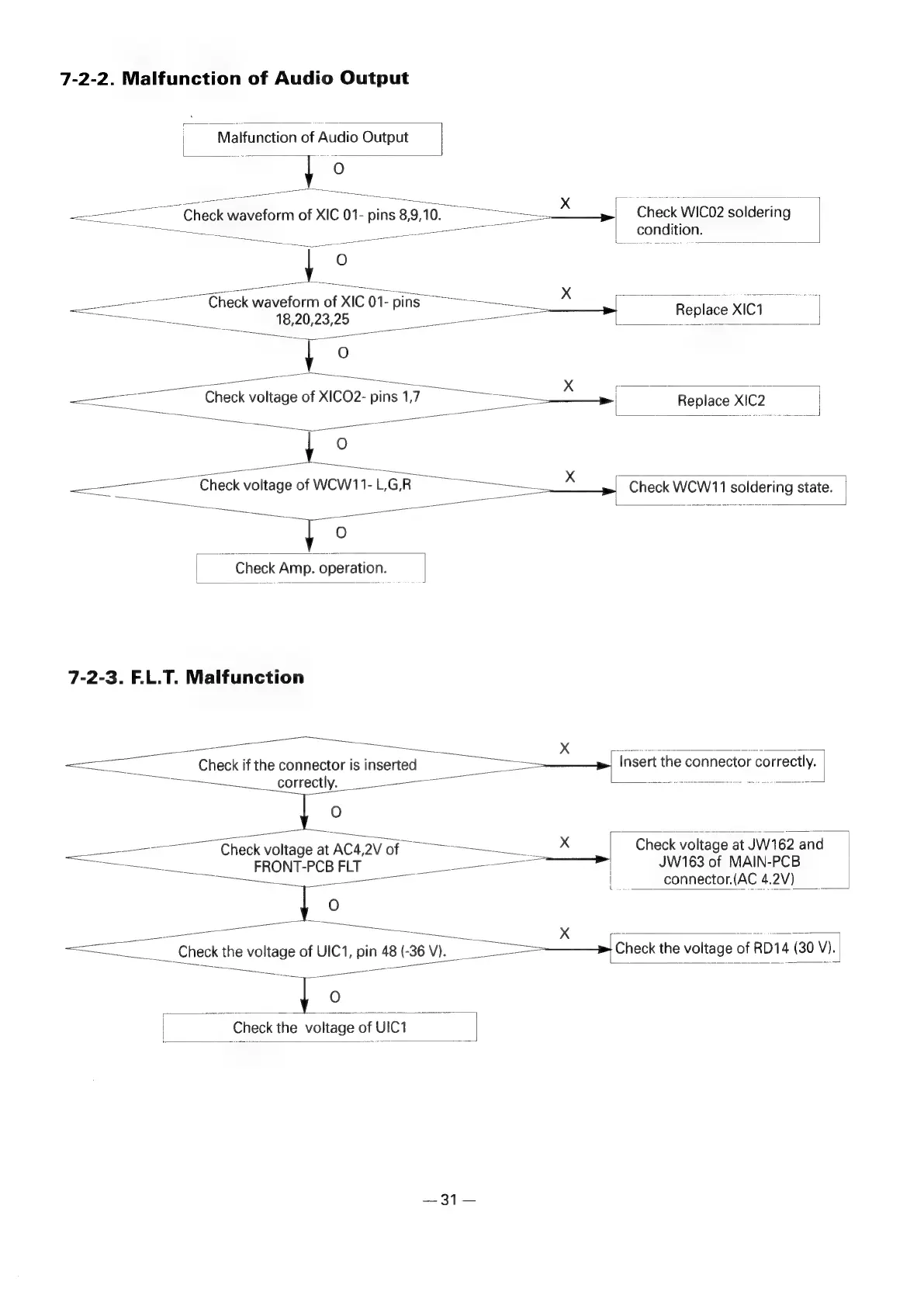
7-2-2.
Malfunction
of
Audio
Output
|
;
Malfunction
of
Audio
Output
|
|
ee
fa
i
O
sep
wee
eee
x
Pier
;
a
ee
Check
waveform
of
XIC
01-
pins
8,9,10.
ee
Check WIC02
soldering
OE
ait
al
ha
|__condition.
Ae
sine
Check
wavetein
of
XIC
01-
ping
X
Se
agua
oN
a
18.
20.23,25
‘nse
Replace
XIC1
|
Rie
ete
ee
ee
ae’
|
O
nese
ee
ee.
fe
Pane
Se
x
r
=
eed
Check
voltage
of
XICO2-
pins
1,7
|
Replace
X!C2
|
OO
snk
|
ee
ae
———
oo
ee
gS
ee
eee,
ee
ee
O
-
ice
ee
x
<TC
CCheck
voltage
of
WCW11-
LGR
cues
ee
|
Check
WCW11
soldering
state.
ee
paese
=e
[a
a
ee
ee
fo
|
Check
Amp.
operation.
|
7-2-3.
F.L.T.
Malfunction
ee
ee
Ve
ee
:
'
.
Rite
eee
pansewe
Bey
can
eor
eee
ee,
rer
—«
-
a
Check
if
the
connector
is
inserted
|
Invert
the
connector
correctly.
correctly.
a
O
_
ae
eee
ee
ee
—_————__
Check
voltage
at
AC4,2V
of
>
X
Check
voltage
at
JW162
and
ee
FRONT-PCB
FLT
Se
ee
JW163
of
MAIN-PCB
eee
L
connector.(AC
4.2V)
O
—_—
ies
Xx
~
ears
eae
Poe
Check
the
voltage
of
UIC1,
pin
48
(-36
V).
a
Check
the
voltage
of
RD14
(30
V).
ee
eee
=
a
elie
a
Sas
Ae
|
Check
the
voltage
of
UIC1
|
2372

Related product manuals