EasyManua.ls Logo

Samsung MAX-485 - Page 37

Samsung MAX-485
69 pages
Print Icon
To Next Page IconTo Next Page
To Previous Page IconTo Previous Page
Loading...
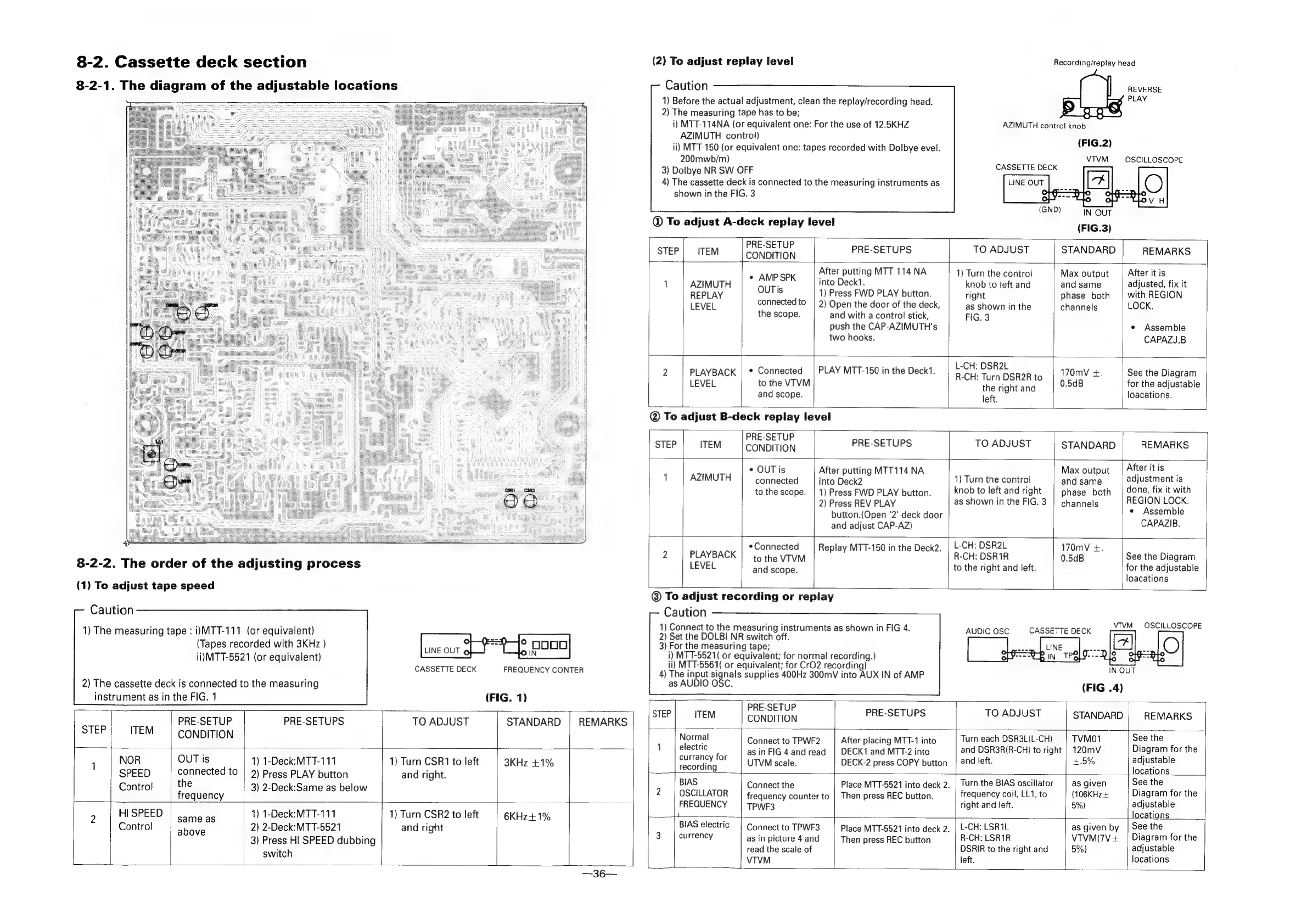
8-2.
Cassette
deck
section
(2)
To
adjust
replay
level
Recording/replay
head
Caution
1)
Before
the
actual
adjustment,
clean
the
replay/recording
head.
2)
The
measuring
tape
has
to
be;
i)
MTT-114NA
(or
equivalent
one:
For
the
use
of
12.5KHZ
AZIMUTH
control
knob
AZIMUTH
control)
ii)
MTT-150
(or
equivalent
one:
tapes
recorded
with
Dolbye
evel.
(FIG.2)
200mwb/m)
VTVM
OSCILLOSCOPE
3)
Dolbye
NR
SW
OFF
CASSETTE
DECK
4)
The
cassette
deck
is
connected
to
the
measuring
instruments
as
shown
in
the
FIG.
3
REVERSE
8-2-1.
The
diagram
of
the
adjustable
locations
PLAY
ee
BES
o
|
@
To
adjust
A-deck
replay
level
(FIG.3)
PRE-SETUP
STEP
ITEM
Bid
bat
PRE-SETUPS
TO
ADJUST
STANDARD
REMARKS
»
ampspx
_|
After
putting
MTT
114
NA
1)
Turn
the
control
Max
output
_|
After
it
is
1
AZIMUTH
OUT}
into
Deck1.
knob
to
left
and and
same
adjusted,
fix
it
REPLAY
is
1)
Press
FWD
PLAY
button.
right
phase
both
|
with
REGION
LEVEL
connected
to
|
2)
Open
the
door
of
the
deck,
as
shown
in
the
channels
LOCK.
the
scope.
and
with
a
control
stick,
FIG.
3
push
the
CAP-AZIMUTH's
*
Assemble
two
hooks.
CAPAZJ,B
2
PLAYBACK
|
*
Connected
|
PLAY
MTT-150
in
the
Deck1.
ae
re
ae
ig
170mV
+.
See
the
Diagram
LEVEL
to
the
VTVM
f
the
right
and
0.5dB
for
the
adjustable
and
scope.
loacations.
left.
@
To
adjust
B-deck
replay
level
|
PRE-SETUP
STEP
ITEM
CONDITION
PRE-SETUPS
TO
ADJUST
STANDARD
REMARKS
*
OUT
is
After
putting
MTT114
NA
Max
output
|Afteritis
1
AZIMUTH
connected
into
Rea
a
1)
Turn
the
control
and
same
adjustment
is
to
the
scope.
|
1)
Press
FWD
PLAY
button.
|
knobtoleftandright
|
phase
both
|
one,
fix
it
with
2)
Press
REV
PLAY
as
shown
in
the
FIG.3
|
channels
REGION
LOCK.
button.(Open
'2'
deck
door
*
Assemble
and
adjust
CAP-AZ)
CAPAZIB.
a
|
*Connected
|
Replay
MTT-150
in
the
Deck2.
|
L-CH:
DSR2L
170mV
+.
:
:
2
PLAYBACK
|
to
the
VTVM
a
R-CH:
DSR1R
0.5dB
See
the
Diagram
8-2-2.
The
order
of
the
adjusting
process
LEVEL
andiscops:
to
the
right
and
left.
for
the
adjustable
loacations
(1)
To
adjust
tape
speed
-
-
To
adjust
recording
or
replay
Caution
1)
Connect
to
the
measuring
instruments
as
shown
in
FIG
4.
2)
Set
the
DOLBI
NR
switch
off.
pes
3)
For the
measuring
tape;
i)
MTT-5521(
or
equivalent;
for
normal
recording.)
Caution
VTIVM
CASSETTE
DECK
aE
ecOre
1)
The
measuring
tape
:
i)MTT-111
(or
equivalent)
(Tapes
recorded
with
3KHz
}
ii)
MTT-5521
(or
equivalent)
U
LINE
OUT
©
ii)
MTT-5561(
or
equivalent;
for
CrO2
recording)
vhoeueery
©.
UEBEUENGECONTER
4)
The
input
signals
supplies
400Hz
300mV
into
AUX
IN
of
AMP
2)
The
cassette
deck
is
connected
to
the
measuring
as
AUDIO
OSC.
(FIG
.4)
instrument
as
in
the
FIG.
1
(FIG.
1)
PRE
<EnUe
STEP
ITEM
‘i
PRE-SETUPS
TO
ADJUST
STANDARD
REMARKS
step|
rem
|
PRE-SETUP
PRE-SETUPS
TO
ADJUST
STANDARD
|
REMARKS
L
CONDITION
|
|
CONDITION
Normal
Connect
to
TPWF2
‘|
After
placing
MTT-1
into
Turn
each
DSR3L(L-CH)
|
TVMO1
See
the
|
1
|
electric
;
as
in
FIG
4and
read
|
DECK1
and
MTT-2
into
and
DSR3R(R-CH)
to
right
|
120mV
Diagram
for
the
,
|
NOR
OUT
is
1)
1-Deck:MTT-111
1)
Turn
CSR1
to
left
|
3KHz
+1%
recording.
|
UTVMscale.
DECK-2
press
COPY
button
|
and
left.
+
5%
adjustable
SPEED
|
connected
to
|
2)
Press
PLAY
button
and
right.
:
ocations
Control
the
3)
2-Deck:Same
as
below
BIAS
Conneetthe
Place
MTT-5521
into
deck
2.
|
Turn
the
BIAS
oscillator
|
as
given
See
the
franieney
:
2
|
OSCILLATOR
frequency
counter
to
|
Then
press
REC
button.
frequency
coil,
LL1,
to
(106KHz+
Diagram
for
the
FREQUENCY
|
Tpwr3
right
and
left.
5%)
adjustable
9
Hi
SPEED
enpiene
1)
1-Deck:MTT-111
1)
Turn
CSR2
to
left
6KHz+
1%
-
locations
Control
|
shove
2)
2-Deck:MTT-5521
and
right
BIAS
electric
|
Connect
to
TPWF3
|
Place
MTT-§521
into
deck
2.
|
L-CH:
LSR1L
as
given
by
|
See
the
3}
Press
HI
SPEED
dubbing
3
|
currency
as
in
picture
4
and
Then
press
REC
button
R-CH:
LSR1R
VTVM(7V+
|
Diagram
for
the
itch
read
the
scale
of
DSRIR
to
the
right
and
5%)
adjustable
switc
L
VTVM
left.
locations
4
aie

Related product manuals