EasyManua.ls Logo

Samsung MAX-L65 - Installingyourmini-Compactsystem; Front Panel View

Samsung MAX-L65
26 pages
Print Icon
To Next Page IconTo Next Page
To Previous Page IconTo Previous Page
Loading...
GB
4
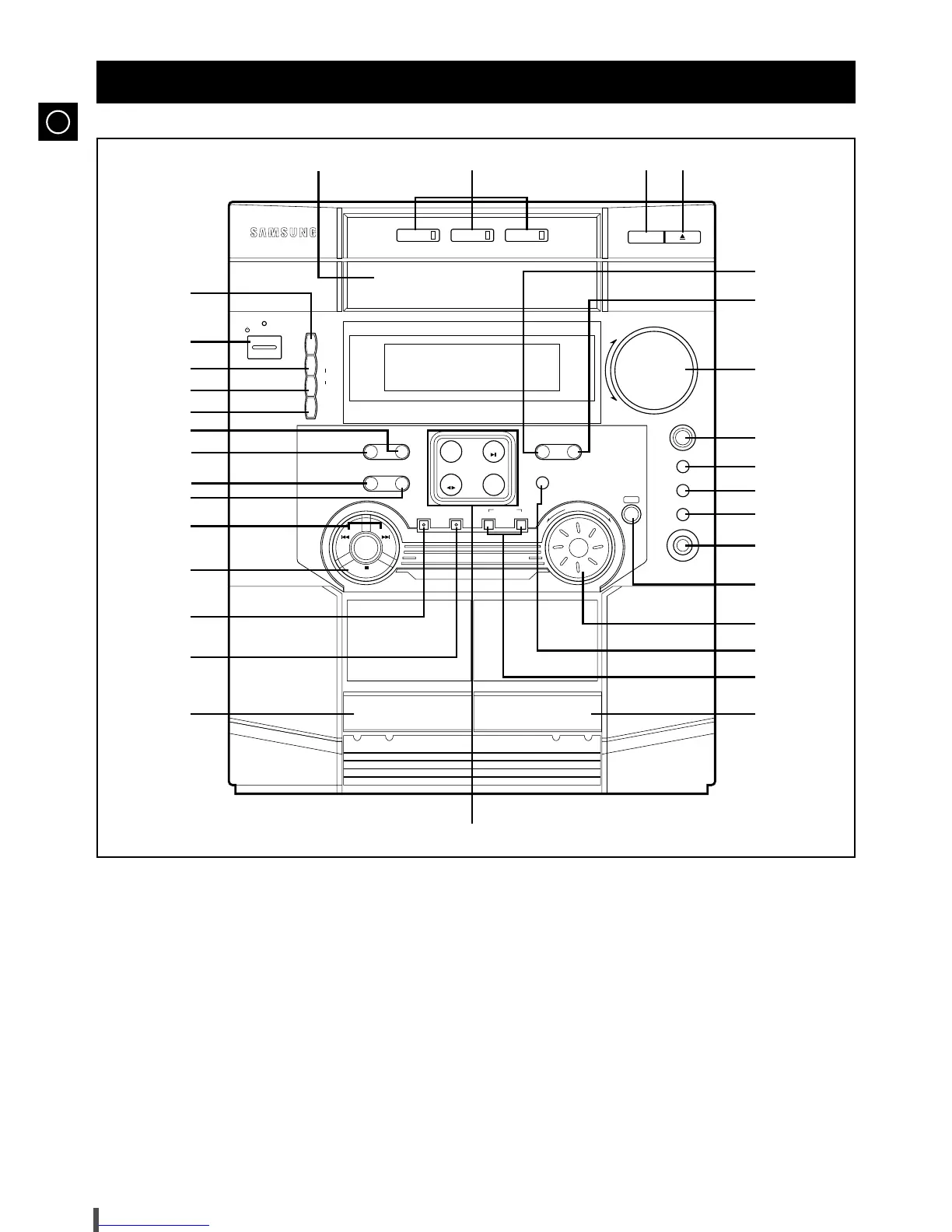
1. Disc Selection buttons
2. Compact Disc Compartment
3. Demo
4. On/Standby
5. PTY (RDS)
6. Display (RDS)
7. Timer/Clock
8. Preset/Memory
9. Mono/ST
10. Deck 1/2
11. REV.Mode
12. Search Function buttons
13. Tuning Mode or Stop button
14. REC/Pause
15. CD Synchro Recording
16. Cassette Deck 1
17. Function Selection buttons
18. Cassette Deck 2
19. TAPE Normal / Hi-Speed Dubbing
20. Shuffle
21. Multi Jog
22. Enter
23. Headphone Jack Connector
24. D.S.P
25. EQ
26. S.BASS
27. Power Surround
28. Volume
29. CD Repeat
30. Program
31. Open/Close
32. Disc Change
Front Panel View

-- Disc Selection / Direct Play --
Volu me
+
_
On/Standby
M
u
l
t
i
F
u
n
c
t
i
o
n
M
u
l
t
i
J
o
g
Disc 1 Disc 2 Disc 3
Disc Change
Demo
PTY
RDS
Display
Timer
/Clock
Mono/ST
REC/Pause
Down
Normal
Dubbing
HI - Speed
CD
Synchro
Program
Shuffle
Enter
Power
Surround
S.BASS
E Q
D.S.P
Phones
CD
Repeat
Preset/
Memory
Deck 1/2 REV.Mode
CD
AUX
TAPE
TUNER
Band
D / P / S
DIRECT PLAY & SELECTION
CD–R/RW PLAYBACK
Up
Tuning Mode
131322
3
4
5
6
7
8
9
10
12
11
13
14
15
16
17
18
19
20
21
23
22
24
25
26
27
28
29
30

Table of Contents