
 Need help?
Do you have a question about the Samsung MIM-F10N and is the answer not in the manual?
Defines WARNING for severe injury/death and CAUTION for minor injury/property damage levels.
Covers consulting qualified installers, using supplied cables, and wiring standards for safe installation.
Warns against installing near flammable gas, oil, or spray, and unsafe operational practices.
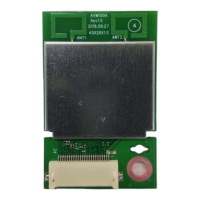
Lists included accessories such as FCU interface module, cables, case, and manual.
Illustrates how to connect the FCU interface module to the FCU KIT.
Details connecting DC power and communication cables to the FCU KIT.
Explains how to set address and option switches on the FCU interface module.
Describes manual and automatic address assignment methods and default switch settings.
Illustrates connecting multiple FCU KITs to a DMS system.
Explains the meaning of LED indicators (Y-GRN, RED) during communication.
Explains program codes, tracking progress, and normal communication indicators.
Details various error codes (Er↔88, Er↔E3, Er↔E4, Er↔E5, Er↔E6, Er↔E7) and their causes.
Provides crucial notes on communication lines, model compatibility, and resetting after changes.
Instructions for responsible disposal of the product and accessories as Waste Electrical & Electronic Equipment.
 General
| Model | MIM-F10N |
|---|---|
| Category | Control Unit |
| Operating Temperature | -10°C to 50°C |
| Storage Temperature | -20°C to 60°C |
| Protection Class | IP20 |
| Compatibility | Samsung DVM S |
| Communication Method | RS485 |
| Weight | 150g |
| Communication Interface | RS485 |
| Type | Wired Remote Controller |
| Input Voltage | 12V DC |
| Humidity | 0% to 90% RH |









 To Next Page