
 Need help?
Do you have a question about the Samsung ML-2010 Series and is the answer not in the manual?
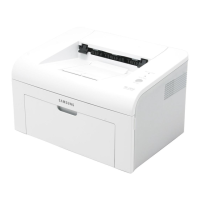
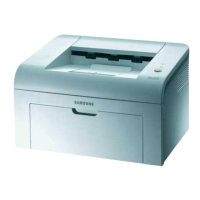
This document provides a comprehensive service manual for the Samsung ML-2010 Series laser printer, specifically covering the ML-2015/XEV model, with the ML-2010 as the basic model. The manual is designed to assist service personnel in understanding, maintaining, and troubleshooting the printer, ensuring optimal performance and longevity. It covers a wide range of topics from initial product installation and basic operation to complex system overviews, detailed hardware and software structures, and advanced troubleshooting techniques.
The primary function of the Samsung ML-2010 Series printer is to produce high-quality monochrome prints. It is designed for both personal and small office environments, offering reliable printing capabilities for various document types. The printer utilizes a laser printing mechanism, which is known for its speed, precision, and cost-effectiveness in producing sharp text and graphics. Its compact design allows for easy integration into different workspaces, making it a versatile choice for users with limited desk space. The printer supports standard paper sizes and types, catering to everyday printing needs such as reports, letters, and forms.
From a usage perspective, the ML-2010 Series printer is designed for straightforward operation. The manual details the control panel, which serves as the primary interface for users to interact with the printer. This includes instructions on how to interpret LED status error messages, which are crucial for identifying and resolving common operational issues. The control panel provides visual cues regarding the printer's status, such as power on/off, paper jams, low toner, and other alerts, enabling users to quickly understand and address problems without extensive technical knowledge. The manual also covers sample patterns, which can be used to test the printer's output quality and ensure proper functioning after maintenance or troubleshooting.
The printer incorporates a multi-purpose feeder (MPF) type cassette, allowing for flexible paper handling. This feature is particularly useful for printing on different media types or sizes without having to frequently change the main paper tray. The manual provides guidance on how to load paper correctly into the MPF and the main cassette, emphasizing the importance of proper paper handling to prevent jams and ensure consistent print quality. Additionally, the printer supports manual duplex printing, which allows users to print on both sides of a page by manually re-feeding the paper. This feature helps conserve paper and is an environmentally friendly option for document production. The manual includes instructions on how to utilize the manual feed guide for duplex printing, ensuring users can effectively leverage this capability.
Maintenance is a critical aspect covered extensively in this service manual. It begins with general precautions for disassembly and reassembly, highlighting safety warnings and ESD (Electrostatic Discharge) precautions to protect both the service personnel and the printer components. These precautions are essential to prevent damage to sensitive electronic parts during servicing. The manual provides step-by-step instructions for disassembling and reassembling various parts of the printer, which is invaluable for replacing components, performing cleaning, or accessing internal mechanisms for repair. This detailed guidance ensures that maintenance tasks can be performed systematically and safely.
The manual also delves into consumables and replacement parts, providing information on the toner cartridge and its replacement procedures. Understanding the lifecycle of consumables and knowing when to replace them is crucial for maintaining print quality and avoiding interruptions. The document outlines the initial toner cartridge capacity and the sales toner cartridge capacity, helping users and service personnel plan for replacements. Furthermore, it covers the fuser design, which is a lamp type, and provides insights into its maintenance and replacement, as the fuser is a key component in the printing process responsible for permanently bonding toner to the paper.
Troubleshooting is a major focus of the manual, offering a structured approach to diagnosing and resolving issues. It categorizes problems into checking symptoms, bad discharge, malfunction, bad software environment, and bad image. For each category, the manual provides detailed diagnostic steps and potential solutions. For instance, "bad discharge" might refer to issues related to the transfer of toner to the paper, while "bad image" covers various print quality defects such as streaks, spots, or faded prints. The manual also includes a section on "periodic defective image," which helps identify and address recurring print quality problems that might indicate wear or damage to specific components.
A unique feature highlighted for maintenance is the "How to use DCU" section. While the exact nature of the DCU (Diagnostic Control Unit) is not detailed in the provided text, its inclusion suggests that there is a dedicated tool or software utility designed to assist service personnel in diagnosing and configuring the printer. This tool likely allows for more in-depth testing, calibration, and error logging, going beyond what is available through the standard control panel. Effective use of the DCU can significantly streamline troubleshooting and repair processes, enabling quicker and more accurate problem resolution.
The manual also provides a comprehensive system overview, including the system outline, hardware (H/W) structure and descriptions, and software (S/W) structure and descriptions. This foundational knowledge is essential for service personnel to understand how different components interact and how the printer's internal logic operates. Detailed block diagrams and schematic diagrams for the main board, connector circuits, SMPS (Switched-Mode Power Supply), and HVPS (High Voltage Power Supply) are included. These diagrams are critical for advanced troubleshooting, allowing technicians to trace electrical paths, identify faulty components, and understand power distribution within the printer. The system timing chart further aids in understanding the sequence of operations and potential timing-related issues.
Furthermore, the manual includes an "Exploded Views & Parts List," which is an indispensable resource for identifying and ordering replacement parts. This section typically provides detailed diagrams showing all the printer's components in an exploded view, with corresponding part numbers. This ensures that the correct parts are ordered and installed during repairs, minimizing errors and ensuring compatibility.
Reference information is also provided, including a list of troubleshooting tools, acronyms and abbreviations, and guidelines for selecting printer locations. The section on selecting printer locations is important for ensuring the printer operates in an optimal environment, considering factors such as temperature, humidity, and ventilation, which can impact performance and longevity. The "Sample Tests Patterns" section offers various patterns that can be printed to diagnose specific print quality issues, such as alignment problems, banding, or missing dots.
Finally, the "Circuit Description" section, particularly focusing on the "Engine Controller," provides an in-depth understanding of the printer's core control unit. This section would detail the functions of the engine controller, its interfaces with other components, and how it manages the printing process. A thorough understanding of the engine controller is vital for diagnosing complex electronic failures and performing advanced repairs.
In summary, the Samsung ML-2010 Series service manual is a complete guide for maintaining and servicing the printer. It covers everything from basic operational features and user-level troubleshooting to detailed technical specifications, component-level repair instructions, and advanced diagnostic tools. The emphasis on safety, systematic troubleshooting, and comprehensive documentation ensures that service personnel can effectively support the ML-2010 Series printer throughout its operational life, maximizing its reliability and performance.
 General
| Print Technology | Laser |
|---|---|
| Print Resolution | Up to 1200 x 600 dpi |
| Connectivity | USB 2.0 |
| Monthly Duty Cycle | Up to 5, 000 pages |
| Warm-up Time | Less than 30 seconds |
| Time to First Page | Less than 10 seconds |
| Output Capacity | 100 sheets |
| Processor Frequency | 150 MHz |
| Internal Memory | 8 MB |
| Operating System Compatibility | Windows, Mac OS, Linux |
| Media Types Supported | Plain paper, envelopes, labels, transparencies |
| Standard Media Sizes | A4, A5, B5 |
| Weight | 5.5 kg |
| Print Speed | Up to 20 ppm (A4) |
| Paper Capacity | 150 sheets |











 To Next Page