10 English
Getting Started
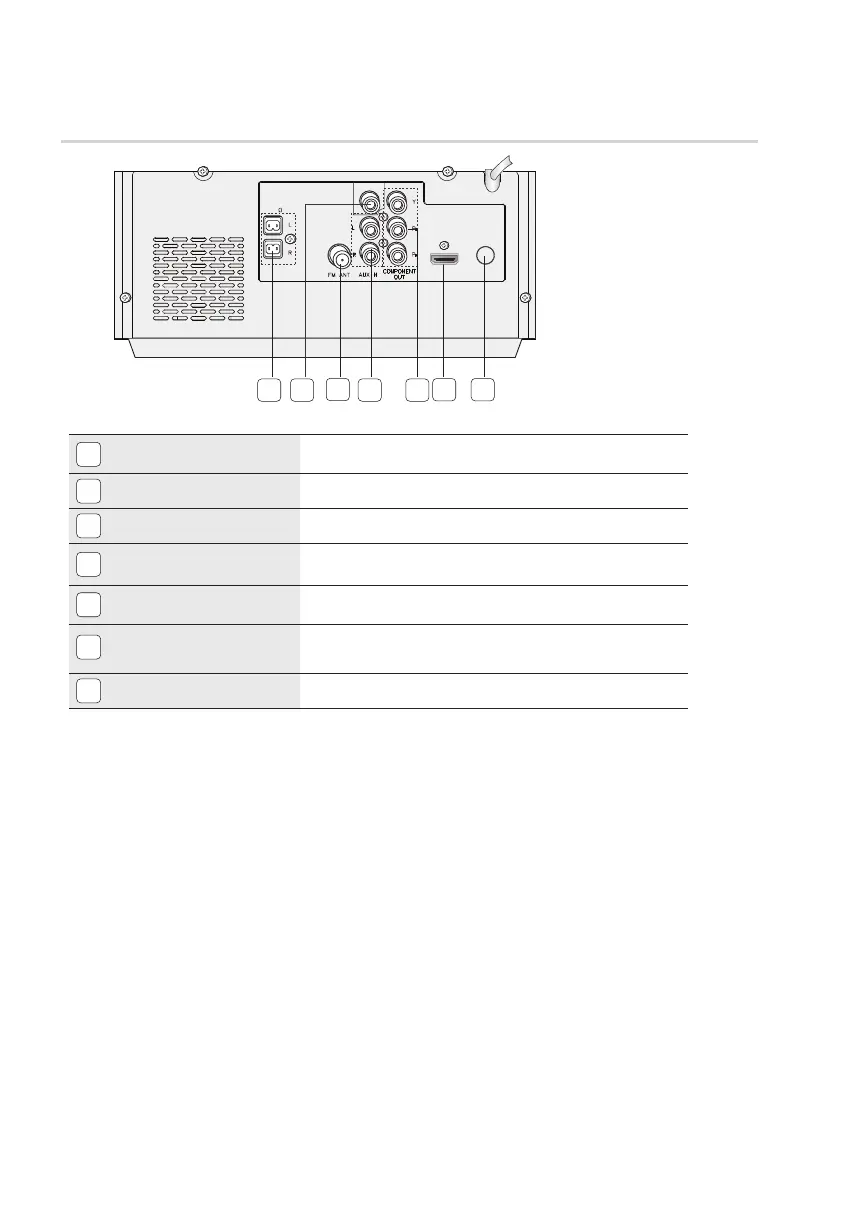
Rear Panel
1
2.0 CHANNEL SPEAKER OUTPUT
CONNECTORS
Connect the speakers.
2
VIDEO OUT JACK
Connect your TV's Video Input jack (VIDEO IN) to the VIDEO OUT jack.
3
FM ANTENNA JACK
Connect the FM antenna.
4
AUX IN JACK
Connect the Audio Out of the external analog component to the AUX IN
jack.
5
COMPONENT VIDEO OUTPUT
JACKS
Connect a TV with Component video inputs to these jacks.
6
HDMI OUT JACK
Use an HDMI calbe,connect this HDMI output terminal to the HDMI
input termianl on your TV for the best quality picture.
7
ONLY FOR SERVICE
This jack is just for testing, please don't use it.
SPEAKERS
OUT (4 )
ONLY FOR
SERVICE
VIDEO OUT
HDMI
OUT
1
2
3
4
5
6 7


 To Next Page