English 13
02 Connections
Connecting Audio from External Components
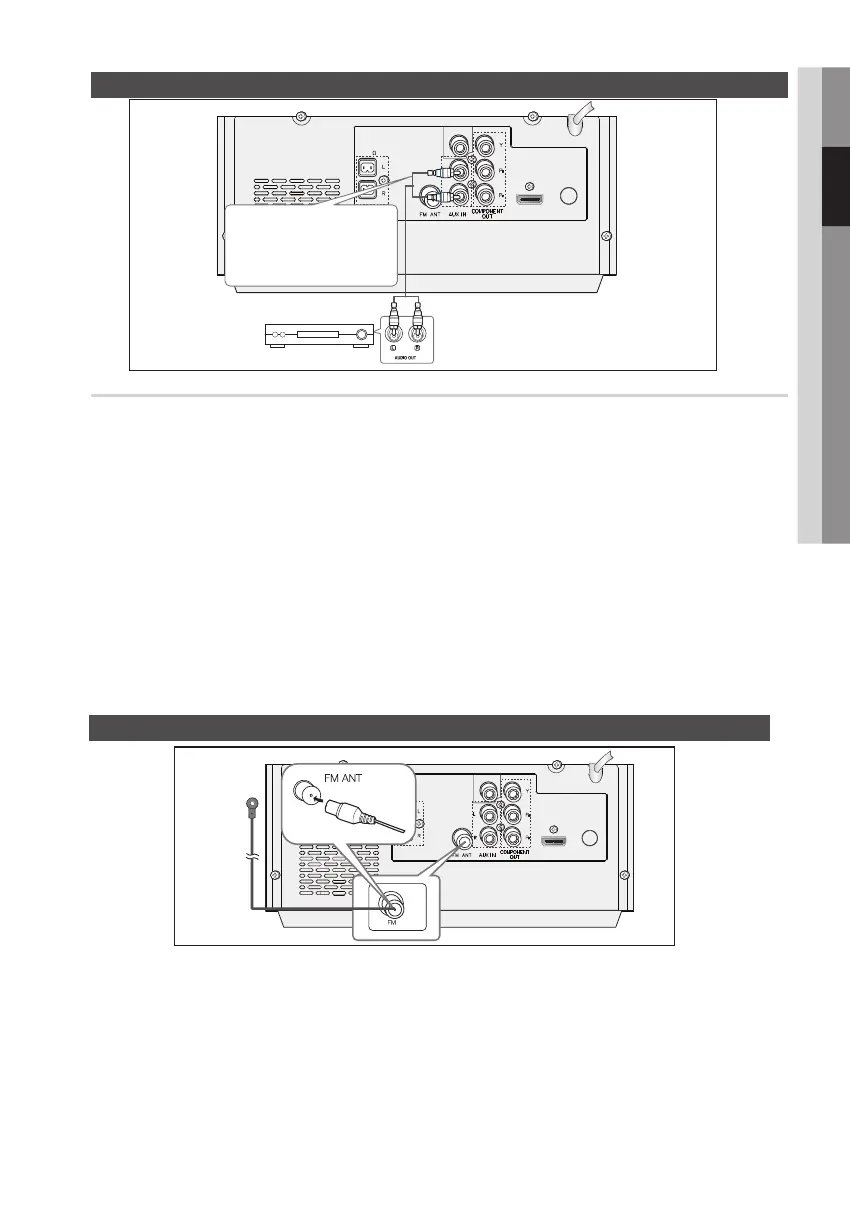
AUX : Connecting an External Analog Component
Analog signal components such as a VCR.
1. Connect AUX IN (Audio) on the back of the product to the Audio Out of the external Analog component.
• Be sure to match the colors of the connecting jacks.
2. Press the FUNCTION button to select AUX input.
• The mode switches as follows :
DVD/CD ➞ ARC ➞ FM ➞ USB ➞ R.IPOD ➞ IPOD ➞ AUX ➞ BT/GAL.
✎ NOTE
` You can connect the Video Output jack of your VCR to the TV, and connect the Audio Output jacks of the
VCR to this product.
SPEAKERS
OUT (4 )
ONLY FOR
SERVICE
VIDEO OUT
HDMI
OUT
Audio Cable
(not supplied)
If the external analog
component has only one Audio
Out, connect either left or right.
Connecting the FM Antenna
1. Connect the FM antenna (supplied) to the FM Antenna jack.
2. Slowly move the antenna wire around until you find a location where reception is good, then fasten it
to a wall or other rigid surface.
✎ NOTE
` This product does not receive AM broadcasts.
SPEAKERS
OUT (4 )
PHONES AUX IN
ONLY FOR SERVICE
ONLY FOR
SERVICE
VIDEO OUT
HDMI
OUT
FM Antenna
(supplied)


 To Next Page