GB
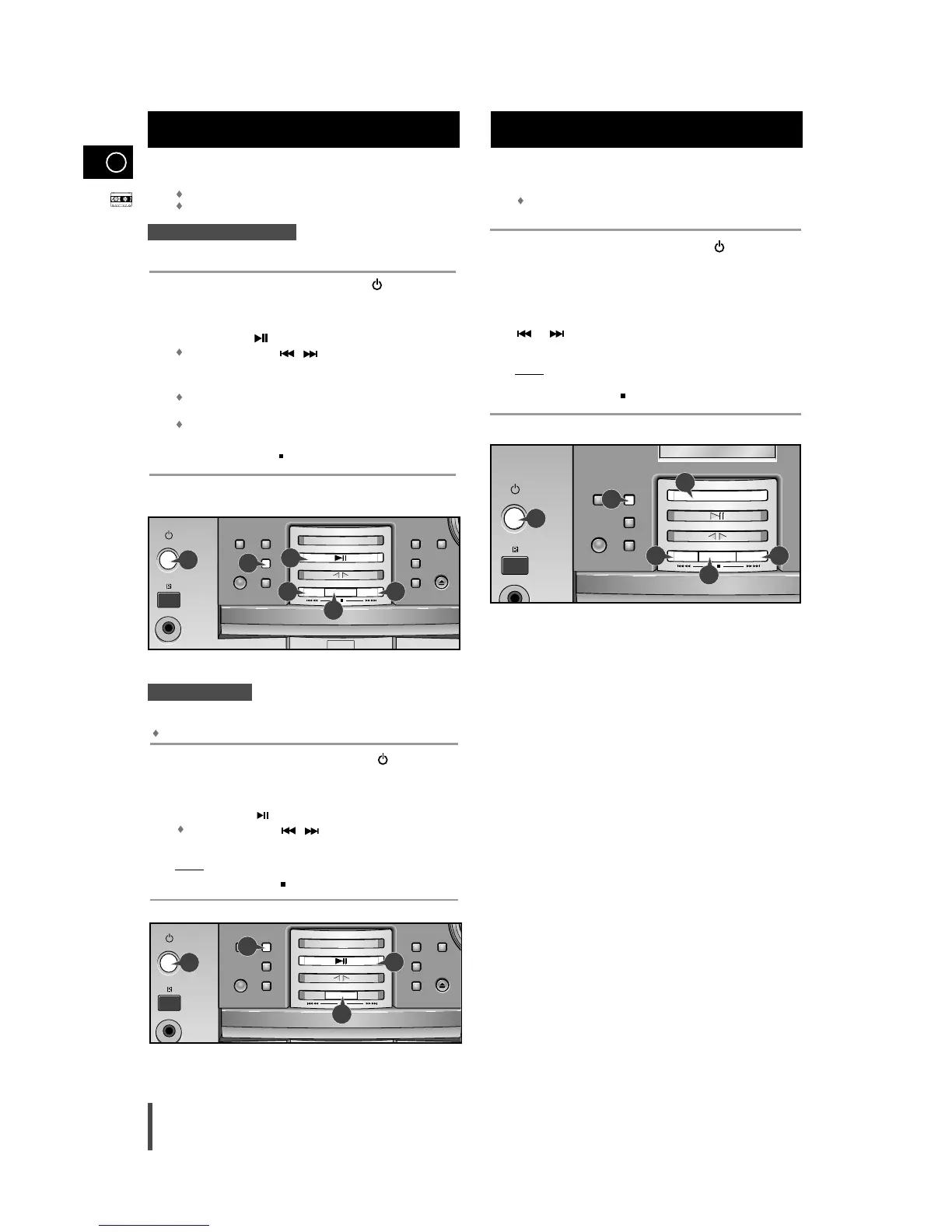
The direct recording mode enables you to start recording
with any track on the compact disc.
You do not need to adjust the volume, as it has no effect on the recording.
Switch your system on by pressing on/standby ( ) .
Insert a blank cassette in Deck.
Load a compact disc.
Press the
VCD/CD ()
button.
Use the CD selection ( , ) buttons to select the desired song.
Press the REC/Pause button.
Result:
Recording will begin.
To stop recording, press .
On/Standby
AUX
Phones
Power
Surround
Sleep
Mono/ST
Open/Close
Sound
Mode
REC/Pause
CD Synchro
CD Repeat
TUNER
/Band
Tuning Mode
VCD/CD
TAPE
Color Display
/Demo
V
C
D
/
M
P
3
-
C
D
/
C
D
-
R
/
R
W
P
L
A
Y
B
A
C
K
20
You can record a radio program of your choice.
You do not need to adjust the volume, as it has no effect on
the recording.
Switch the system on by pressing on/standby ( ) .
Insert a blank cassette in Deck.
Select the TUNER function by pressing TUNER/Band.
Select the radio station that you wish to record by pressing
or .
Press REC/Pause.
Result:
REC is displayed in red and recording starts.
To stop recording, press .
Recording a Radio Program
1
2
3
4
5
6
On/Standby
AUX
Phones
P
Su
S
M
REC/Pause
CD Synchro
CD Repeat
TUNER/Band
Tuning Mode
VCD/CD
TAPE
Color Display
/Demo
V
C
D
/
M
P
3
-
C
D
/
C
D
-
R
/
R
W
P
L
A
Y
B
A
C
K
4
1
4
5
6
3
You can record a compact disc on a cassette in two different ways:
Synchronised recording
Direct recording
This feature enables you to synchronize the start of the
recording with the start of the disc or track of your choice.
Switch the system on by pressing on/standby ( ) .
Insert a blank cassette in Deck.
Load a compact disc.
Press the
VCD/CD ()
button.
Use the CD selection ( , ) buttons to select the desired
song.
Press the CD Synchro
button.
When stopped, press the button to start the recording from the
first piece of music.
Press CD Synchro button during the playback of CD to start the
recording from the first part of the music being played.
To stop recording, press .
Synchronised recording
1
2
3
4
5
6
1
2
3
4
5
6
Direct recording
Recording a Compact Disc
1
5
6
On/Standby
AUX
Phones
Power
Surround
Sleep
Mono/ST
Open/Close
Sound
Mode
REC/Pause
CD Synchro
CD Repeat
TUNER
/Band
Tuning Mode
VCD/CD
TAPE
Color Display
/Demo
V
C
D
/
M
P
3
-
C
D
/
C
D
-
R
/
R
W
P
L
A
Y
B
A
C
K


 To Next Page