GB
21
The timer enables you to switch the system on or off at
specific times.
Example: You wish to wake up to music every morning.
If you no longer want the system to be switched on or off
automatically, you must cancel the timer.
Before setting the timer, check that the current time is correct.
For each step, you have a few seconds to set the required
options. If you exceed this time, you must start again.
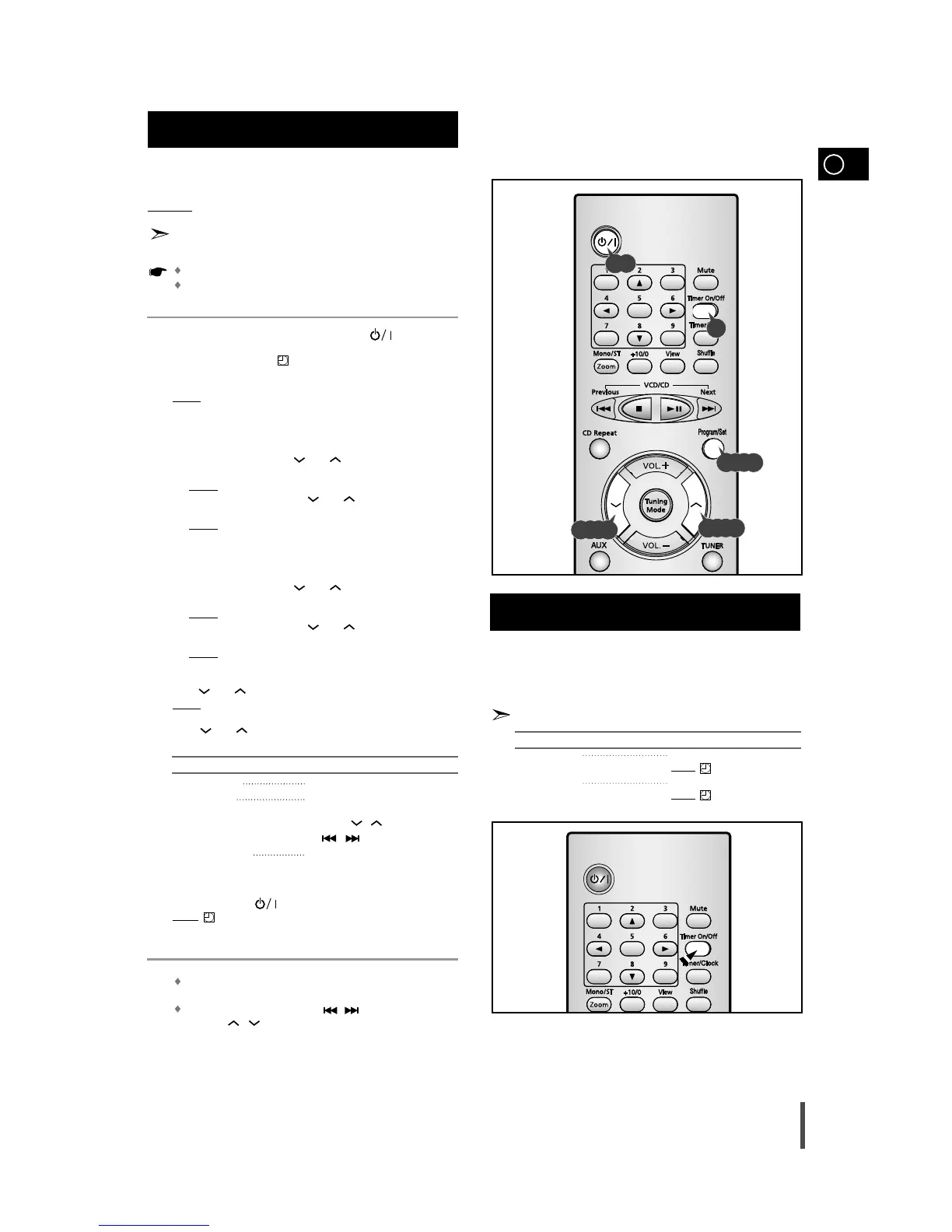
Switch the system on by pressing on/standby ( ) .
Press Timer/Clock until TIMER is displayed.
Press Program/Set.
Result:
ON TIME is displayed (instead of the equalizer symbols) for
a few seconds, followed by any switch-on time already set;
you can set the timer switch-on time.
Set the timer switch-on time.
a Set the hour by pressing and .
b Press Program/Set.
Result:
The minutes flash.
c Set the minutes by pressing and .
d Press Program/Set.
Result:
OFF TIME is displayed (instead of the equalizer symbols)
for a few seconds, followed by any switch-off time already
set; you can now set the timer switch-off time.
Set the timer switch-off time.
a Set the hour by pressing and .
b Press Program/Set.
Result:
The minutes flash.
c Set the minutes by pressing and .
d Press Program/Set.
Result:
VOL 10 is displayed, where 10 corresponds to the
volume already set.
Press and to adjust the volume level and press Program/Set.
Result:
The source to be selected is displayed.
Press and to select the source to be played when the
system switches on.
If you select... You must also...
TAPE (cassette) Insert a cassette tape.
TUNER (radio) a Press Program/Set.
b Select a preset station by pressing
Tuning
, (remote control) or
,
(main unit)
.
CD (compact disc) Load a compact disc.
Press Program/Set to confirm the timer.
Press on/standby ( ) to set the system to standby mode.
Result: is displayed to the upside right of the time, indicating that
the timer has been set. The system will switch on and off
automatically at the required times.
If the timer switch on and off times are identical, the word ERROR
is displayed.
You can use the Multi Jog or
/ button on the main unit
to instead / button in step 4,5,6,7.
Timer Function
7
8
9
5
6
1
2
3
4
After having set the timer, it will start automatically as shown
by the TIMER indication on the display. If you no longer wish
to use the timer, you must cancel it.
You can stop the timer at any time (system on or in standby mode).
To... Press Timer On/Off...
Cancel the timer Once.
Result
: is no longer displayed.
Restart the timer Twice.
Result
: is displayed again.
Cancelling the Timer
1,9
2
3,4,5,6,7,8
4,5,6,7
4,5,6,7


 To Next Page