EasyManua.ls Logo

Samsung MWR-WG00JN - User Manual

Samsung MWR-WG00JN
28 pages
Print Icon
To Next Page IconTo Next Page
Loading...
Air conditioner
User manual
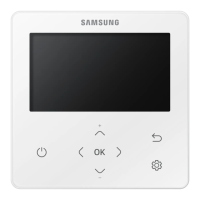
Wired remote controller MWR-WG00JN
Thank you for purchasing this Samsung Product.
Before operating this unit, please read this user manual carefully and retain it for future
reference.

Other manuals for Samsung MWR-WG00JN

Questions and Answers

  • N
    Nichole BarnettAug 3, 2025
    What to do if Samsung Remote Control tracking is not complete?
    • K
      Kelly SheltonAug 4, 2025
      If the tracking between the Wired Samsung Remote Controller and indoor units / ventilators (ERV) is incomplete for more than 5 minutes, a reset is required. Check the number of installed indoor units and ventilators (ERV) before resetting.
  • J
    Jeremy LesterAug 13, 2025
    How to fix no communication between Samsung Master and Slave Remote Controllers?
    • K
      Katherine Russell DDSAug 13, 2025
      If no communication occurs between the Master (Main) and Slave (Sub) Wired Samsung Remote Controllers, a reset is required. Ensure you check the number of installed indoor units and ventilators (ERV) before performing the reset.
  • J
    James JacobsAug 25, 2025
    What to do if Samsung Remote Control shows more than 16 indoor units installed?
    • B
      bcookAug 25, 2025
      If more than 16 indoor units and ventilators (ERV) are installed, a reset is required. Check the number of installed units and ventilators (ERV) before resetting your Samsung Remote Control.

Summary

Remote Controller Overview

Operation Status Display

Displays the operation/function settings and statuses.

Operation On;Off Button

Turns the air conditioner/ventilator power On/Off.

Safety Information

Remote Controller Operation

Operation Modes

Explains how to change the operating mode to Auto, Cool, Dry, Fan, or Heat.

Controlling Temperature

Details how to adjust the set temperature for different modes.

Controlling Fan Speed

Explains how to select fan speeds in various operating modes.

Cooling Operation

Heating Operation

Quick Smart Features

Ventilation (ERV) Operation

Energy-Saving Operation

Schedule

Allows setting timers, weekly, yearly, and holiday schedules for operation.

Setting Options

General Settings

Covers button lock, filter reset, error list, and indoor unit information.

Indoor Settings

Includes blade selection and motion detection sensor settings.

Option - User Mode

User mode options include language and daylight savings time settings.

Option - Lock Functions

Settings for locking various operation modes and functions.

Option - Wired Remote Controller

Settings for wired remote controller, including current time and display.

Samsung MWR-WG00JN Specifications

General IconGeneral
BrandSamsung
ModelMWR-WG00JN
CategoryRemote Control
LanguageEnglish

Related product manuals