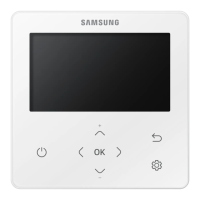
This document is a user manual for the Samsung MWR-WH01 Wired Remote Controller, designed for System Air Conditioners. It provides comprehensive instructions for operating and maintaining the device, ensuring users can fully utilize its features.
Function Description:
The MWR-WH01 is a wired remote controller that allows users to manage various functions of a Samsung System Air Conditioner. It is installed on the wall and serves as the primary interface for controlling the indoor unit(s). The controller supports multiple operating modes, including Automatic, Cooling, Dry, Fan, and Heating, enabling users to tailor the air conditioning to their specific comfort needs. It also features advanced functionalities such as Quiet mode for reduced noise, Sleep mode for comfortable overnight operation, and an Auto Stop function for energy saving. The device includes timer settings (On Timer and Off Timer) to schedule operation, temperature limits to prevent extreme settings, and a part lock function to restrict access to certain controls.
Important Technical Specifications:
The manual does not explicitly list detailed technical specifications such as power consumption, operating voltage, or communication protocols. However, it implies that the device is designed to work with Samsung System Air Conditioners and requires a rated power supply. The temperature setting range is specified for different modes:
- Automatic Mode: 18°C (65°F) to 30°C (86°F).
- Cooling Mode: 18°C (65°F) to 30°C (86°F).
- Dry Mode: 18°C (65°F) to 30°C (86°F).
- Heating Mode: 16°C (61°F) to 30°C (86°F).
Temperature adjustments are made in 1°C (1°F) increments. The timer settings allow for scheduling up to 24 hours in advance, with adjustments in 0.5-hour units for the first 3 hours and 1-hour units thereafter. The Auto Stop function can be set between 0 and 12 hours.
Usage Features:
Getting Started:
The manual emphasizes reading the instructions carefully and keeping the manual handy. It uses three symbols for step-by-step procedures: "PRESS", "PUSH", and "HOLD DOWN".
Operation ON/OFF:
The main ON/OFF button controls the power to the indoor unit. A built-in protection mechanism delays startup by 3 minutes if the unit was recently plugged in or stopped.
Mode Selection:
- Automatic Operating Mode: The controller automatically adjusts room temperature and fan speed. The fan speed is automatically selected and cannot be controlled manually in this mode.
- Cooling Mode: Lowers room temperature. Fan speed can be adjusted through Low, Medium, High, and Auto settings.
- Dry Mode: Reduces room humidity. Fan speed is automatically selected and cannot be controlled manually.
- Fan Mode: Circulates air without changing temperature. Fan speed can be adjusted. Temperature cannot be adjusted in this mode.
- Heating Mode: Raises room temperature (available only on heat pump models). The air may not come out immediately to prevent cold air discharge. A "Defrost" indicator appears during defrosting.
Special Modes:
- Quiet Mode: Reduces operating noise. If the indoor unit does not support this mode, "Restricted" will be displayed.
- Sleep Mode: Provides comfortable sleep by gradually adjusting the set temperature and automatically turning off the unit after 6 hours. This mode is supported only in cooling and heating modes. If not supported or not in Cool/Heat mode, "Restricted" will be displayed.
Temperature Adjustment:
Temperature can be adjusted using the up/down arrow buttons within the specified range for each mode.
Fan Speed Adjustment:
Fan speed can be cycled through Low, Medium, High, and Auto settings using the fan speed button (except in Auto and Dry modes where it's automatic).
Air Swing Direction:
The air swing direction can be adjusted to circulate air effectively. Pressing the swing button starts/stops the blade movement. This feature is not available for duct-type indoor units.
Checking Room Temperature:
Pressing the "Temp." button displays the current room temperature for 3 seconds before returning to the set temperature display. Note that the displayed temperature may vary based on the remote controller's installation location.
Locking Features:
- Locking the Wired Remote Controller: Holding the "Set" button for 3 seconds locks the entire controller, displaying a lock icon. This prevents accidental changes. Holding "Set" again for 3 seconds unlocks it.
- Locking Parts of the Wired Remote Controller: This function allows specific buttons (Mode and Fan Speed) to be locked to prevent children or others from changing settings. It is accessed through a setup menu (menu 3) and allows setting a lock value (0 for cancel, 1 for set). This function is not available under centralized control or when "Lock all" is set.
Timer Functions:
- Setting the On Timer: Schedules the indoor unit to turn on at a preset time. The default is 0.5 hours, adjustable up to 24 hours. The "On" indicator blinks during setup and becomes steady once set. The unit will turn on with the most recent operation settings.
- Setting the Off Timer: Schedules the indoor unit to turn off at a preset time. Similar to the On Timer, it's adjustable from 0.5 to 24 hours. The "Off" indicator blinks during setup and becomes steady once set.
- Canceling Timers: Timers can be canceled by pressing the "Cancel" button or by pressing the On Timer/Off Timer buttons again. Timers are also canceled if the remote controller is reset or turned off.
Auto Stop Function:
This function automatically turns off the indoor unit after a set period of inactivity (no button presses). It's designed to save energy if the user forgets to turn off the unit. The auto stop time can be set between 0 and 12 hours (0 cancels the function). This function does not work under centralized control.
Temperature Limits:
Users can set upper and lower temperature limits to prevent the desired temperature from being set too high or too low. This is accessed through a setup menu (menu 2). The lower limit cannot be the same as or higher than the upper limit. Even if a lower limit below 18°C (65°F) is set, it will default to 18°C (65°F) in all modes except heating.
Maintenance Features:
- Filter Reset: After cleaning the air filter, pressing the "Filter Reset" button turns off the filter sign on the display. The remote controller displays the filter sign to remind the user to clean the filter.
Safety Precautions:
The manual includes important safety precautions:
- Do not attempt to install or repair the controller yourself; consult authorized service personnel.
- Ensure the wall is strong enough to support the controller's weight.
- Install with a rated power supply.
- In case of malfunction (e.g., burning smell), stop operation, turn off the breaker, and consult authorized personnel.
- Do not use inflammable gases near the controller.
- Do not spill water or operate with wet hands.
- Avoid installing in locations with combustible gases, machine oil, or sulphide gas.
- Do not press buttons with pointed objects.
- Do not pull or bend the cable excessively.
- Do not use for purposes other than air conditioning control.
- Do not spray insecticide or other combustible materials on the controller.
- Do not clean with benzene, solvents, or other chemicals.
- Do not shock or disassemble the controller.

 Need help?
 General

 To Next Page