English 7
1 1
2 2
3 3
4 4
5
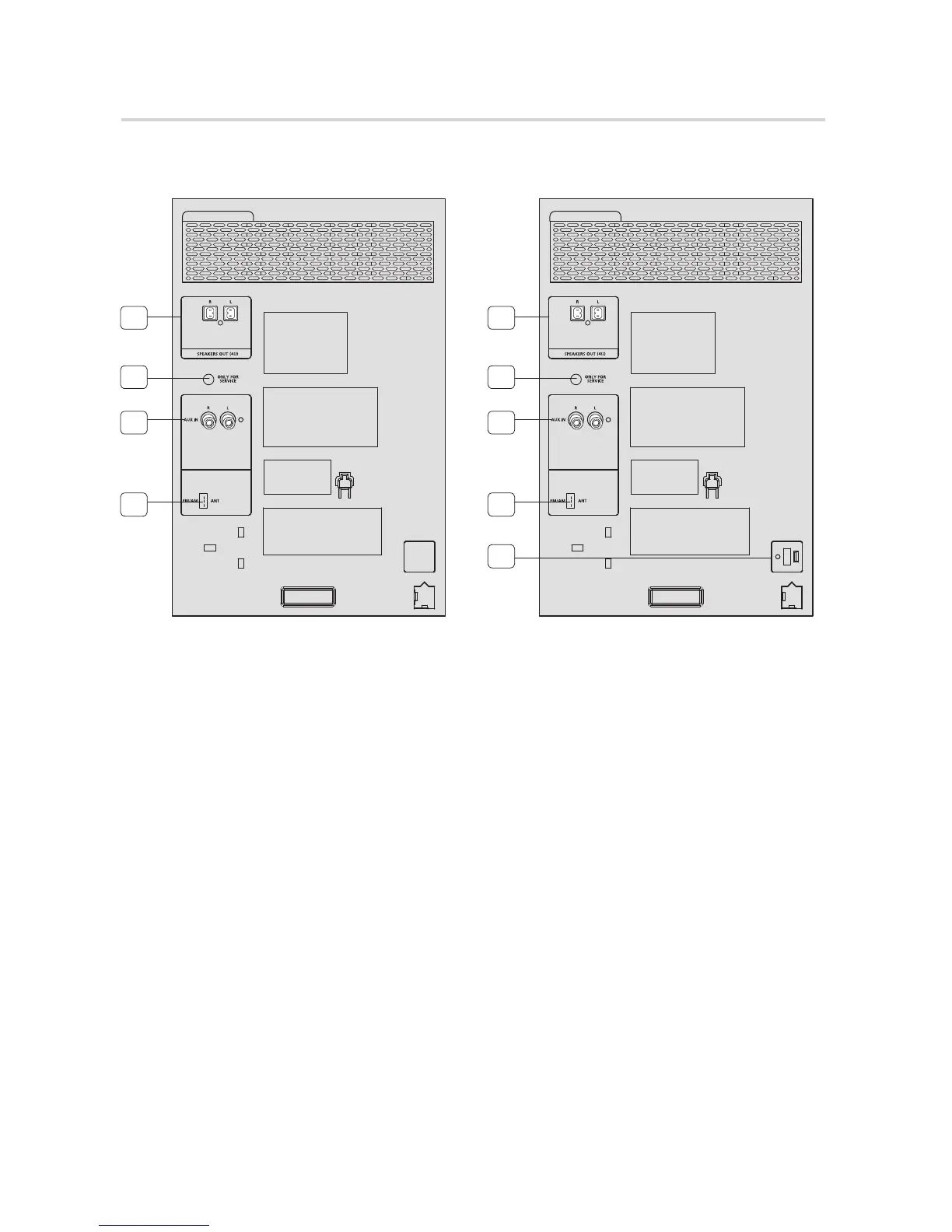
1. 2.0 CH Speaker Connector Terminals
The speaker connector terminals are located on
the rear of the system.
1.
To achieve the correct sound quality, insert
the speaker connector cables identified
below into the correct speaker terminals on
the back of the system.
• Leftspeaker(markedL).
• Rightspeaker(markedR).
2. ONLY FOR SERVICE
• Thisjackisforserviceonly.Pleasedonot
use.
3. AUX IN Terminals
1.
Use an Audio Cable (not supplied) to connect
AUX IN on the product to Audio Out on an
external analog component.
• Besuretomatchconnectorcolors.
• Iftheexternalanalogcomponenthasonly
oneAudioOutjack,connecttoeitherthe
leftorrightterminal.
• PresstheTUNER/AUXbuttontoselectthe
AUXinput.
• WhentheunitisinAUXmode,ifnoneof
thebuttonsarepushedformorethan8
hours,thepowerwillautomaticallyturnoff.
4. FM/AM Antenna Connector Terminal
Plug the connector on the FM/AM antenna (supplied)
into the FM/AM terminal on the rear of the system.
5. Voltage Selector (MX-H730 only)
Check the position of the voltage selector on the rear
of the system.
Rear Panel
MX-H630
MX-H730


 To Next Page