02 Getting Started
Getting Started
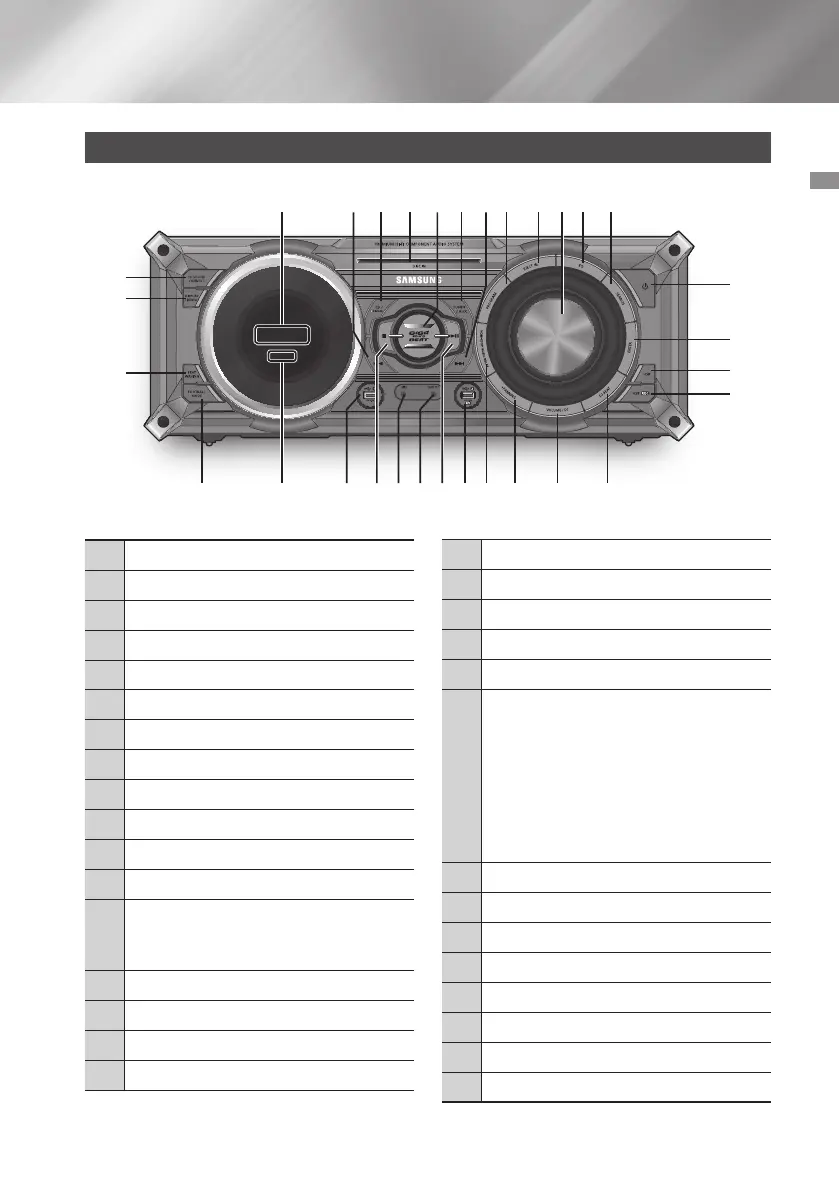
Front Panel
1
Display Panel
2
BACKWARD SEARCH/SKIP button
3
CD/Bluetooth button
4
DISC slot
5
GIGA SOUND BEAT button
6
TUNER/AUX button
7
FORWARD SEARCH/SKIP button
8
PROGRAM button
9
Eject button for Disc
0
VOLUME/SEARCH JOG
!
EQ button
@
SEARCH button
#
POWER button
•
Press this button to switch your
product on or off.
$
ENTER button
%
USB button
^
USB REC button
&
DJ BEAT button
*
VOLUME / DJ button
(
+PANNING button
)
NON-STOP MUSIC RELAY button
a
USB 2 jack for Playing and USB Recording
b
PLAY/PAUSE button
c
AUX IN 1 jack
Use to connect an external device such
as an MP3 player.
•
Connect AUX IN 1 on the front panel
of the product to the Audio Out of an
external device/MP3 player.
•
Press the TUNER/AUX button to
select AUX1.
d
MIC jack
e
STOP button
f
USB 1 jack for only Playback
g
REMOTE CONTROL SENSOR
h
FOOTBALL MODE button
i
BEAT WAVING button
j
DISPLAY / DEMO button
k
TV SOUNDCONNECT button
7 English
3 64 8 @9 !052 7
#
%
^
i
j
k
$
&*()be cf adgh
1



 To Next Page