4
Electronic Expansion Valve Kit Installation (cont.)
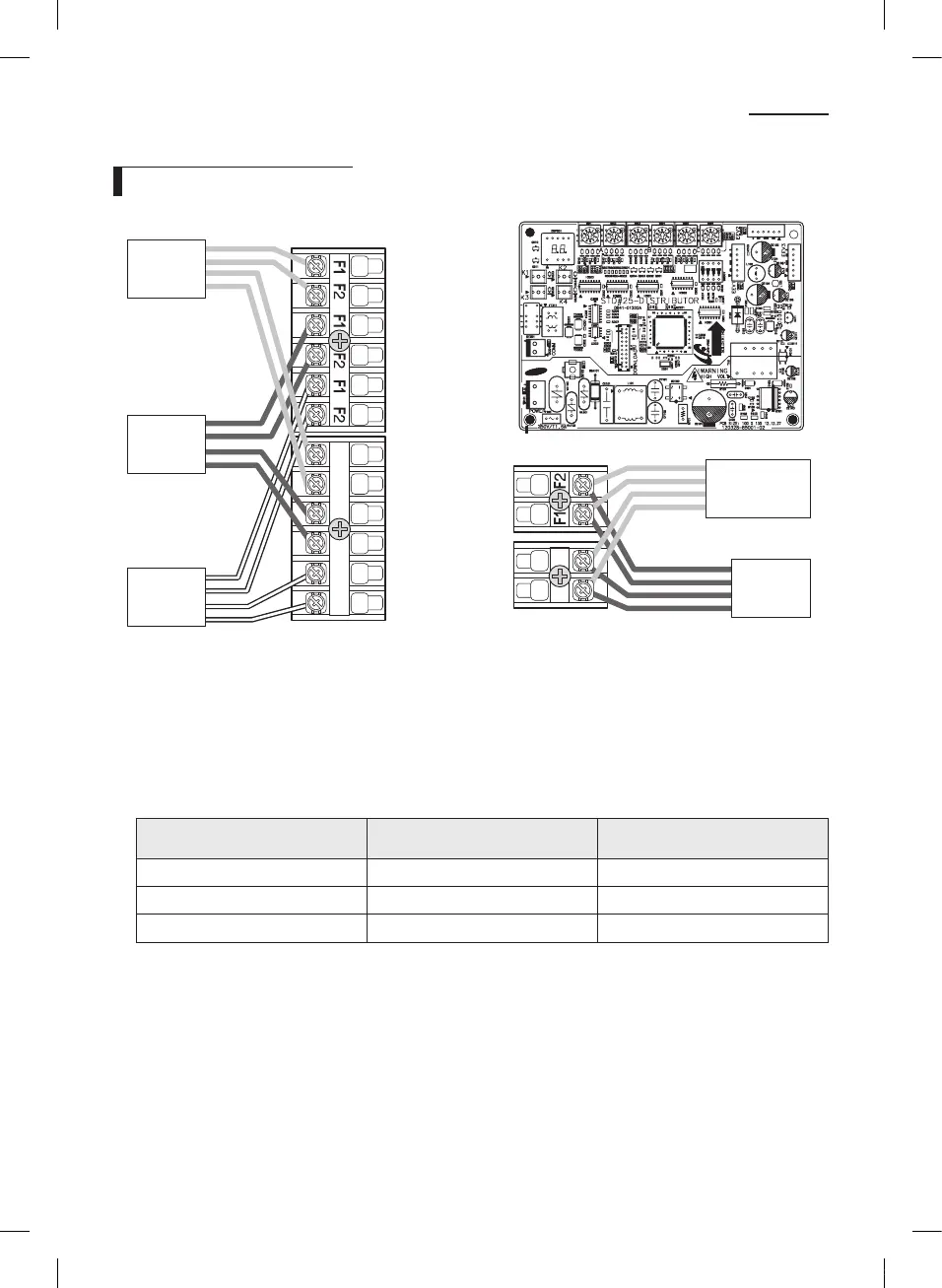
Wiring & Assigning address
1(L) 2(N)
1(L) 2(N) 1(L) 2(N) 1(L) 2(N)
Another
distributor kit
Outdoor
unit
Room A
Room B
Room C
1. Connect the AC power cable and communication cable from the outdoor unit to terminal, then connect the cable to
another electronic expansion valve kit.
2. Connect the AC power cable and communication cable to each indoor unit (A, B and C).
3. Align the SW01/SW02, SW03/SW04 and SW05/SW06’s addresses with A, B and C indoor units’.
Switch No.
Appropriate indoor unit
(Electronic expansion valve)
Connector No.
SW01/SW02 A EEV.1 CN801(YELLOW)
SW03/SW04 B EEV.2 CN802(BLUE)
SW05/SW06 C EEV.3 CN803(WHITE)
NASA_Distributor Kit_IM_EN_03757A-03.indd 4 2014-05-26 오후 2:39:43



 To Next Page