EasyManua.ls Logo

Samsung N145 Plus - User Manual

Samsung N145 Plus
2 pages
Print Icon
To Next Page IconTo Next Page
Loading...
N145 Plus
Fast Start, Just flip and go!
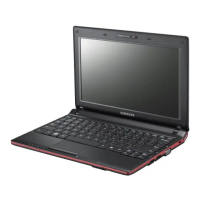
The Samsung N145 Plus netbook offers all the
high-end style you’re looking for, but without the
high-end price tag. And you don’t have to worry
about reliability. Most of its components are
manufactured directly by Samsung and undergo
intensive quality assurance testing. There’s no
compromise on performance either. You can get
going fast using an innovative Fast Start, while a
10.1” LED anti-reflective screen lets you enjoy the
sharpest details and boldest colours even in direct
sunlight. It also delivers an extensive 13.8 hours* of
battery power. Which is probably just as well, as it’s
lightweight and ultra durable design and host of
advanced communication and data-sharing tools
mean you really can just keep on going and going
Samsung recommends Windows® 7.
Start up in seconds
Jumpstart your day with a PC that
lets you get started in mere seconds.
With the Samsung N145 Plus you
can spend more time emailing,
gaming or surfing the web and less
time waiting to power up. Thanks to
the hybrid sleep mode, data is saved
on the HDD as well as in its memory,
so if power is suddenly lost, all your
contents will be waiting for you when
you restart, just as you left them.
And that means it’s always ready to
go.
Practically non-stop performance
for your non-stop life
On a long flight or short on outlets?
No problem. Now you can break free
from your power cord with the N145
Plus. A 6 cell battery, delivers up to
13.8 hours* of power to keep you
running all day long. That means you
can keep sending emails and
uploading photos without worrying
about being shut down. And an
energy efficient LED display and
optimized processing technology
adds to its long-lasting performance.
Go anywhere and do anything – with
the N145 Plus, there’s always less
downtime.
Stream media, share memories
Share your memories with
everyone, effortlessly. Samsung’s
AllShare™ lets you stream and play
videos, music and photos on your
mobile PC without installing time-
consuming drivers. With DLNA-
connected devices you can easily
flip through photos from your
camera or play videos from your PC
on your TV.
Question and Answer IconNeed help?

Do you have a question about the Samsung N145 Plus and is the answer not in the manual?

Summary

Start up in seconds

Practically non-stop performance for your non-stop life

Stream media, share memories

N145 Plus Specifications

Operating System

Specifies the operating system installed, such as Genuine Windows 7 Starter.

Processor

Details the CPU model, speed, and cache size, e.g., Intel Atom N455 (1.66GHz).

Memory

Lists system memory size and type, like 1GB DDR3 1066MHz with one SODIMM slot.

Display

Provides information on the LCD screen size and resolution, e.g., 10.1" WSVGA 1024x600.

Graphics

Details the graphics processor and memory, such as Intel GMA 3150 DVMT.

Multimedia

Covers audio features, speakers, and integrated camera specifications.

Storage

Specifies storage components like hard drive size and type (e.g., 250GB SATA).

Communication

Lists communication interfaces like Modem, Wired Ethernet, and Wireless LAN.

I;O Port

Details input/output ports including USB, card reader, VGA, and HDMI.

Input

Describes keyboard type, touchpad features, and security input devices.

Security

Outlines security features like fingerprint reader, BIOS passwords, and Kensington lock.

Power

Details power adapter specifications and battery type and life.

Physical

Provides physical dimensions and weight of the device.

Packaging

Lists packaging dimensions, weight, and warranty information.

Software

Enumerate pre-installed software applications.

Other

Includes miscellaneous information or disclaimers.

Summary

Start up in seconds

Practically non-stop performance for your non-stop life

Stream media, share memories

N145 Plus Specifications

Operating System

Specifies the operating system installed, such as Genuine Windows 7 Starter.

Processor

Details the CPU model, speed, and cache size, e.g., Intel Atom N455 (1.66GHz).

Memory

Lists system memory size and type, like 1GB DDR3 1066MHz with one SODIMM slot.

Display

Provides information on the LCD screen size and resolution, e.g., 10.1" WSVGA 1024x600.

Graphics

Details the graphics processor and memory, such as Intel GMA 3150 DVMT.

Multimedia

Covers audio features, speakers, and integrated camera specifications.

Storage

Specifies storage components like hard drive size and type (e.g., 250GB SATA).

Communication

Lists communication interfaces like Modem, Wired Ethernet, and Wireless LAN.

I;O Port

Details input/output ports including USB, card reader, VGA, and HDMI.

Input

Describes keyboard type, touchpad features, and security input devices.

Security

Outlines security features like fingerprint reader, BIOS passwords, and Kensington lock.

Power

Details power adapter specifications and battery type and life.

Physical

Provides physical dimensions and weight of the device.

Packaging

Lists packaging dimensions, weight, and warranty information.

Software

Enumerate pre-installed software applications.

Other

Includes miscellaneous information or disclaimers.

Overview

The Samsung N145 Plus is a netbook designed for users seeking a blend of portability, performance, and reliability, all while running on Windows® 7. This device emphasizes quick usability and extended battery life, making it suitable for on-the-go computing.

Function Description

The N145 Plus serves as a compact and lightweight personal computer, ideal for everyday tasks such as web browsing, email communication, document editing, and multimedia consumption. Its primary function is to provide a portable computing experience without compromising on essential features. The netbook is powered by an Intel® Atom™ Processor, ensuring efficient performance for its intended use. It comes pre-installed with Genuine Windows® 7 Starter, offering a familiar and user-friendly operating environment. The device is equipped with a 10.1-inch LED anti-reflective screen, which enhances visibility and detail, even in bright conditions, making it comfortable for extended use in various environments.

Usage Features

The N145 Plus is designed with several features to enhance user experience and convenience:

  • Fast Start: One of its standout features is the "Fast Start" capability. Utilizing a hybrid sleep mode, the netbook saves data to both the hard disk drive (HDD) and its memory. This means that if power is suddenly lost, all content remains preserved, and the device can restart quickly, resuming exactly where the user left off. This minimizes waiting times and maximizes productivity, allowing users to jump into their tasks almost instantly.
  • Extended Battery Life: The netbook boasts an impressive battery life of up to 13.8 hours, thanks to its 6-cell lithium-ion battery (4400mAh), an energy-efficient LED display, and optimized processing technology. This extended duration allows users to work, browse, and enjoy multimedia for prolonged periods without the need for frequent recharging, making it highly suitable for travel or environments with limited power outlets.
  • Anti-Reflective Display: The 10.1-inch WSVGA (1024 x 600) SuperBright© Non-Gloss LED Display is a key feature for usability. It reduces glare and reflections, ensuring that details are sharp and colors are bold, even when used outdoors or in brightly lit rooms. This significantly improves visual comfort and readability.
  • Multimedia and Communication: The N145 Plus includes integrated stereo speakers (3W, 1.5W x 2) with SRS 3D Sound Effect, providing a decent audio experience for its size. It also features a 0.3-megapixel Livecam for video calls and a built-in microphone with noise suppression for clear communication. For connectivity, it offers 802.11 b/g/N wireless LAN, 10/100 wired Ethernet LAN, and Bluetooth, enabling versatile networking and peripheral connections.
  • Data Sharing and Connectivity: The netbook is equipped with two USB 2.0 ports and a 4-in-1 card reader (SD, SDHC, SDXC, MMC), facilitating easy transfer of photos, videos, and other files from cameras, phones, and other devices. Samsung's AllShare™ technology further enhances data sharing by allowing users to stream and play videos, music, and photos on their mobile PC without installing drivers. With DLNA-connected devices, users can effortlessly flip through photos or play videos from their PC on a compatible TV.
  • User Input: It features an 84-key keyboard and a Touch Pad with Scroll Scope and Flat Type functionality, providing comfortable and intuitive input for typing and navigation.
  • Durability and Design: The N145 Plus is designed to be lightweight and ultra-durable, making it resilient to the rigors of daily use and travel. Its compact form factor (264 x 188.0 x 25.3 ~ 34.7mm) and light weight (1.26kg) contribute to its excellent portability.

Maintenance Features

The Samsung N145 Plus incorporates several features and software solutions aimed at maintaining system health, security, and ease of use:

  • Samsung Recovery Solution: This pre-installed software is crucial for system maintenance, allowing users to restore their netbook to a previous state or factory settings in case of system issues, data corruption, or virus infections. This provides a safety net for users, minimizing downtime and data loss.
  • Security Features: The netbook includes BIOS Boot Up Password and HDD Password protection, safeguarding access to the device and its data. A Kensington Lock Port is also provided, allowing users to physically secure the netbook against theft. For software security, it comes with a 60-day trial of Norton Internet Security 2010, offering initial protection against viruses and other malware.
  • Samsung Magic Doctor: This utility helps diagnose and resolve common system problems, acting as a first line of defense for troubleshooting and maintaining optimal performance.
  • Samsung Update Plus: This software ensures that the netbook's drivers and system software are kept up-to-date, which is vital for performance, security, and compatibility with new applications and hardware.
  • Battery Life Extender: This feature helps in managing the battery's health and longevity, potentially extending its overall lifespan by optimizing charging cycles and usage patterns.
  • Quality Assurance: Samsung emphasizes the reliability of the N145 Plus, stating that most of its components are manufactured directly by Samsung and undergo intensive quality assurance testing. This commitment to quality helps reduce the likelihood of hardware failures and ensures a more dependable computing experience.
  • Easy SpeedUp Manager: This tool is designed to optimize system performance, allowing users to manage and potentially speed up their netbook by adjusting various settings.
  • Easy Display Manager and Easy Network Manager: These utilities simplify the management of display settings and network connections, making it easier for users to configure their netbook for different environments and needs.

In summary, the Samsung N145 Plus is a well-rounded netbook that prioritizes user convenience through fast startup, extended battery life, and a clear display, while also providing robust security and maintenance tools to ensure a reliable and enjoyable computing experience.

Samsung N145 Plus Specifications

General IconGeneral
ProcessorIntel Atom N455
RAM1GB DDR3
Storage250GB HDD
Resolution1024 x 600
GraphicsIntel GMA 3150
Operating SystemWindows 7 Starter
Wireless802.11b/g/n
Display10.1 inch
Battery6-cell
Ports3 x USB 2.0, VGA, Ethernet
Dimensions264 x 188 x 25.3 mm

Related product manuals