Getting started
7
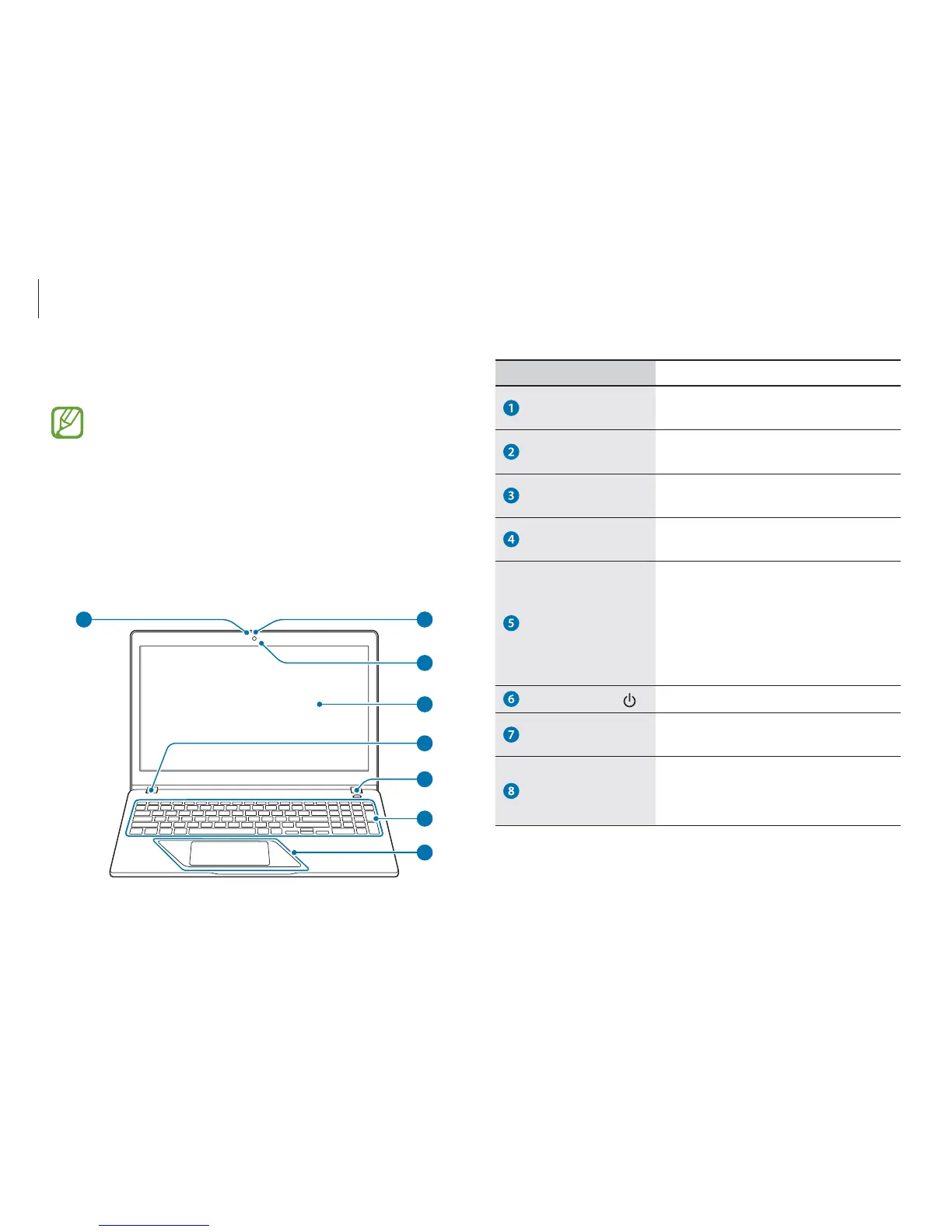
Number/Name Description
Camera indicator
light (optional)
r
This indicates the camera
operating status.
Camera (optional)
r
Using this camera, you can take
still pictures and record video.
Microphone
r
You can use the built-in
microphone.
LCD
r
The screen’s images are displayed
here.
Operating status
LED
r
Shows the operating status of the
computer.
–
Red
: Charging
–
Green
: Fully charged
–
Blue
: Turned on
Power button
r
Turns the computer on and off.
Keyboard
r
Enter text or control computer
functions.
Touchpad
r
Moves the cursor and selects
options.
r
Functions as a mouse.
Layout
r
Features or options may differ depending on the model.
r
The items marked as optional may not be provided or
may be provided in different locations.
r
Since some space on the SSD is reserved for system
recovery and operations, the available space on the SSD
may be less than the actual capacity.
Front view
1
2
3
4
5
6
7
8








 To Next Page