Need help?
Do you have a question about the Samsung QND-6010R and is the answer not in the manual?
Details regarding the copyright of the manual.
Information on registered trademarks mentioned.
Conditions for reproduction and distribution of the document.
User responsibility and rights for document changes.
Critical safety guidelines for proper operation and installation.
Essential warnings and safety precautions for product use.
Interpretation of visual symbols used in the manual.
Requirements for Class I construction connections.
Precautions for battery use and disposal.
Information on device disconnection and general cautions.
Highlights of the camera's functionalities and capabilities.
System requirements for optimal PC performance with the camera.
Guidelines for selecting suitable Micro SD/SDHC/SDXC memory cards.
Specifications for compatible Network Attached Storage devices.
List of items provided in the camera package.
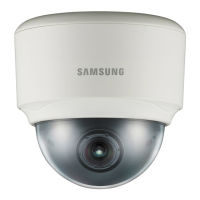
Identification and diagram of external parts for QND models.
Detailed explanations of each camera component's purpose.
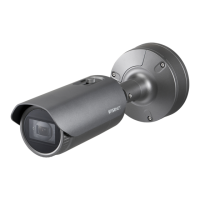
Identification and diagram of external parts for QNO models.
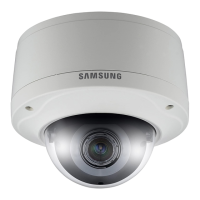
Identification and diagram of external parts for QNV models.
In-depth descriptions of camera components and their roles.
Safety measures before QND installation and camera disassembly steps.
Step-by-step guide for installing the QND camera.
Safety guidelines before installing the QNO camera.
Procedure for QNO installation and RJ45 waterproof cable connection.
Guidance for outdoor setup and QNV camera disassembly.
Steps for QNV installation and LAN cable setup.
Instructions for connecting audio, alarm, and power cables.
Guidance on using optional adapters for camera mounting.
Procedure for waterproofing cables for outdoor use.
Details on available accessories for camera installation.
Steps to adjust Pan, Tilt, and Rotate for optimal camera view.
Procedure for inserting a Micro SD card into QNO cameras.
Procedure for inserting a Micro SD card into QND/QNV cameras.
Steps for safely removing the Micro SD memory card.
Details about memory cards and recommendations for selection.
Diagrams illustrating power and Ethernet cable connections.
Information on power and network cable types and limitations.
Procedure for connecting microphones or audio output devices.
Steps for connecting alarm input/output signals.
Schematic for wiring alarm input sensors.
Schematics for connecting alarm output devices.
Instructions for connecting external alarm input sensors.
Connecting to the camera from a local PC on the LAN.
Setting up camera connectivity via a DHCP DSL/Cable modem.
Procedure for connecting the camera using a PPPoE modem.
Configuring camera connection through a broadband router.
Description of buttons and functions within the IP Installer tool.
Manual steps to assign a static IP address to the camera.
Configuring IP settings manually when not using a router.
Setting IP and port configurations when using a broadband router.
Using IP Installer for automatic network configuration.
Configuring the camera to obtain a dynamic IP address.
Setting up port forwarding rules on the router for remote access.
Connecting to the camera from another PC on the same network.
Accessing the camera remotely via the internet.
Connecting to the camera using its IP address or URL.
Using Bonjour for discovery and DDNS for remote access.
Connecting the camera using the UPnP protocol.
Guidelines for creating strong and secure passwords.
Steps to log in to the camera's web interface.
Information on browser compatibility and plugin requirements.
Procedure for installing the necessary WebViewer plugin.
Accessing live view without plugins in Chrome/Edge.
Description of the live view screen and its controls.
Details on controls like Monitoring, Playback, Setup, and Profile.
How to choose different video profile types for viewing.
Steps to capture and save still images from the video feed.
Methods for viewing video in full screen and using audio features.
Using the pixel counting tool for measurement.
Procedure for searching and playing back recorded video footage.
Using event search to locate specific recorded events.
Steps to search and play recorded video based on specific times.
Using playback controls for navigation and adjusting playback speed.
Setting criteria for searching recorded events.
Selecting and playing individual recorded events.
Interface for searching recorded video using a time bar.
Steps to play recorded video after a time-based search.
Procedure for backing up recorded video segments.
How to play backup video files using external media players.
Accessing and playing AVI video files from a Micro SD card.
Accessing and playing recorded videos stored on NAS.
Navigating to and understanding the basic setup options.
Setting up video profiles for various recording scenarios.
Steps to create or modify video profiles for recording.
Explanation of GOV length in video compression for H.264/H.265.
Description of the dynamic GOV function for adaptive bit rates.
Configuring user accounts, passwords, and access permissions.
Setting the camera's current time, timezone, and daylight saving.
Setting up IP addresses, ports, and network protocols.
Configuring various event detection triggers and actions.
Configuring video sources, rotation, and privacy masking.
Setting up audio input for different camera models.
Adjusting core camera settings like sensor, SSDR, and white balance.
How to set up and use predefined camera image presets.
Configuring sensor frame rate and Super Dynamic Range (SSDR).
Adjusting white balance and Backlight Compensation (BLC).
Configuring WDR for improved image quality in challenging lighting.
Adjusting brightness, shutter speed, and anti-flicker settings.
Setting camera operation for day/night transitions.
Configuring sharpness, LDC, and IR mode settings.
Using WiseStream for video quality and bandwidth optimization.
Explanation of Dynamic Domain Name Service.
Steps to register the camera with Samsung's DDNS service.
Finalizing the connection to Samsung DDNS.
Steps for setting up public DDNS servers.
Creating lists to allow or deny IP access.
Configuring secure HTTPS communication with the camera.
Configuring 802.1x for network access authentication.
Setting Quality of Service for specific IP traffic.
Setting up SNMP for remote network monitoring.
Enabling automatic IP address assignment for camera access.
Configuring FTP/Email servers for transferring event images.
Choosing between Micro SD card or NAS for data storage.
Configuring recording parameters for the Micro SD card.
Steps to set up and configure recording to Network Attached Storage.
Specific guidance for integrating with Synology NAS.
Configuring how the camera's alarm output functions.
Setting alarm input types, activation times, and operation modes.
Configuring time-based transmission of images.
Configuring the camera to detect tampering attempts.
Configuring the camera to detect lens defocus.
Configuring the camera to detect motion events.
Detailed steps for configuring motion detection sensitivity, size, and area.
Configuring event logging for network disconnection.
Accessing details about the camera's model and serial number.
Steps for upgrading firmware and rebooting the camera.
Viewing, searching, and backing up system and event logs.
Checking connection status, user activity, and profile details.
Details on image sensor, resolution, and illumination.
Information on lens properties and camera operational ranges.
Specifications for camera movement and detection range.
Details on network protocols, compression, and web viewer support.
Operating temperature, humidity, and power consumption.
Information on weight, dimensions, and vandal resistance.
Diagrams showing the physical dimensions of QND cameras.
Diagrams showing the physical dimensions of QNO/QNV cameras.
Solutions for issues related to video display and network connectivity.
Troubleshooting problems encountered with SD card or NAS recording.
Details on software licensed under GPL and LGPL.
Understanding the conditions for copying, distribution, and modification.
Conditions for redistributing and modifying GPL-licensed software.
License terms for Apache 2.0 and Bzip2 software.
License terms for University of Illinois/NCSA software.
Copyright statements from multiple software contributors.
License terms for MIT and Mozilla components.
Definitions and termination clauses within the Mozilla Public License.
License terms for the T-Kernel software.
Detailed conditions for using the Apache License 2.0.
Conditions for using and distributing T-Kernel software.
Terms and conditions for the Apache License 2.0.
Additional details and disclaimers for the Apache License 2.0.
License terms for Bzip2 and University of Illinois/NCSA software.
License terms for the PHP software.
Information on FCC, Eco-label, and proper product disposal.
 General
| Form factor | Dome |
|---|---|
| Weatherproof | Yes |
| Mounting type | Ceiling |
| Product color | Ivory |
| Housing material | Plastic |
| Protection features | Vandal proof |
| International Protection (IP) code | IP66 |
| Type | IP security camera |
| Languages support | Multi |
| Number of languages | 17 |
| Placement supported | Indoor |
| Connectivity technology | Wired |
| Pan range | 0 - 350 ° |
| White balance | ATW, AWC, Indoor, Manual, Outdoor |
| Tilt angle range | 0 - 67 ° |
| Angle of rotation | 355 ° |
| Camera shutter type | Electronic |
| Minimum illumination | 0 lx |
| Fixed focal length | 2.8 mm |
| Maximum aperture number | 1.8 |
| Number of cameras | 1 |
| DC output voltage | 12 |
| Power source type | PoE |
| Power consumption (max) | 5.8 W |
| Power consumption (Power over Ethernet (PoE)) | 7 W |
| Audio system | 1-way |
| Audio formats supported | G.711, G.726 |
| Audio system full duplex | No |
| Sensor type | CMOS |
| Optical sensor size | 1/2.9 \ |
| Total megapixels | 2 MP |
| Maximum resolution | 2000 x 1121 pixels |
| Supported video modes | 240p, 360p, 480p, 576p, 720p, 1080p |
| Video formats supported | H.264, H.265, M-JPEG |
| Supported graphics resolutions | 320 x 240, 640 x 360, 640 x 480 (VGA), 720 x 480, 720 x 576, 800 x 600 (SVGA), 1024 x 768 (XGA), 1280 x 1024 (SXGA), 1280 x 720 (HD 720), 1280 x 960, 1920 x 1080 (HD 1080) |
| LED type | IR |
| Night vision distance | 20 m |
| Interface | RJ-45 |
| Security algorithms | HTTPS, SNMP, SSL/TLS |
| Alert notification type | |
| Password protection type | - |
| Number of users | 6 user(s) |
| Cabling technology | 10/100Base-T(X) |
| Networking standards | IEEE 802.1x, IEEE 802.3af |
| Ethernet interface type | Fast Ethernet |
| Supported network protocols | TCP/IP, UDP/IP, RTP(UDP), RTP(TCP), RTCP, RTSP, NTP, HTTP, HTTPS, SSL/TLS, DHCP, PPPoE, FTP, SMTP, ICMP, IGMP, SNMPv1/v2c/v3(MIB-2), ARP, DNS, DDNS, QoS, PIM-SM, UPnP, Bonjour |
| Compatible memory cards | MicroSD (TransFlash), MicroSDHC, MicroSDXC |
| Maximum memory card size | 128 GB |
| Mac operating systems supported | Mac OS X 10.10 Yosemite, Mac OS X 10.11 El Capitan, Mac OS X 10.9 Mavericks |
| Windows operating systems supported | Windows 10 Education, Windows 10 Education x64, Windows 10 Enterprise, Windows 10 Enterprise x64, Windows 10 Home, Windows 10 Home x64, Windows 10 Pro, Windows 10 Pro x64, Windows 7 Enterprise, Windows 7 Enterprise x64, Windows 7 Home Basic, Windows 7 Home Basic x64, Windows 7 Home Premium, Windows 7 Home Premium x64, Windows 7 Professional, Windows 7 Professional x64, Windows 7 Starter, Windows 7 Starter x64, Windows 7 Ultimate, Windows 7 Ultimate x64, Windows 8.1, Windows 8.1 Enterprise, Windows 8.1 Enterprise x64, Windows 8.1 Pro, Windows 8.1 Pro x64, Windows 8.1 x64 |
| Browser supported | Google Chrome 47, MS Edge 20, S Explore 11, Mozilla Firefox 43, Apple Safari 9 |
| Storage temperature (T-T) | -30 - 60 °C |
| Operating temperature (T-T) | -10 - 55 °C |
| Operating relative humidity (H-H) | 0 - 90 % |
 Weight and Dimensions
| Height | 86 mm |
|---|---|
| Weight | 290 g |
| Diameter | 110 mm |

 To Next Page