Need help?
Do you have a question about the Samsung QND-6020R and is the answer not in the manual?
Detailed safety guidelines for using the apparatus, covering installation, operation, and maintenance.
Critical safety warnings regarding fire and electric shock risks when using the equipment.
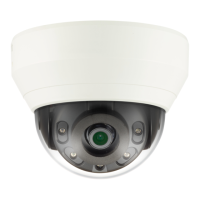
Steps to install the QND-6010R/6020R/6030R camera, including precautions.
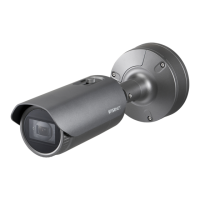
Steps to install the QNO-6020R/6030R camera, including precautions.
Instructions for installing the camera in outdoor environments.
Steps to install the QNV-6010R/6020R/6030R camera, including precautions.
Guide to orienting the camera's view using Pan, Tilt, and Rotation.
Instructions for inserting and removing Micro SD memory cards.
Guide for connecting the camera within a Local Area Network.
Steps to connect the camera to a modem using DHCP.
Guide for connecting the camera using a PPPoE modem.
Connecting the camera to a broadband router for network access.
Procedures for configuring a static IP address for the camera.
Procedures for configuring a dynamic IP address for the camera.
Instructions for setting up port forwarding on the broadband router.
Accessing the camera remotely over the internet.
Main section detailing how to connect to the camera via the web viewer.
How to set, change, and manage the camera's administrator password.
Process for logging into the camera's web interface.
Viewing the live camera feed using the plugin-free web viewer.
Viewing the live camera feed using the plugin-based web viewer.
How to view recorded videos using the plugin-free web viewer.
Playing recorded video based on event type.
How to view recorded videos using the plugin web viewer.
Playing recorded video based on a specific time.
Main section for configuring various camera settings.
Configuring network IP address and port settings.
Configuring network parameters like DDNS, IP filtering, and HTTPS.
Configuring storage settings for recording, including SD card and NAS.
Steps to configure recording to a Network Attached Storage.
Main section for system-wide configuration and management.
Solutions for common problems encountered with the camera.
 General
| Model | QND-6020R |
|---|---|
| Category | Network camera |
| Max. Resolution | 1920 x 1080 |
| Lens Type | Fixed |
| Max. Aperture Ratio | F2.0 |
| Day & Night | ICR |
| Wide Dynamic Range | Digital WDR |
| Digital Noise Reduction | SSNR |
| Video Compression | H.265, H.264, MJPEG |
| Ingress Protection | IP66 |
| IR Viewable Length | 20m |
| Ethernet | RJ45 (10/100BASE-T) |
| ONVIF Conformance | Profile S |
| Image Sensor | 1/2.8" 2M CMOS |
| Operating Temperature | -30°C to +55°C |


 To Next Page