EasyManua.ls Logo

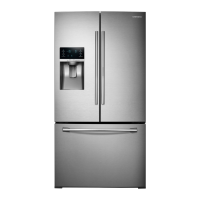
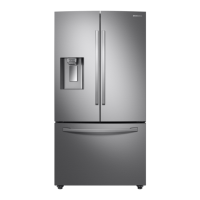
Samsung RF28K9070 - User Manual

Samsung RF28K9070
19 pages
Print Icon
To Next Page IconTo Next Page
Loading...
June 2019
Technical Service Assistance: 1.844.312.7158
Asuriontechline@asurion.com
Technical Assistance Specialist Major Appliance
Tips: From Your Technical Assistance Specialist
Product: Samsung Refrigerators
Topic: French Door Direct Cool Ice Maker No Ice, Frozen, Frost, Ice Bucket Stuck
Applies to models produced between 2014 - 2018
RF22K9381*,RF22K95*,RF22KRED,RF22M95*,RF22NP**,RF23J9011,RF23M8070,RF23M8090
RF23M8960,RF23M8570,RF23M8590,RF23HCED,RF23HTED,RF24FSED,RF25HMED,RF26J7500
RF28HDED,RF28HFED,RF28HMED,RF28JBED,RF28K9070,RF28K9380,RF28K9580,RF28M9580
RF28N9780,RF28HDEDP,RF28HFEDT,RF28NHED,RF263BEAEB,RF263TEAES,RF265BEAE,RF30KMEDB
NOTE: Samsung does not have an upgraded IM SVC KIT for all models. If your specific model is not
included in this bulletin, there are no kits available at this time. Do NOT make any substitutions.
Providers should follow the normal steaming, de-icing and drying process. Apply the silicon and
install the Y clips, update icemaker, auger and drain, Zip Tie and Main PCB. Confirm the dispenser is
closing and water pressure delivers no more than 16 ounces in 20 seconds. The IM SVC Kit come
For additional information on this process contact Asurion Technical Assistance 1-844-312-7158
************ All STEPS AND PARTS MUST BE FOLLOWED AND INSTALLED**************
Failure to properly follow these steps can result in a failed repair and return visit to the consumer. Please
complete all steps as they are written and do not skip or modify the repair procedure. If a part has
previously been replaced prior to installing this kit, replace it with the part included in the kit.

Other manuals for Samsung RF28K9070

Question and Answer IconNeed help?

Do you have a question about the Samsung RF28K9070 and is the answer not in the manual?

Summary

Service Preparation Steps

Enter Self Diagnostic Mode

Place the unit into Self Diagnostic mode to retrieve any existing fault codes for troubleshooting.

Ice Maker Disassembly and Inspection

Disassemble Ice Maker Assembly

Follow steps to disassemble the ice maker, including removing screws, cables, and ducts.

Disassemble Auger Motor

Disconnect the auger motor cable and remove the auger motor assembly.

Auger Drain Replacement and Sealing

Auger Drain Disassembly and Replacement

Disassemble the auger drain and replace it with the improved part from the IM SVC Kit.

Seal Ice Room with RTV Sealant

Seal any gaps found in the ice room sides and floor with RTV sealant for an airtight seal.

Reassembly and PCB Replacement

Install New Main PCB

Install the new Main PCB from the IM SVC Kit, ensuring all connections are secure.

Repair Confirmation and Validation

Perform Test Mode

Press the "Test Mode" button and listen for a chime to start the 6-minute test.

SVC Information and Parts Listing

Parts Listing for Counter Depth Models

Identify required IM SVC Kit parts based on model number and production range.

Parts Listing for Full Size Models

Identify required IM SVC Kit parts for full size models based on serial number.

Summary

Service Preparation Steps

Enter Self Diagnostic Mode

Place the unit into Self Diagnostic mode to retrieve any existing fault codes for troubleshooting.

Ice Maker Disassembly and Inspection

Disassemble Ice Maker Assembly

Follow steps to disassemble the ice maker, including removing screws, cables, and ducts.

Disassemble Auger Motor

Disconnect the auger motor cable and remove the auger motor assembly.

Auger Drain Replacement and Sealing

Auger Drain Disassembly and Replacement

Disassemble the auger drain and replace it with the improved part from the IM SVC Kit.

Seal Ice Room with RTV Sealant

Seal any gaps found in the ice room sides and floor with RTV sealant for an airtight seal.

Reassembly and PCB Replacement

Install New Main PCB

Install the new Main PCB from the IM SVC Kit, ensuring all connections are secure.

Repair Confirmation and Validation

Perform Test Mode

Press the "Test Mode" button and listen for a chime to start the 6-minute test.

SVC Information and Parts Listing

Parts Listing for Counter Depth Models

Identify required IM SVC Kit parts based on model number and production range.

Parts Listing for Full Size Models

Identify required IM SVC Kit parts for full size models based on serial number.

Overview

This document outlines the service preparation, repair steps, and parts required for addressing common issues with Samsung French Door Direct Cool Ice Makers, specifically "No Ice, Frozen, Frost, Ice Bucket Stuck." This guide applies to models produced between 2014 and 2018.

Function Description:

The Samsung French Door Direct Cool Ice Maker is designed to produce and dispense ice in compatible refrigerator models. It is an integrated system that includes an ice maker assembly, an auger motor for dispensing, an ice bucket for storage, and a cooling loop to facilitate ice production. The system relies on a precise balance of temperature, water flow, and mechanical components to function correctly. When operating optimally, it provides a convenient source of ice for household use.

Usage Features:

The ice maker system is typically controlled through the refrigerator's main display panel, allowing users to select ice types (cubed/crushed) and manage ice production. The ice bucket is designed for easy removal and re-insertion, enabling users to access stored ice or clean the bucket. The dispenser chute allows for convenient access to ice and water. The refrigerator also features a self-diagnostic mode to help identify potential issues, and a forced defrost mode to aid in maintenance and repair.

Maintenance Features:

Regular maintenance is crucial for the proper functioning of the ice maker. The document emphasizes several key maintenance steps:

  • Self-Diagnostic Mode: Users or technicians can place the unit into self-diagnostic mode to retrieve fault codes, which indicate specific errors within the ice maker system (e.g., Ice Maker Sensor Error, Ice Room Sensor Error, Ice Maker Function Error, Ice Room FAN Error, Ice dDuct Heater Error).
  • Forced Defrost Mode: This mode is used to loosen ice and warm up the cooling loop, preparing the unit for ice maker removal and service. It is a critical step before any disassembly to prevent damage from frozen components.
  • Ice Bucket Inspection: The ice bucket should be regularly removed and inspected for cracks, fractures, or issues with its gasket. A damaged or rigid gasket can prevent a proper seal, leading to air leaks and frost buildup.
  • Ice Chute Flapper Inspection: The ice chute flapper and its assembly should be inspected for a tight seal. Water can be added to the ice route to test for leaks. The rubber flapper should be soft, pliable, and free of tears or rips, ensuring it closes fully. The ice dispensing opening should also be clean and clear of hard water minerals.
  • Thorough Ice Removal: During service, it is imperative to remove all ice and frost from the ice room and auger area using a steamer. The document explicitly warns against using heat guns or hair dryers, as these can melt the plastic liner and cause irreparable damage. Failure to remove all ice can lead to repeat service visits.
  • Drain Inspection: After removing the auger motor assembly, the ice room drain should be inspected for foam remnants or ice blockage. The drain must remain open to ensure proper water flow to the drip pan.
  • Ice Room Sealing: Any gaps found in the ice room sides and floor should be sealed with RTV sealant (Part Number DA81-05595A) to create an airtight environment and prevent frost buildup.
  • Water Line Adjustment: The gap between the water line outlet and the fill tube should be checked. If it is less than 10mm, the insertion length of the water line in the cabinet rear should be adjusted to 15-20mm to prevent water spray.
  • Y-Clip Installation: New Y-clips (DA82-02367A) and retainers should be installed to the bottom of the cooling loop, ensuring they point straight down and have no gap between the clip and the rear wall retainer clip. Incorrect installation can lead to water pooling and freezing.
  • Ice Maker and Main PCB Replacement: The document specifies that the ice maker assembly and the main PCB (Printed Circuit Board) provided in the IM SVC Kit must be installed, even if the unit previously had an updated ice maker. This ensures all components are compatible and up-to-date.
  • Post-Repair Validation: After repairs, the unit should be placed into "Test Mode" to check for water leaks or functional failures. This process takes approximately 6 minutes and involves filling with less water. Following this, the unit should be returned to "Self Diagnosis" mode to confirm no other error codes are present.
  • Serial Number and Production Date: The document provides detailed instructions on how to decipher the production date from the unit's serial number. This information is critical for ordering the correct IM SVC Kit, as parts vary based on the production date range of the unit. No substitutions for parts are allowed.

The document emphasizes that all steps and parts included in the IM SVC Kit must be followed and installed. Failure to do so can result in a failed repair and subsequent return visits. For validation of repair, Asurion Tech Line requires specific photos, including the model and serial tag, ice chute leak test, dispenser water test, correctly positioned "Y" clips, correctly positioned water inlet hose, updated ice maker, assembled drain line, neatly applied silicone sealant, and the updated main PCB board.

Samsung RF28K9070 Specifications

General IconGeneral
Total Capacity28 cu. ft.
Cooling SystemTwin Cooling Plus
Ice MakerYes
Water DispenserYes
ColorStainless Steel
Counter DepthNo
Door AlarmYes
Energy Star CertifiedYes
TypeFrench Door
Width35 3/4 inches
Depth36 1/4"

Related product manuals