10-6 Samsung Electronics
Q AN035JSKLKN/AN050JSKLKN/AN080JSKLKN/AN100JSKLKN
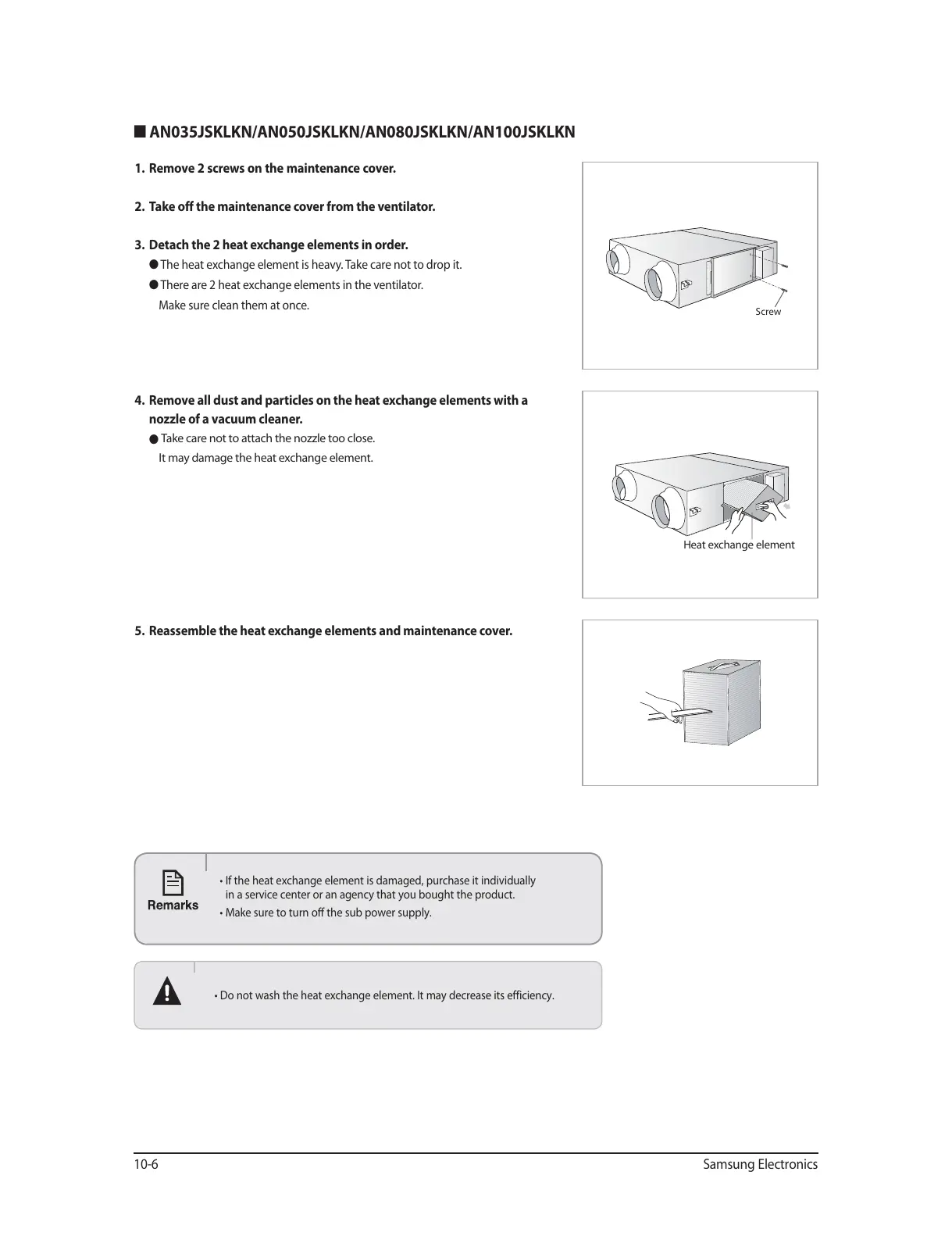
1. Remove 2 screws on the maintenance cover.
2. Take off the maintenance cover from the ventilator.
3. Detach the 2 heat exchange elements in order.
O The heat exchange element is heavy. Take care not to drop it.
O There are 2 heat exchange elements in the ventilator.
Make sure clean them at once.
4. Remove all dust and particles on the heat exchange elements with a
nozzle of a vacuum cleaner.
O
Take care not to attach the nozzle too close.
It may damage the heat exchange element.
5. Reassemble the heat exchange elements and maintenance cover.
tDo not wash the heat exchange element. It may decrease its efficiency.
t*GUIFIFBUFYDIBOHFFMFNFOUJTEBNBHFEQVSDIBTFJUJOEJWJEVBMMZ
in a service center or an agency that you bought the product.
t.BLFTVSFUPUVSOPGGUIFTVCQPXFSTVQQMZ
Heat exchange element
Screw




 To Next Page