EasyManua.ls Logo

Samsung SC-152 - User Manual

Samsung SC-152
8 pages
Print Icon
To Next Page IconTo Next Page
Loading...
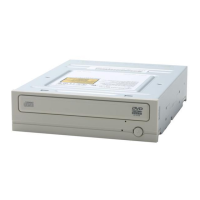
CD-ROM DRIVE
SC-152
User's Guide - ENGLISH
BG68-00326C Rev:01
FCC Compliance
This equipment has been tested and found to comply with the limits for a
Class B digital device, pursuant to Part 15 of the FCC rules.
These limits are designed to provide reasonable protection against harmful
interference in a residential installation.
This equipment generates, uses, and can radiate radio frequency energy and,
if not installed and used in accordance with the instructions, may cause
harmful interference to radio communications. However, there is no guarantee
that interference will not occur in a particular installation. If this equipment
does cause harmful interference to radio or television reception, which can be
deter-mined by turning the equipment off and on, the user is encouraged to
try to correct the interference by one or more of the following measures:
• Re-orient or relocate the receiving antenna.
• Increase the separation between the equipment and receiver.
• Connect the equipment into an outlet on a circuit different from that to
which the receiver is connected.
• Consult the dealer or an experienced radio/TV technician for help.
http://www.samsungodd.com
www.samsungelectronics.com
1
Safety Precautions
The following diagrams illustrate the precautions to be taken when using
your CD-ROM drive.
You must not use the drive in any manner other than that specified in this guide.
Avoid exposing your eyes or skin to direct or scattered radiation.
CAUTION
Do not attempt to repair the CD-ROM drive yourself. Contact
your dealer or local SAMSUNG representative for all repairs.
If you make any adjustments or perform any operations other
than those specified in this guide, you run the risk of exposure to
hazardous radiation.
WARRANTY
Please refer to the Samsung limited warranty statements.
Precautions
1.To reduce the risk of fire or electric shock, do not expose
this appliance to rain or moisture.
2. Always check each disc for cracks before using it. If there are
cracks on the surfaces, especially around the border of the
center hole, we recommend that you make a copy of the disc
immediately and then stop using it. If you continue using the
disc, it will probably develop more cracks and eventually cause
irreparable damage.
3. Do not use poor quality discs:
From unknown sources
Without any copyright
Scratched or damaged in any way
Changes or modifications not expressly approved by the party responsible for compliance
could void the user’s authority to operate the equipment
Question and Answer IconNeed help?

Do you have a question about the Samsung SC-152 and is the answer not in the manual?

Summary

Safety Precautions

General Safety and Warnings

Covers diagrams, unauthorized modifications, radiation hazards, and general operational warnings for the CD-ROM drive.

Warranty and Legal Information

Refers users to Samsung's limited warranty statements and notes on compliance.

Disc Handling and Care

Provides essential precautions for handling discs, protecting against moisture, and preventing damage to the drive.

FCC Compliance

FCC Regulatory Statement

Details the equipment's compliance with FCC rules for Class B digital devices and methods to correct interference.

Front View of the CD-ROM Drive

Front Panel Components

Explains the headphone connector, volume control, disc compartment, emergency eject hole, LED, and eject button.

Rear View of the CD-ROM Drive

Rear Panel Connections

Details digital output, sound output, master/slave select, interface, and power terminals on the rear panel.

System Requirements

Installation System Requirements

Lists required computer type, expansion unit, disk space, and operating system versions for successful installation.

Installing the CD-ROM Drive

Physical Installation Guide

Step-by-step instructions for physically mounting the CD-ROM drive inside a computer, including cable connections.

Setting Up the Device Driver

Device Driver Installation Procedures

Guides through automatic and manual setup processes for installing the necessary device driver for the CD-ROM drive.

Solving Technical Problems

Troubleshooting Common Issues

Provides solutions for common problems like drive detection failures, PC slowdown, and disc reading errors.

Technical Specifications

Product Technical Details

Details disc compatibility, performance metrics, interface connectors, physical dimensions, and reliability.

Summary

Safety Precautions

General Safety and Warnings

Covers diagrams, unauthorized modifications, radiation hazards, and general operational warnings for the CD-ROM drive.

Warranty and Legal Information

Refers users to Samsung's limited warranty statements and notes on compliance.

Disc Handling and Care

Provides essential precautions for handling discs, protecting against moisture, and preventing damage to the drive.

FCC Compliance

FCC Regulatory Statement

Details the equipment's compliance with FCC rules for Class B digital devices and methods to correct interference.

Front View of the CD-ROM Drive

Front Panel Components

Explains the headphone connector, volume control, disc compartment, emergency eject hole, LED, and eject button.

Rear View of the CD-ROM Drive

Rear Panel Connections

Details digital output, sound output, master/slave select, interface, and power terminals on the rear panel.

System Requirements

Installation System Requirements

Lists required computer type, expansion unit, disk space, and operating system versions for successful installation.

Installing the CD-ROM Drive

Physical Installation Guide

Step-by-step instructions for physically mounting the CD-ROM drive inside a computer, including cable connections.

Setting Up the Device Driver

Device Driver Installation Procedures

Guides through automatic and manual setup processes for installing the necessary device driver for the CD-ROM drive.

Solving Technical Problems

Troubleshooting Common Issues

Provides solutions for common problems like drive detection failures, PC slowdown, and disc reading errors.

Technical Specifications

Product Technical Details

Details disc compatibility, performance metrics, interface connectors, physical dimensions, and reliability.

Samsung SC-152 Specifications

General IconGeneral
BrandSamsung
ModelSC-152
CategoryCD/CDR Drive
LanguageEnglish

Related product manuals