76
Your Phone
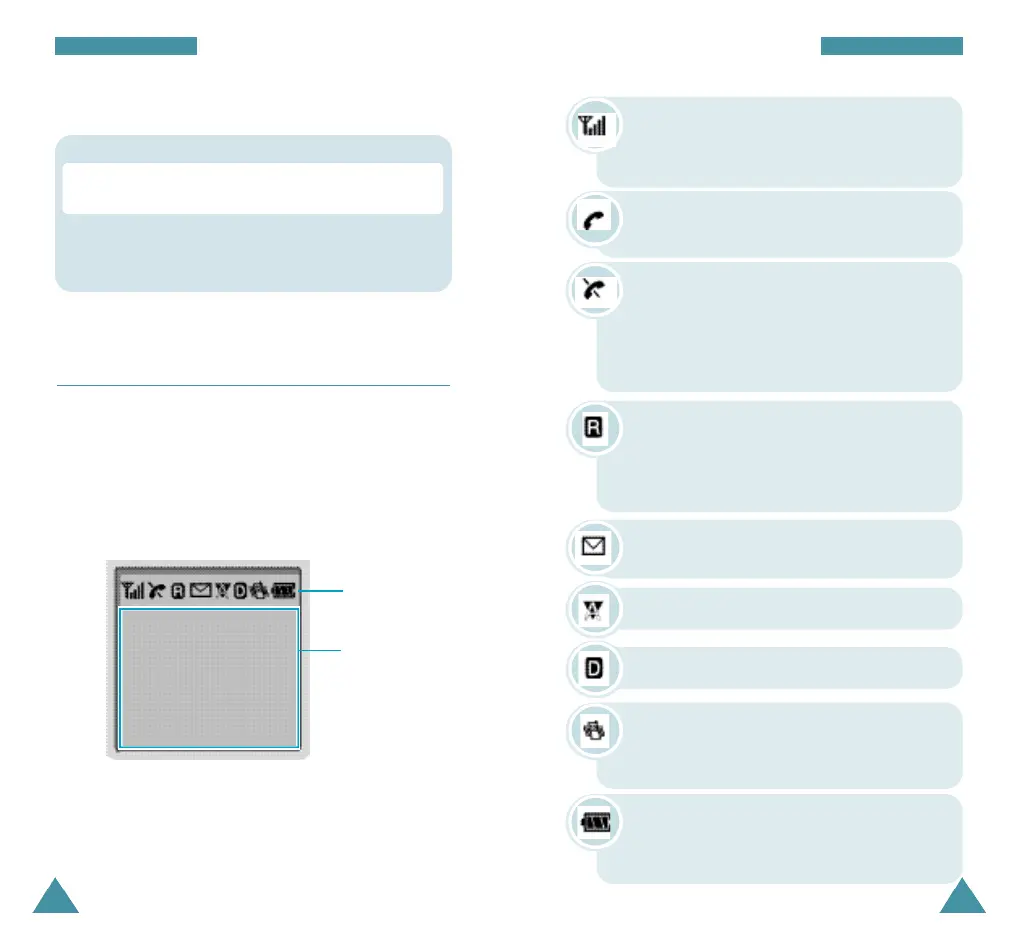
New Message: Appears when a new text
message has been received.
Digital mode: Indicates the digital mode.
Battery strength: Shows the level of your
battery. The more bars you see, the more
power you have left.
Vibrator on: Appears when a vibrate mode
is on. An incoming call will vibrate the
phone rather than ring it.
Roaming: Appears When you are out of
your home area and have registered with a
different network (when travelling in other
countries, for example).
Analog mode: Indicates the analog mode.
Your Phone
Display
Layout
The display comprises two areas; an upper line of fixed
icons, and the lower text and graphic area. The
following icons display at power-on:
Icons
Text and
graphic area
Signal strength : Shows the received
signal strength. The greater the number of
bars, the better the signal strength.
Icons
Service: Appears when a call is in
progress.
No service indicator: Appears when you
are outside a service area. When it
appears, you cannot make or receive calls.
Wait a little while for a signal or move into
an open area.
* : When held down to access the voice dial
function in idle mode.
Key Functions
# : When held down to toggle between the silent
mode on and off
Key Descriptions (continue...)









 To Next Page