SAMSUNG Proprietary-Contents may change without notice
Exploded View and Parts List
7-5
This Document can not be used without Samsung's authorization
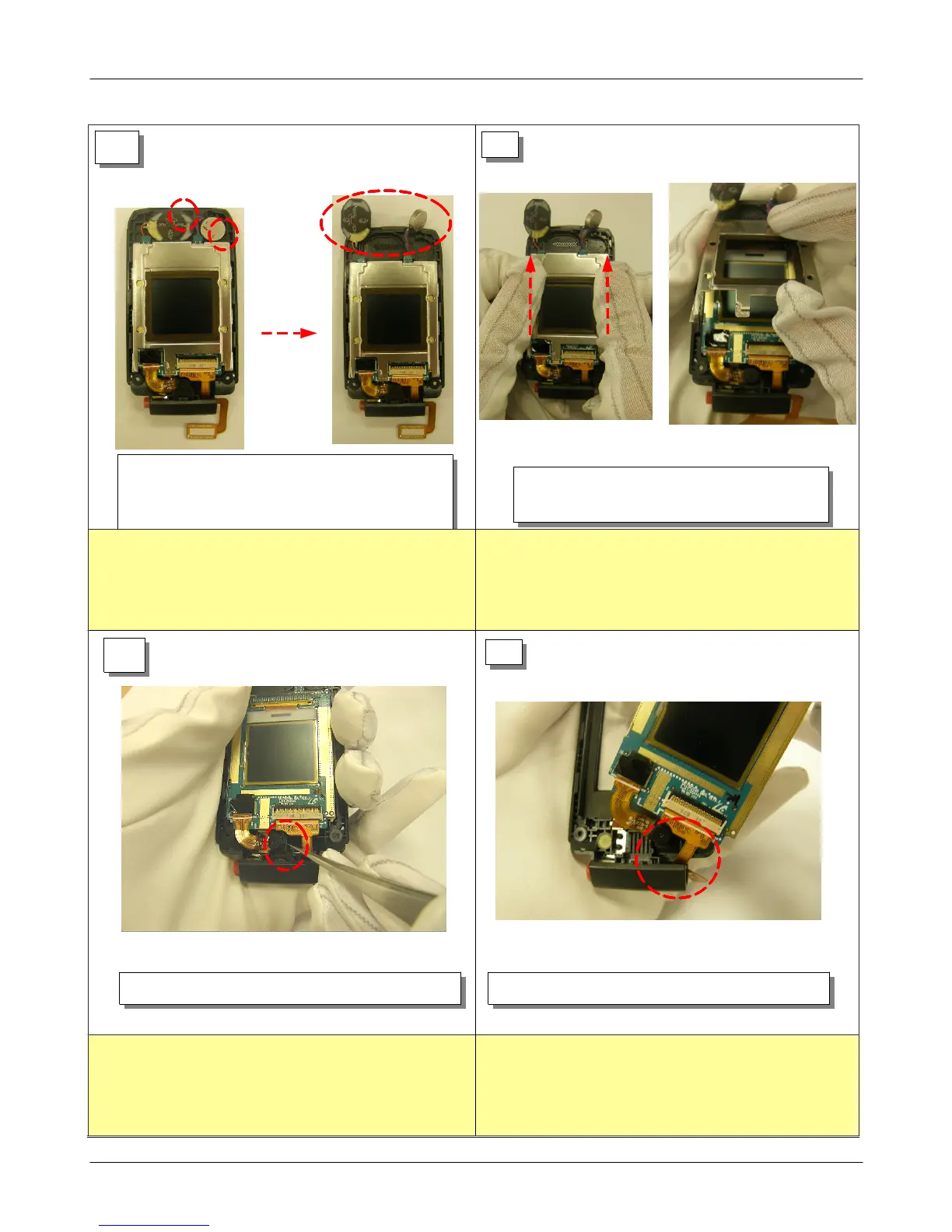
1) Enter upward after push LCD Bracket to
the top portion and disjoints.
13
14
15
1) Separate CAMERA in LOWER by tweezers.
16
1) Seperate LCD ASS'Y in Lower.
1) Separate SPEAKER and MOTOR in LOWER after
insertion in the decomposition groove using
tweezers.
1) Be careful not to make scratch and LOCKER damage!
1) Be careful not to inflow stem in SUB LCD and LCD
damage.
1) Be careful CAMERA damage at CAMERA separation by
tweezers.
1) Be carefule LCD CON TO CON damage.
2) Beware not to remain stem or fingerprint in
MAIN/SUB LCD.






 To Next Page