SAMSUNG Proprietary-Contents may change without notice
10. Flow Chart of Troubleshooting
10-1
This Document can not be used without Samsung's authorization
10-1-1.
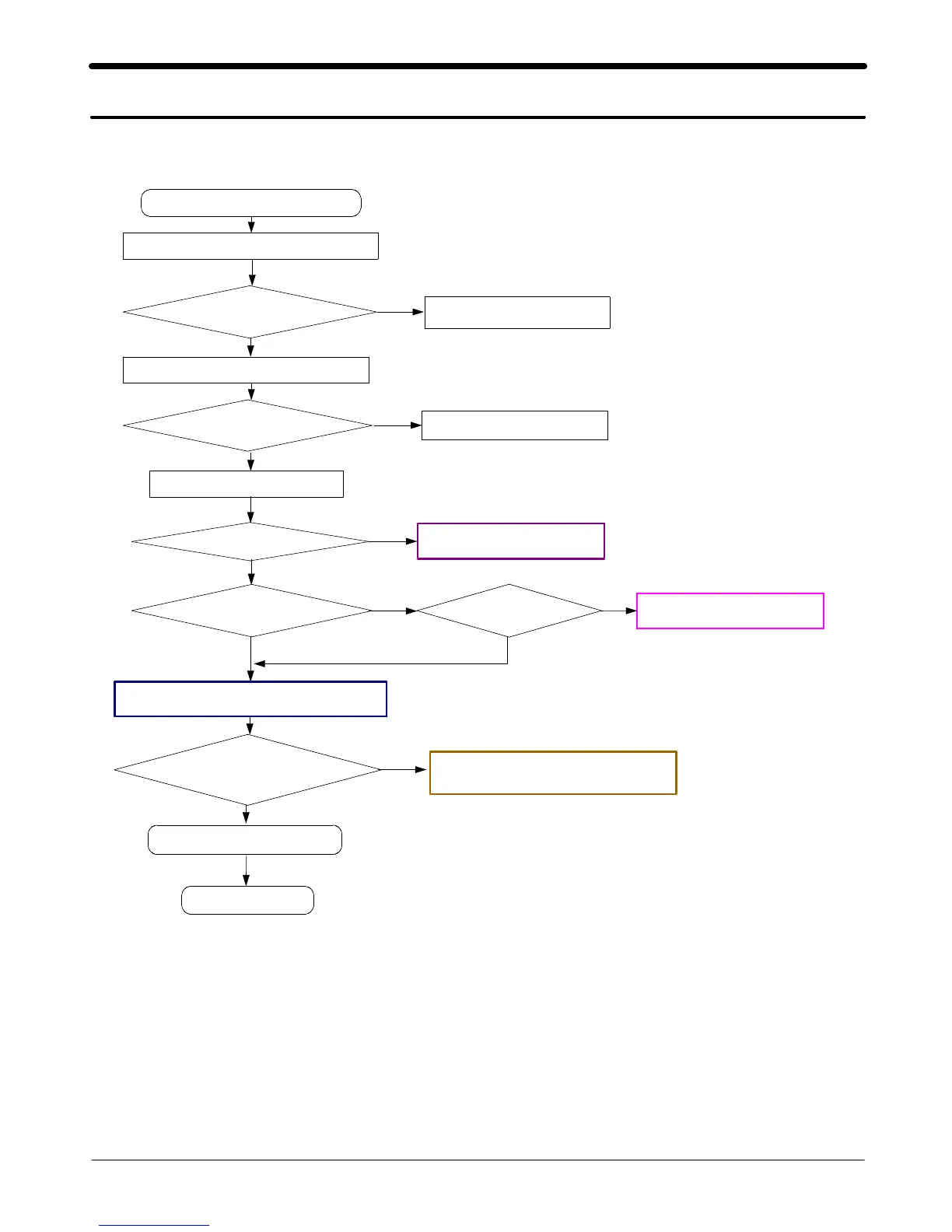
Power ON
'
Power On' does not work
Voltage
>=3.3V
Download again
Charge the Battery
Pin#D6
>= 2.9V
Check UCD3
00
and
C318
Pin#F3 and pin#E14
=2.9V
Check UCD300 and
C317
Freq
=26
MHz
Vrms
>=300
mV
Vpp
≒
900
mV
Check the clock generation circuit
(
relatedtoOSC
101)
Check the initial operation
END
No
Yes
Yes
Yes
Yes
Yes
No
No
No
No
pin#A6
=1.8V
No
Yes
Check the current consumption
Check the Vbat Voltage
Check the pin of UCD3
00
Check the clock signal at pin#21 of RFT100
Current consumption
>= 100
mA
Yes






 To Next Page