3Samsung Electronics
2. Operating Instructions & Installation
2-1 The Feature of Key in remote control
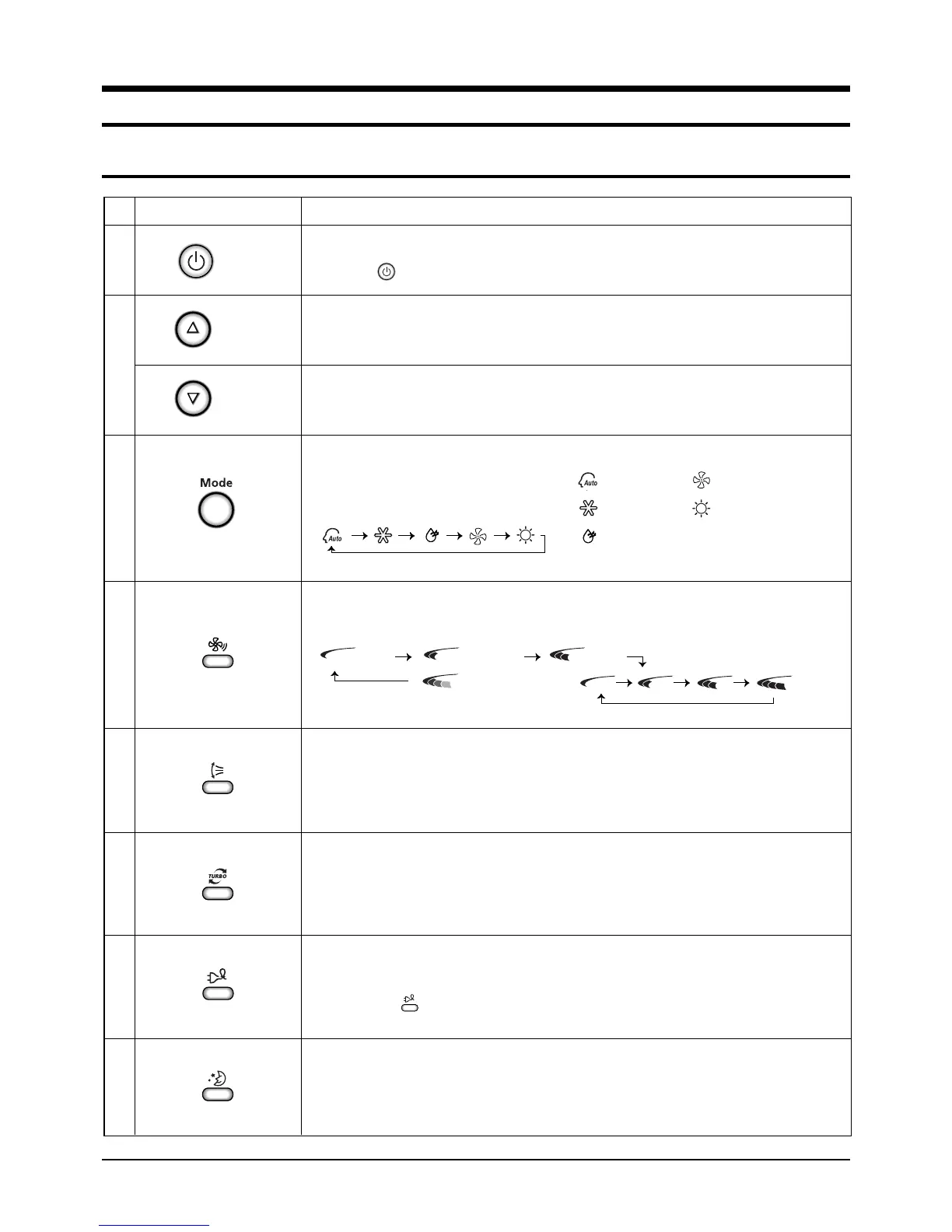
Fan speed adjustment button.
Each time you press this button, FAN SPEED is changed in the following order.
Temperature adjustment button(DOWN).
To decrease the temperature by the pressing the temperature button.
FUNCTION
On/Off button.
Press the button to stop or run the air conditioner.
BUTTONNo
1
2
3
4
5
6
7
8
Swing button.
It adjusts the airflow to upward and downward.
Temperature adjustment button(UP).
To increase the temperature by the pressing the temperature button.
(On/Off)
(UP)
(DOWN)
Low Medium High
Automatic(rotated : )
Sleep button.
The sleep timer can be used when you are cooling or heating your room to switch the
air conditioner off automatically after a period of 6 hours.
Turbo button.
The air conditioner cools or heats the room as quickly as possible.
After 30minutes, the air conditioner is reset automatically to the previous mode.
Mode selection button,
Each time you press this button,
Mode is changed in the following order.
: Auto Mode : Fan Mode
: Cool Mode : Heat Mode
: Dry Mode
Energy saving button.
If you wish to save energy when using your air conditioner, select the Energy saving
mode with the button.
DB98_21605A(1)_1 1/5/05 7:47 PM Page 3


 To Next Page