
 Need help?
Do you have a question about the Samsung SM-A235F/DSN and is the answer not in the manual?
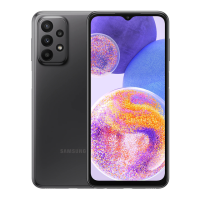
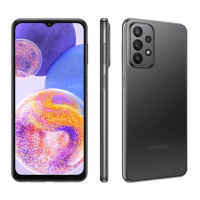
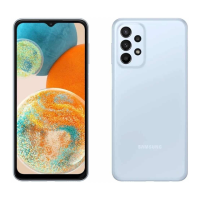
Identifies physical buttons, ports, and components of the device.
Explains the function of physical buttons and how to customize the side button.
Details on-screen navigation buttons and how to charge the device.
Guides on inserting and managing SIM and microSD cards.
Instructions for turning the device on/off and completing initial setup.
Overview of the device's apps and features chapter.
Steps to sign in, manage, and sign out of your Samsung account.
Explains basic touch gestures like tapping, dragging, and pinching.
Details navigation bar functions, hiding it, and customizing the home screen.
How to install, uninstall, and manage app permissions and settings.
Making calls, international calls, and sending/receiving messages.
Using split screen and pop-up view for multitasking.
Browsing the web, bookmarking, and using Secret Mode.
Setting up parental controls for Samsung Kids and using Samsung Health.
Creating notes with Samsung Notes and using Samsung Members for support.
Creating events in Calendar and setting up reminders for tasks.
Optimizing gaming performance and configuring the gaming environment.
Connecting smart devices and mirroring phone screen to TV.
Brief descriptions of common Google applications.
Taking photos, videos, and exploring various camera modes.
Browsing, viewing, and editing photos and videos.
Creating AR emojis and using AR features.
Recording voice memos and using the FM radio function.
Making payments and managing digital cards and tickets.
Sharing content via Quick Share and with contacts.
Taking screenshots and transferring data from an old device.
Overview of device settings and how to navigate them.
Managing Samsung account and configuring network connections like Wi-Fi/Bluetooth.
Using NFC for payments and managing mobile data usage.
Managing connected devices and configuring printer settings.
Setting up custom modes, routines, and adjusting sound/vibration.
Customizing display settings, refresh rate, and managing battery.
Customizing home/lock screens and managing security features.
Registering and using face or fingerprint for unlocking the device.
Protecting data with Secure Folder and managing Wi-Fi/passwords.
Managing location, emergency features, accounts, and Google services.
Enabling advanced features like motion gestures and dual apps.
Monitoring usage, optimizing device, and managing system settings.
Updating software, getting support, and viewing phone information.
Important warnings and guidelines for safe and proper device operation.
Identifies causes of device heating and provides solutions for safe operation.
Solutions for common device prompts like password, PIN, and network errors.
Resolving call connection issues and multimedia file playback errors.
Troubleshooting Bluetooth, computer connections, and device storage.
 General
| Model | SM-A235F/DSN |
|---|---|
| Technology | GSM / HSPA / LTE |
| Display Type | PLS LCD, 90Hz |
| Card slot | microSDXC (dedicated slot) |
| Features | LED flash, panorama, HDR |
| Video | 1080p@30fps |
| Selfie Camera | 8 MP, f/2.2, (wide) |
| Selfie Video | 1080p@30fps |
| Loudspeaker | Yes |
| 3.5mm jack | Yes |
| WLAN | Wi-Fi 802.11 a/b/g/n/ac, dual-band, Wi-Fi Direct |
| Bluetooth | 5.0, A2DP, LE |
| Positioning | GPS, GLONASS, GALILEO, BDS |
| NFC | Yes (market/region dependent) |
| USB | USB Type-C 2.0 |
| Battery | Li-Po 5000 mAh, non-removable |
| Status | Available. Released |
| 2G bands | GSM 850 / 900 / 1800 / 1900 - SIM 1 & SIM 2 |
| 3G bands | HSDPA 850 / 900 / 2100 |
| 4G bands | 1, 3, 5, 7, 8, 20, 28, 38, 40, 41 |
| 5G bands | No |
| Speed | HSPA, LTE |
| Build | Glass front, plastic back, plastic frame |
| SIM | Dual SIM (Nano-SIM, dual stand-by) |
| Protection | Corning Gorilla Glass 5 |
| Operating System | Android 12, upgradable to Android 13, One UI 5.1 |
| CPU | Octa-core |
| Internal | 64GB 4GB RAM, 128GB 4GB RAM, 128GB 6GB RAM |
| Main Camera | 50 MP, f/1.8, (wide), PDAF |
| Ultrawide Camera | 5 MP, f/2.2, 123˚ (ultrawide) |
| Macro Camera | 2 MP, f/2.4 |
| Depth Camera | 2 MP, f/2.4 |
| Selfie Features | HDR |
| Sensors | Fingerprint (side-mounted), accelerometer, gyro, compass |
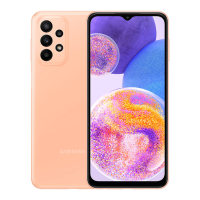
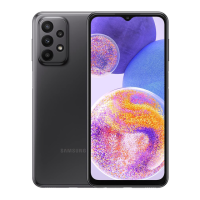
| Colors | Black, White, Blue |
| Models | SM-A235F, SM-A235F/DSN |


 To Next Page