
 Need help?
Do you have a question about the Samsung SP-LSP3BLA and is the answer not in the manual?
Explains safety symbols and precautions for using the projector safely.
Details regarding the projector being a Class 1 Laser product and associated safety precautions.
Guidance on ensuring adequate airflow around the projector for optimal performance and to prevent overheating.
Instructions on how to use the projector, including handling, battery disposal, and shutdown procedures.
Guidelines for cleaning the projector, avoiding liquids, and preventing scratches or damage.
Identifies and describes the various parts and features of the projector.
Instructions on how to enable or disable the microphone using the side switch.
Details the buttons and functions of the Samsung Smart Remote for controlling the projector.
Explains how to use the Voice Assistant feature with the remote control.
Describes how to use navigation buttons, volume, and playback controls on the remote.
Instructions for launching apps and pairing the remote control with the projector.
Warnings and precautions for handling the remote control to prevent injury or damage.
Explains how to access and use accessibility features via the remote control shortcuts.
How to activate and configure voice guides for visually impaired users.
Instructions on enabling captions for programs that support them.
How to zoom in on sign language content displayed on the screen.
Features to help users learn remote button positions and projector menu structures.
Options to turn off the screen for power saving and to output audio to multiple devices.
Settings to improve text readability by adjusting contrast and font size.
Options to change screen colors for better visibility or specific visual effects.
Adjusts the repeat speed of remote control buttons when held down.
Guides the user through the first-time setup process for basic settings.
Solutions for common issues like the projector not turning on or the remote not working.
Lists technical details such as model name, resolution, dimensions, and operating conditions.
Provides disclaimers, reference information, and notices about product changes.
Tips on how to reduce power usage by unplugging the device when not in use.
This document is a user manual for "The Freestyle" Samsung product, which appears to be a portable projector.
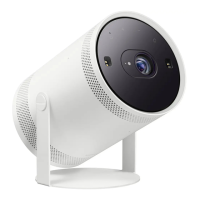
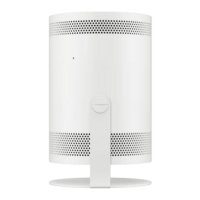
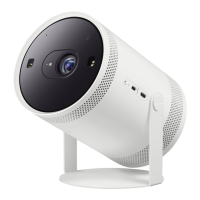
The Freestyle is a Samsung projector designed for versatile use. It features touch keys for basic control, including power, volume adjustment, and a mobile button for direct connection to the SmartThings app on a mobile device. The projector is equipped with a lens, a distance sensor, a remote control sensor/LED indicator, and ventilation. For audio, it includes a speaker. Connectivity options include a Micro HDMI Port and a USB Port for power. The device also has a MIC On/Off switch, indicating support for voice commands or audio input. It comes with a cradle, suggesting adjustable positioning.
The projector requires a USB cable connected to power or an external battery pack for operation. If using an external battery, it must support PD (Power Delivery) and have a single port output of 50 W or more.
The Samsung Smart Remote, included with the projector, offers comprehensive control. It features a power button, a MIC/LED for voice recognition and charging indication, a directional button for menu navigation, a select button, and a return button. It also has a Smart Hub button for accessing Media Home and Ambient Home, play/pause controls, volume adjustment, and channel change buttons. Dedicated launch app buttons are also present. The remote can be charged via a USB-C type port.
The projector supports various accessibility functions. Voice Guide Settings provide audible descriptions of menu options for the visually impaired, with configurable volume, speed, pitch, and background sound. Caption Settings allow for the display of captions in programs that support them. Sign Language Zoom Settings enable zooming into the sign language screen when available. Learn Remote helps users with visual impairments learn button positions on the remote by announcing button names when pressed. Learn Menu Screen describes the structure and features of menus on the projector screen. Additional accessibility features include Picture Off (to turn off the screen while maintaining sound), Multi-output Audio (to use the projector speaker and up to two Bluetooth devices simultaneously), High Contrast (for white text on a black background or opaque menus), Enlarge (to increase font size), Grayscale (to change the screen to black and white tones), and Color Inversion (to invert text and background colors). Remote Button Repeat Settings allow adjustment of the operation speed for continually pressed remote control buttons.
The projector is designed for ease of setup and use. Upon initial power-on, it guides the user through an Initial Setup process to configure basic settings. The remote control is paired by pointing it at the projector and holding specific buttons. The projector's internal operating system supports software updates to improve security and functionality, which can be set to automatic.
For optimal performance, proper ventilation is crucial. The projector should be installed with at least 4 inches (10 cm) clearance from other objects and at least 19 inches (50 cm) clearance around intake and exhaust vents when in an enclosed space.
The projector is a Class 1 Laser product, and users are cautioned against using controls or procedures other than those specified to avoid hazardous radiation exposure. It complies with FDA performance standards for laser products.
Internet security features are integrated, including encrypted communications, controls to prevent unauthorized application installation, and recommendations for users to secure their wireless access points and networks. Users are advised to install software updates promptly, use strong passwords for online accounts, and avoid suspicious websites or programs.
Maintenance instructions emphasize safety and care for the device. The projector should be handled by its body, not the lens cap. The lens cap should be used when the projector is not in use to protect the lens and distance sensor, as contamination can impair focus and keystone functions.
Cleaning the projector involves unplugging it and wiping it with a soft, dry cloth. Harsh chemicals, abrasives, or liquids should not be used directly on the device, as they can damage its appearance or cause electrical hazards. The exterior should be wiped carefully to prevent scratches.
Power-supply cords should be placed to prevent damage and ensure they are firmly seated in outlets. Metallic objects should not be inserted into the apparatus. Internal components should only be accessed by qualified technicians. In case of unusual sounds or smells, the device should be unplugged immediately and serviced. For protection against lightning or during prolonged disuse, the projector should be unplugged from the wall outlet and any antenna or cable systems disconnected. Accumulated dust can pose fire or electric shock risks.
The remote control requires careful handling to prevent damage or personal injury. It should not be subjected to shock, and foreign substances should be kept away from its charging terminal. If the remote is damaged or emits smoke/fumes, operation should cease, and it should be repaired. Disassembly is not advised, and it should be kept out of reach of infants or pets. Batteries used in the remote should be replaced with the same or equivalent type to avoid explosion risks. Proper disposal or recycling of batteries is encouraged according to local regulations.
To decrease power consumption, the projector should be unplugged when not in use for extended periods, as it draws a small amount of power even in standby mode.
 General
| Native aspect ratio | - |
|---|---|
| Projection technology | DLP |
| Contrast ratio (typical) | 100000:1 |
| Screen size compatibility | 30 - 100 \ |
| Projector native resolution | 1080p (1920x1080) |
| Noise level | 30 dB |
| Operating system installed | Tizen |
| High Dynamic Range (HDR) technology | High Dynamic Range 10 (HDR10) |
| Audio decoders | Dolby Digital Plus |
| RMS rated power | 5 W |
| Product type | Ultra short throw projector |
| Product color | Black, White |
| Market positioning | Portable |
| Light source type | LED |
| Service life of light source | 20000 h |
| Built-in display | No |
| Focus | Auto |
| Throw ratio | 1.2 |
| Power source | AC |
| AC input voltage | 100 - 240 V |
| AC input frequency | 50 - 60 Hz |
| Power consumption (max) | 50 W |
| Power consumption (standby) | 0.5 W |
| Power consumption (typical) | - W |
| USB 2.0 ports quantity | USB 2.0 ports have a data transmission speed of 480 Mbps, and are backwards compatible with USB 1.1 ports. You can connect all kinds of peripheral devices to them. |
| VGA (D-Sub) ports quantity | 0 |
| Wi-Fi standards | Wi-Fi 5 (802.11ac) |
| Bluetooth version | 5.2 |
| Cables included | USB |
 Weight and Dimensions
| Depth | 95.2 mm |
|---|---|
| Width | 104.2 mm |
| Height | 172.8 mm |
| Weight | 800 g |
| Package depth | 138 mm |
| Package width | 155 mm |
| Package height | 252 mm |
| Package weight | 1700 g |





 To Next Page