EasyManua.ls Logo

Samsung SR-S24FTA - Function and Usage of Refrigerator; 7-1. Panel Display; 7-2. Temperature-Control function

Samsung SR-S24FTA
134 pages
Print Icon
To Next Page IconTo Next Page
To Previous Page IconTo Previous Page
Loading...
oyigle(=1e-1celg
7.
Function
and
Usage
of
R
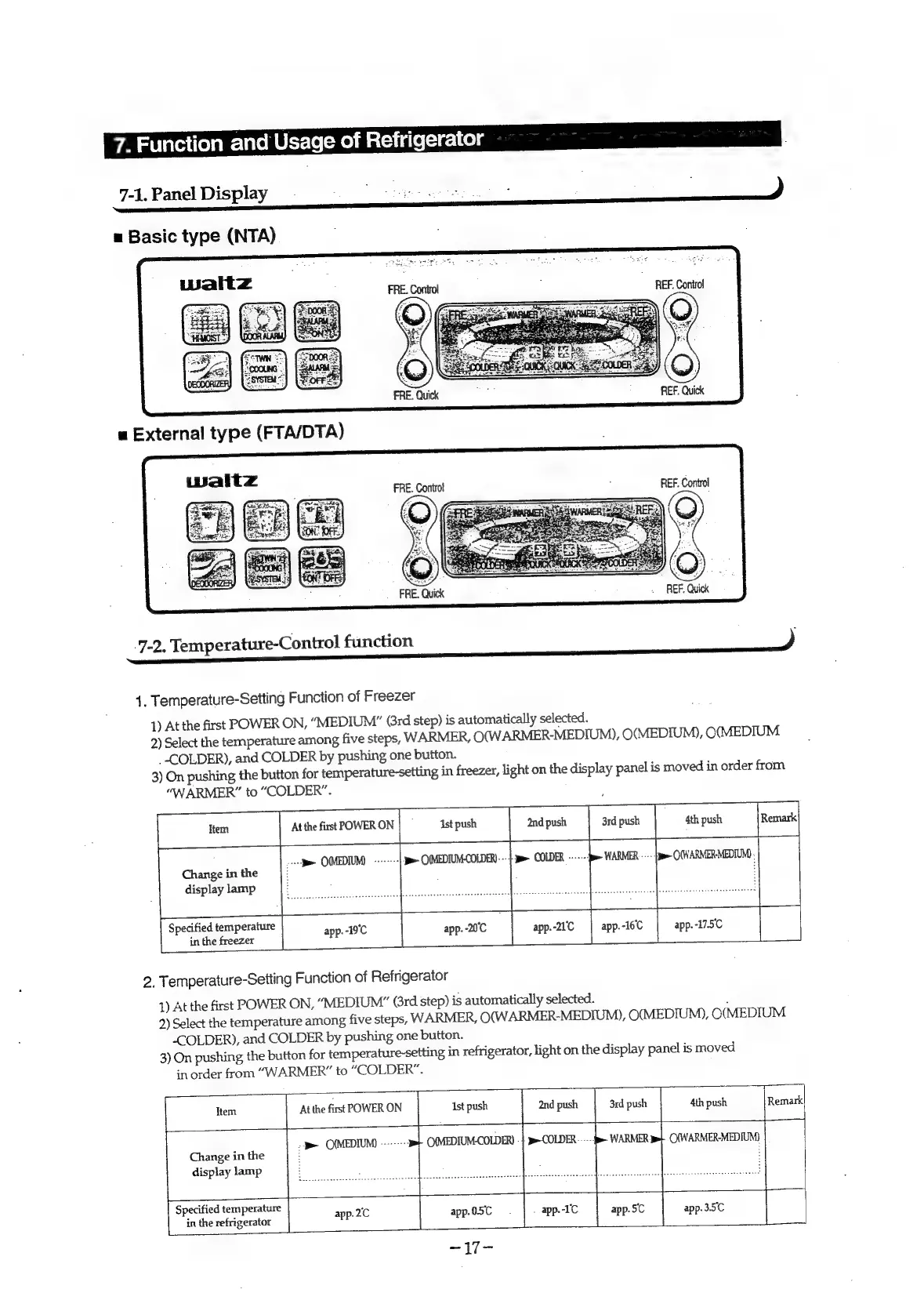
7-1.
Panel
Display
a
Basic
type
(NTA)
REF.
Control
REF.
Quick
REF.
Control
eo
oes
REF.
Quick
7-2.
Temperature-Control
function
)
1.
Temperature-Setting
Function
of
Freezer
1)
At
the
first
POWER
ON,
“MEDIUM”
(rd
step)
is
automatically
selected.
2)
Select
the
temperature
among
five
steps,
WARMER,
O(W
ARMER-MEDIUM),
O(MEDIUM),
O(MEDIUM
_
COLDER),
and
COLDER
by
pushing
one
button.
3)
On
pushing
the
button
for
temperature-setting
in
freezer,
light
on
the
display
panel
is
moved
in
order
from
“WARMER”
to
“COLDER”.
2nd
push
4th
push
.
>
OMEDIM
«-----
ye
OMEDIUM-COLDER)---}
pe
COLDER
------:
>
O(WARMER-MEDIUM)
Change
in
the
display
lamp
:
Specified
temperature
app.-21°C
app.-175C
in
the
freezer
2.
Temperature-Setting
Function
of
Refrigerator
1)
At
the
first
POWER
ON,
“MEDIUM”
Grd
step)
is
automatically
selected.
;
2)
Select
the
temperature
among
five
steps,
WARMER,
O(WARMER-MEDIUM),
O(MEDIUM),
O(MEDIUM
“<COLDER),
and
COLDER
by
pushing
one
button.
3)
On
pushing
the
button
for
temperature-setting
in
refrigerator,
light
on
the
display
panel
is
moved
in
order
from
“WARMER”
to
“COLDER”.
Item
At
the
first
POWER
ON
and
push
|
3rd
push
4th
push
bin
;
<>
O(MEDIUM)
-
C(MEDIUM-COLDER)
|}
j>-COLDER
WARMER
pe
O(WARMER-MEDIUM)
Change
in
the
i
display
lamp
|
:
Specified
temperature
.
,
:
in
the
refrigerator
|
ap-26
app.5C
app.
3.5'C