54
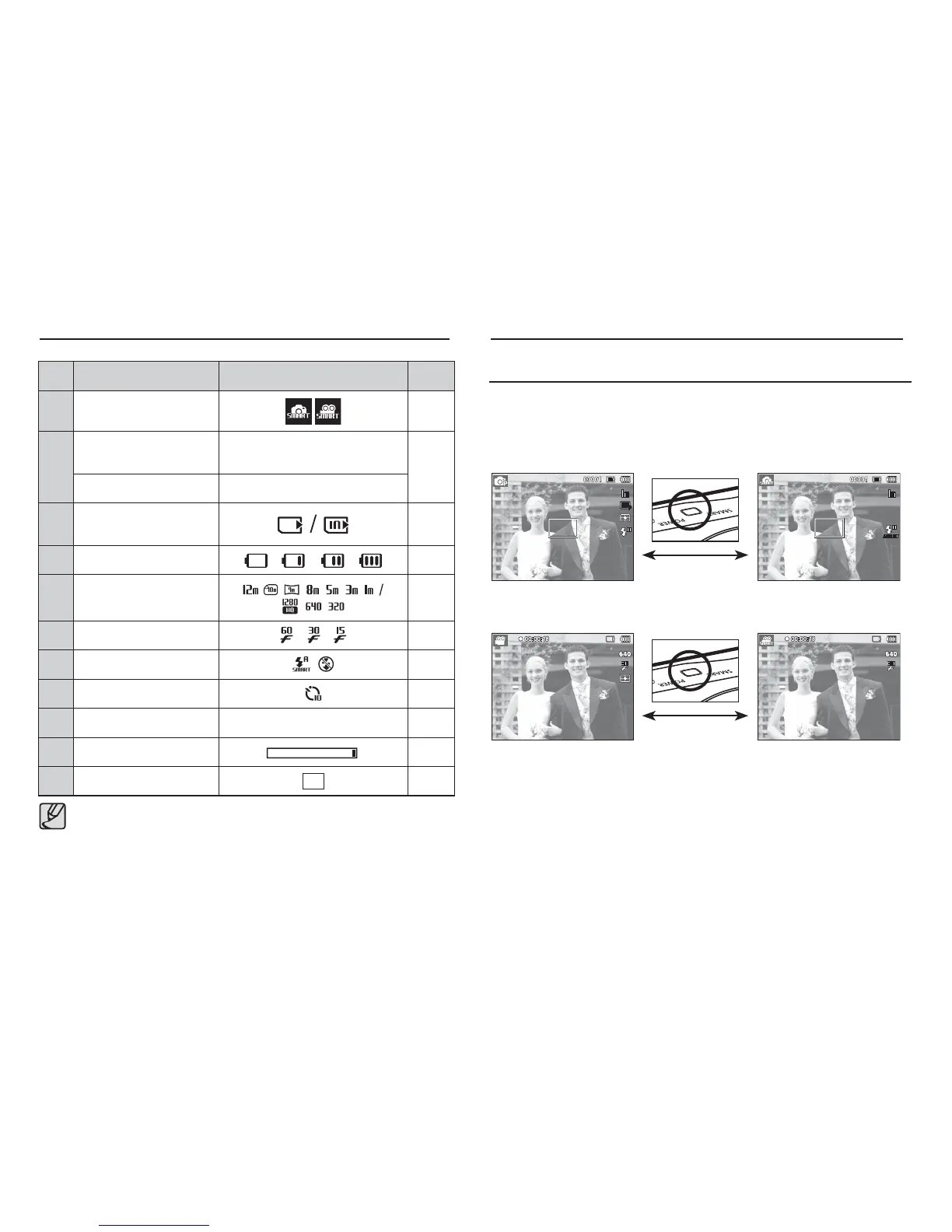
No. Description Icons Page
1 Recording mode
p.53
2
Number of available
shots remaining
00001
p.17
Remaining time 00:00:00
3
Memory card icon /
Internal memory icon
-
4 Battery
p.15
5 Photo Size / Movie Size
p.38
6 Frame rate
p.38
7 Flash
p.34
8 Self-timer
p.35
9 Date / Time 2010/01/01 01:00 PM p.60
10 Optical Zoom bar
p.29
11
Auto Focus Frame
p.45
Smart mode display
Mode selection using the Smart button
You can use the Smart button at the top of your camera to select the
correct smart mode.
Selecting modes
Starting Smart mode
[Frame Rate] is enabled only in [Smart Movie] mode.
[Program mode]
[Smart Auto mode]
[Movie Clip mode] [Smart Movie Clip mode]



 To Next Page