Display
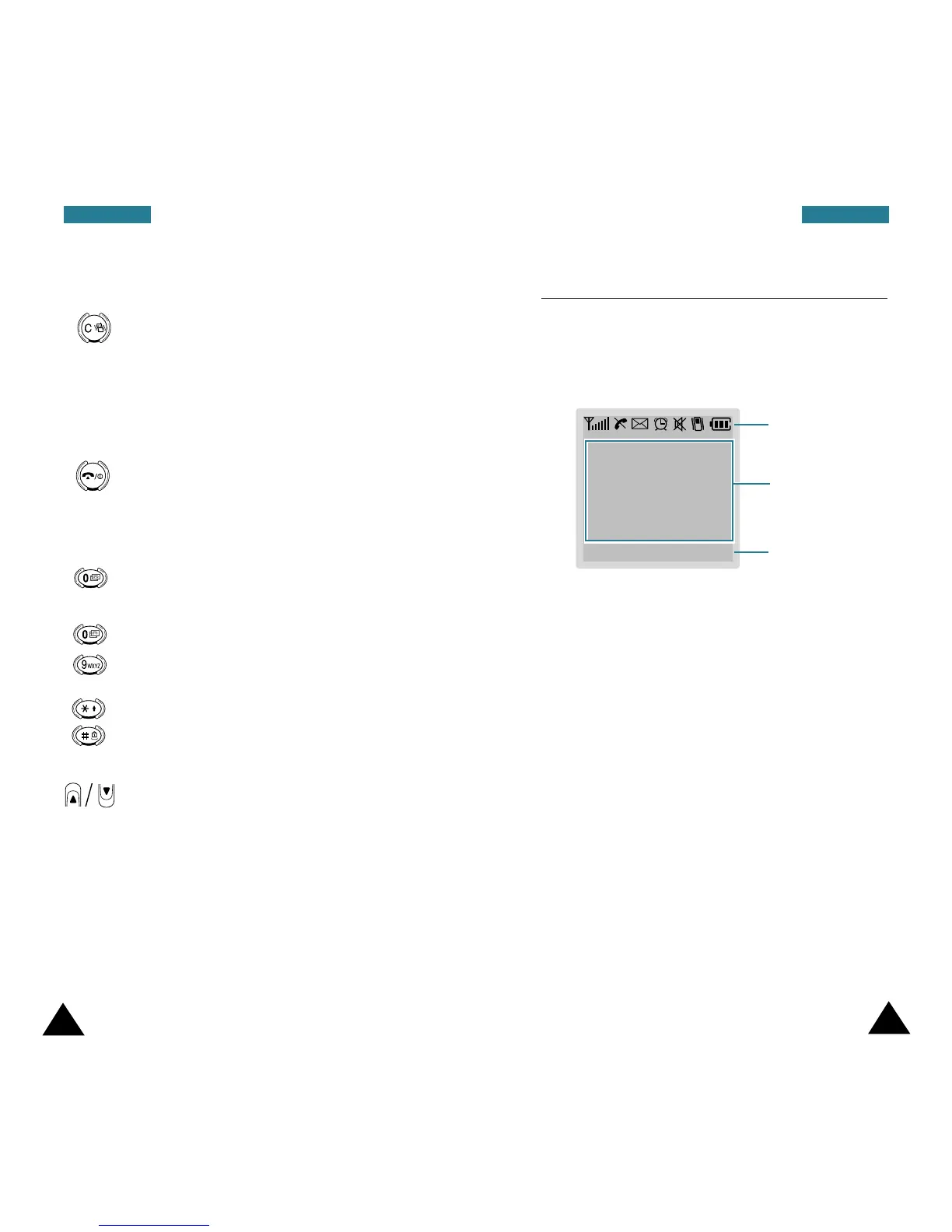
Display Layout
The display comprises three areas.
Area Description
First line Displays various icons (see page 12).
Middle lines Display messages, instructions and
any information that you enter,
number to be dialed, for example.
Last line Shows the functions currently
assigned to the two soft keys.
11
10
YYoouurr PPhhoonnee YYoouurr PPhhoonnee
Key Description (continued...)
Deletes characters from the display.
In menu mode, returns to the previous
menu level.
In idle mode, quickly enters or exits Silent
mode when held down for more than two
seconds.
Ends a call. Also switches the phone on
and off when held down.
In menu mode, cancels your input and
returns to idle mode.
In idle mode, allows you to access to your
voice mail box when held down.
Enter numbers, letters and some special
characters.
Enter special dial characters. Also use
these keys for various purposes in
different functions.
(on the side of the phone)
During a call, adjust the earpiece volume.
In idle mode with the folder open, adjust
the key volume.
In menu mode, scroll through the menu
options or Phonebook memory.
~
Icons
Text and
graphic area
Soft key
indications
MMeennuu NNaammeess







 To Next Page