EasyManua.ls Logo

Samsung SW70SP - User Manual

Samsung SW70SP
24 pages
Print Icon
To Next Page IconTo Next Page
Loading...
imagine the possibilities
Thank you for purchasing a Samsung
product.
To receive a more complete service,
please register your product at
www.samsung.com/register
SW80SP
SW70SP
SW80SPW-02817A-02_EN.indd 1 2010-10-08 ¿ÀÈÄ 2:25:57
COUNTRY CALL OR VISIT US ONLINE AT
AUSTRALIA 1300 362 603 www.samsung.com
Code No. DC68-02817A-02_EN
Washing Machine
user manual
This model is part of a Product Safety Recall.
Please contact our Product Safety Team on 1800 239 655
if you own one.

Questions and Answers

Summary

Features

Safety Information

Important Safety Symbols and Precautions

Explains the meaning of icons and signs used in the manual for safety.

Setting Up Your Washer

Description of Parts

Identifies and labels the various components of the washing machine.

How to Wash Automatically Depends on the Laundry

Control Panel

Start;Pause Button

Function to pause and restart programs, or change procedure during operation.

Power Button

Turns the washing machine on or off.

Program Selection Button

Cycles through available washing programs.

Wash Button

Performs a wash cycle or adjusts the wash time.

Spin Button

Performs a spin cycle or adjusts the spin time.

Rinse Button

Performs a rinse cycle or adjusts the amount of rinse cycles.

Filter Check

Indicator for filter status and instruction to check and clean the Magic filter.

Child-Lock Function

Activates/deactivates the child lock to prevent accidental operation.

Remaining Time, Delay Start Time, Error Display

Shows remaining wash time, delay start time, and error messages.

Advanced Functions

Child Lock

Protects children, the elderly, and the frail from accidental operation or injury.

Manual Functions

Installation & Maintenance

Environment

Recommendations for washer placement regarding space, surface, moisture, and heat.

Levelling

Instructions on how to ensure the washer is properly leveled for stable operation.

Connecting the water supply hose

Guidance on connecting the water supply hose, including tap fitting types.

Connecting the Water Supply Hose

Step-by-Step Connection Guide

Detailed instructions for connecting the water supply hose to the tap and washer.

Pump Filter and Electrical Safety

Electrical Safety Precautions

Essential precautions to prevent electrical leakage and shock, focusing on earthing.

Troubleshooting Common Issues

Washing machine wont work

Checks for power, tap, and drain issues when the machine fails to operate.

Water dose not drain

Checks for drain hose position, freezing, or clogging.

Water is not supplied

Checks for tap, hose, or water pressure issues when no water enters the machine.

Spinning does not work

Checks for even laundry spread and washer levelling.

Water is overflowed

Procedure to restart after spinning or call for agency assistance.

Child Lock Error

Explanation of 'CL' or 'dE' error messages related to the child lock function.

Detailed Troubleshooting

Specifications

Summary

Features

Safety Information

Important Safety Symbols and Precautions

Explains the meaning of icons and signs used in the manual for safety.

Setting Up Your Washer

Description of Parts

Identifies and labels the various components of the washing machine.

How to Wash Automatically Depends on the Laundry

Control Panel

Start;Pause Button

Function to pause and restart programs, or change procedure during operation.

Power Button

Turns the washing machine on or off.

Program Selection Button

Cycles through available washing programs.

Wash Button

Performs a wash cycle or adjusts the wash time.

Spin Button

Performs a spin cycle or adjusts the spin time.

Rinse Button

Performs a rinse cycle or adjusts the amount of rinse cycles.

Filter Check

Indicator for filter status and instruction to check and clean the Magic filter.

Child-Lock Function

Activates/deactivates the child lock to prevent accidental operation.

Remaining Time, Delay Start Time, Error Display

Shows remaining wash time, delay start time, and error messages.

Advanced Functions

Child Lock

Protects children, the elderly, and the frail from accidental operation or injury.

Manual Functions

Installation & Maintenance

Environment

Recommendations for washer placement regarding space, surface, moisture, and heat.

Levelling

Instructions on how to ensure the washer is properly leveled for stable operation.

Connecting the water supply hose

Guidance on connecting the water supply hose, including tap fitting types.

Connecting the Water Supply Hose

Step-by-Step Connection Guide

Detailed instructions for connecting the water supply hose to the tap and washer.

Pump Filter and Electrical Safety

Electrical Safety Precautions

Essential precautions to prevent electrical leakage and shock, focusing on earthing.

Troubleshooting Common Issues

Washing machine wont work

Checks for power, tap, and drain issues when the machine fails to operate.

Water dose not drain

Checks for drain hose position, freezing, or clogging.

Water is not supplied

Checks for tap, hose, or water pressure issues when no water enters the machine.

Spinning does not work

Checks for even laundry spread and washer levelling.

Water is overflowed

Procedure to restart after spinning or call for agency assistance.

Child Lock Error

Explanation of 'CL' or 'dE' error messages related to the child lock function.

Detailed Troubleshooting

Specifications

Overview

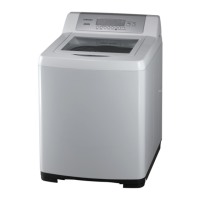
This document is a user manual for the Samsung SW80SP and SW70SP Washing Machines.

Function Description

The Samsung SW80SP and SW70SP are top-loading washing machines designed for household laundry. They feature Fuzzy Control, which automatically senses the washload and selects the optimal washing program, including appropriate water level, washing time, rinsing cycles, and spinning time. The machines offer various washing programs such as Fuzzy, Quick, Super Clean, Water Saving, Clean Tub, Wool, Blanket, and Delicate. Users can also perform manual functions like Wash Only, Rinse Only, Spin Only, Wash and Rinse, Rinse and Spin, and Wash, Rinse and Spin. A Delay Start function allows users to set a delayed end time for the wash cycle (3 to 18 hours), and a Memory function enables saving frequently used programs. The Child-Lock function is a safety feature to prevent accidental operation by children.

Important Technical Specifications

SW80SP Model:

  • Max. Mass of Dry Cloth: 8.0 kg
  • Power Consumption: Wash (510 W), Spin (300 W)
  • Dimensions (W x D x H): 601 x 665 x 1058 mm (High Base), 601 x 665 x 1033 mm (Low Base)
  • Weight: 44 kg
  • Water Pressure: 0.05~0.78 MPa (0.5~8.0 kgf/cm²)
  • Water Usage: Maximum (80 l), Mid (57 l), Mid Low (41 l), Extra Low (30 l)
  • Washing Type: Stirring Type
  • Spin Speed: 680 rpm

SW70SP Model:

  • Max. Mass of Dry Cloth: 7.0 kg
  • Power Consumption: Wash (510 W), Spin (300 W)
  • Dimensions (W x D x H): 601 x 665 x 1058 mm (High Base), 601 x 665 x 1033 mm (Low Base)
  • Weight: 44 kg
  • Water Pressure: 0.05~0.78 MPa (0.5~8.0 kgf/cm²)
  • Water Usage: Maximum (80 l), Mid (51 l), Extra Low (30 l)
  • Washing Type: Stirring Type
  • Spin Speed: 680 rpm

Usage Features

  • Water Saving Course: Certified by WELS (Water Efficiency Labelling and Standards) in Australia, this course uses less water per wash while maintaining cleaning effectiveness.
  • Mist Shower: A fine mist of water spray helps dissolve detergents more effectively, reducing residue and water consumption.
  • Diamond Drum: The diamond-shaped drum creates high water pressure for effective dirt removal and minimizes fabric damage, extending garment lifetime.
  • Double Storm Pulsator: Designed to create multi-dimensional water currents, this pulsator helps prevent clothes from tangling and enhances washing performance.
  • Detergent and Softener Dispensing: Detergent is added to a dedicated box, and softener is automatically dispensed during the last rinse cycle.
  • Control Panel: Features buttons for Power, Start/Pause, Program Selection, Wash, Spin, Rinse, Mist Shower (option), Delay Start, Memory (option), Soak, Water Level (option), and Water Supply. An LED display shows remaining time, delayed start time, and error messages.
  • Child-Lock Function: Activates by pressing Rinse and Spin buttons simultaneously for 3 seconds. It prevents accidental operation and drains water automatically if the lid is opened while active to prevent drowning.
  • Overload Protection: The machine stops automatically if the lid is opened during operation (except during water supply).
  • Hot Water Protection: When hot water is selected, both cold and hot water are supplied for the first 20 seconds to protect clothes.
  • Soak Function: Allows for a soak wash (15 to 30 minutes) for heavily soiled items, not available for Delicate or Wool programs.
  • Water Level Adjustment: Automatically adjusted by Fuzzy Control, but can be manually selected.
  • Water Supply Options: Users can select Cold, Cold & Hot, or Hot water supply.

Maintenance Features

  • Magic Filter: This unique filter captures lint during washing, ensuring high-quality filtering results. The manual recommends cleaning the filter after every wash.
  • Pump Filter: The pump filter should be cleaned regularly to remove dirt. Instructions are provided for removal, cleaning, and reinstallation.
  • Water Supply Connector Filter: This filter should be pulled out, washed, and reconnected tightly to prevent blockages and leaks.
  • Tub Cleaning: The "Clean Tub" program is available to keep the washing tub clean and hygienic.
  • Hose Maintenance: Water inlet hoses should be checked periodically for bulges, kinks, cuts, wear, and leaks, and replaced every five years. New hoses should always be used for installation.
  • Levelling: Adjustable legs allow for proper levelling of the machine, which is crucial to prevent noise and vibration.
  • Grounding: The machine requires proper earthing to prevent electricity leakage and electric shock. Instructions are provided for connecting the grounding wire to an earthed outlet or directly to the earth.
  • Error Display: The machine displays error codes (e.g., "5E" for drain issues, "4E" for water supply issues, "UE" for uneven laundry, "CL" or "dE" for Child Lock issues) to assist in troubleshooting.


Samsung SW70SP Specifications

General IconGeneral
BrandSamsung
ModelSW70SP
CategoryWasher
LanguageEnglish

Related product manuals