On-Screen Display
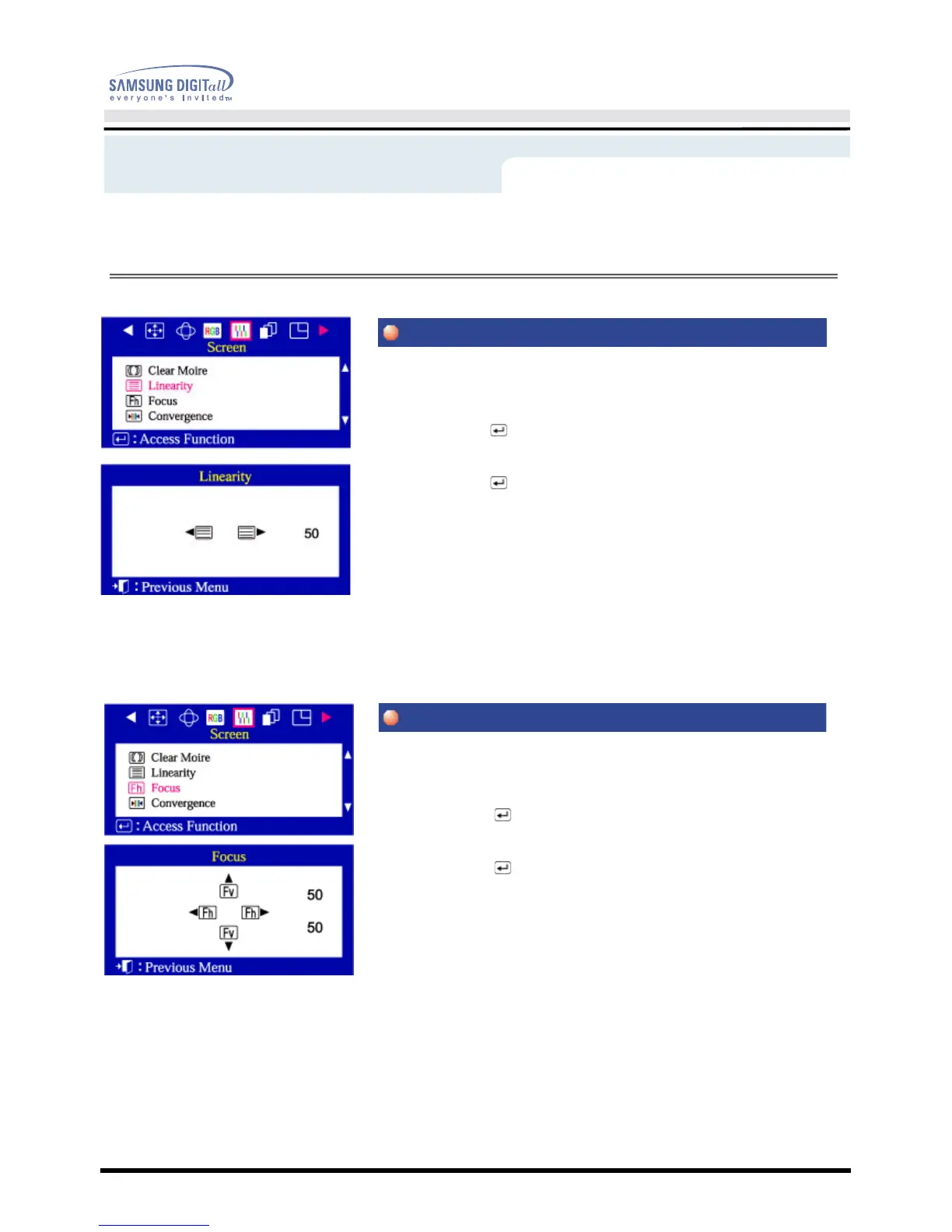
Adjust the linearity setting when the display image is compressed at the left,right
or top,bottom.
1 Push the Menu( ) button.
2 Push the
◀
button or
▶
button until the Screen OSD is displayed.
Push the
▲
button or
▼
button to select Linearity.
3 Push the Menu( ) button to open the Linearity adjustment screen.
4 Use the
◀
button or
▶
button to adjust the vertical Linearity.
Use the focus control when the image displayed on the screen is not sharp in all
areas.
1 Push the Menu ( ) button.
2 Push the
◀
button or
▶
button until the Screen OSD is displayed.
Push the
▲
button or
▼
button to select Focus.
3 Push the Menu ( ) button to open the Focus adjustment screen.
4 Use the
◀
button or
▶
button to adjust the focus along the left and right
areas of the screen.
Use the
▲
button or
▼
button to adjust the center area of the screen.
Menu
How to adjust








 To Next Page