• Time Period : 1 ~ 5 seconds ( Recommend : 5 )
Apply the Screen Pixel function on Product
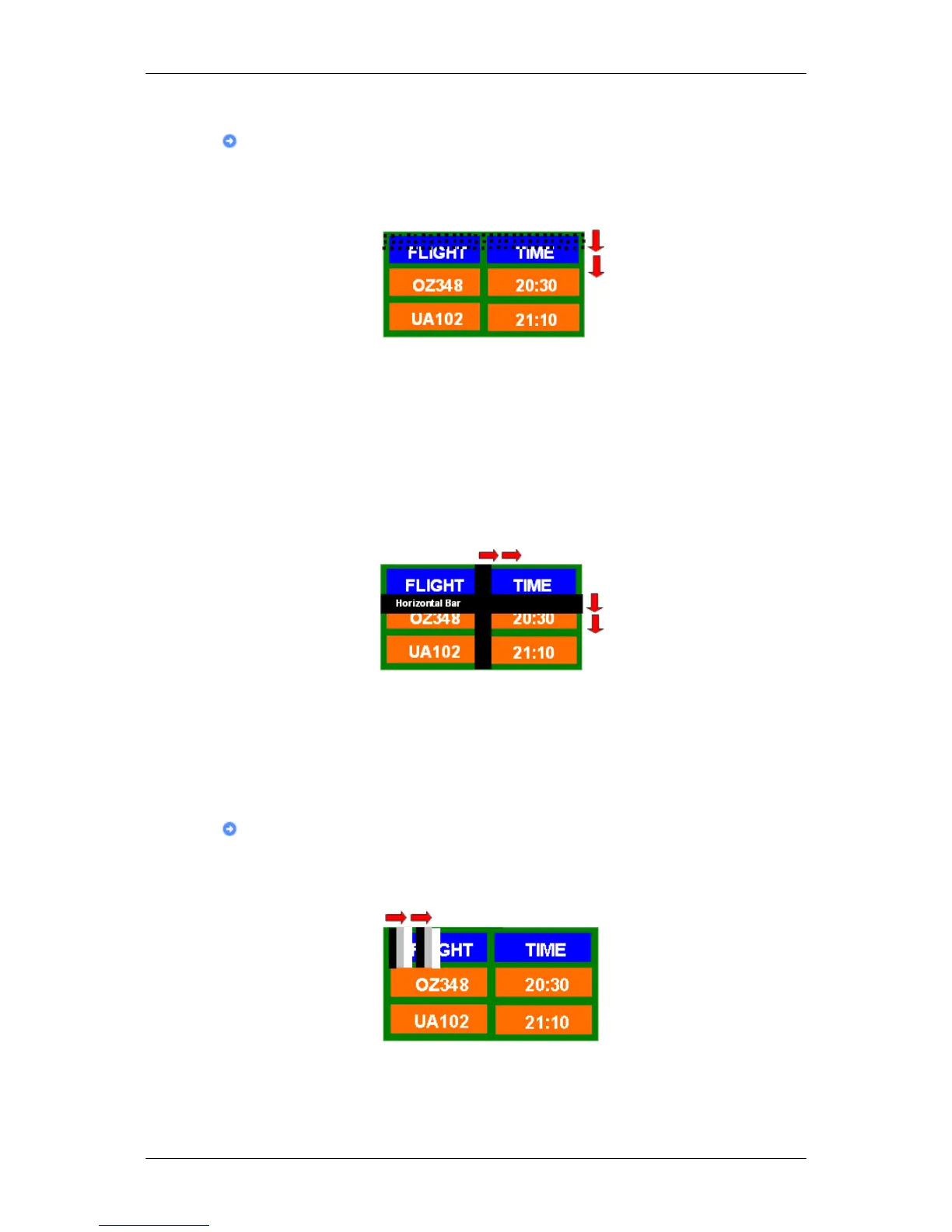
• Apply the Screen Pixel function
- Symptom: Dot with Black Color move up and down.
- Select method
• Instruction Guide : OSD Menu -> Set Up -> Safety Screen -> Pixel
•
Time Interval : 1 ~ 10 hours ( Recommend : 1 )
• Time Period : 10 ~ 50 seconds ( Recommend : 50 )
• Apply the Screen Bar function
- Symptom: Horizontal / Vertical Bar with Black Color move up and down.
- Select method
• Instruction Guide : OSD Menu -> Set Up -> Safety Screen -> Bar
•
Time Interval : 1 ~ 10 hours ( Recommend : 1 )
• Time Period : 10 ~ 50 seconds ( Recommend : 50 )
Apply the Screen Erasing function on Product
• Apply the Screen Erasing function
- Symptom: 2 Vertical blocks move while erasing the display
- Select method
•
Instruction Guide : OSD Menu -> Set Up -> Safety Screen -> Eraser
Information








 To Next Page