Using the Product 3-2
3-2 Remote Control
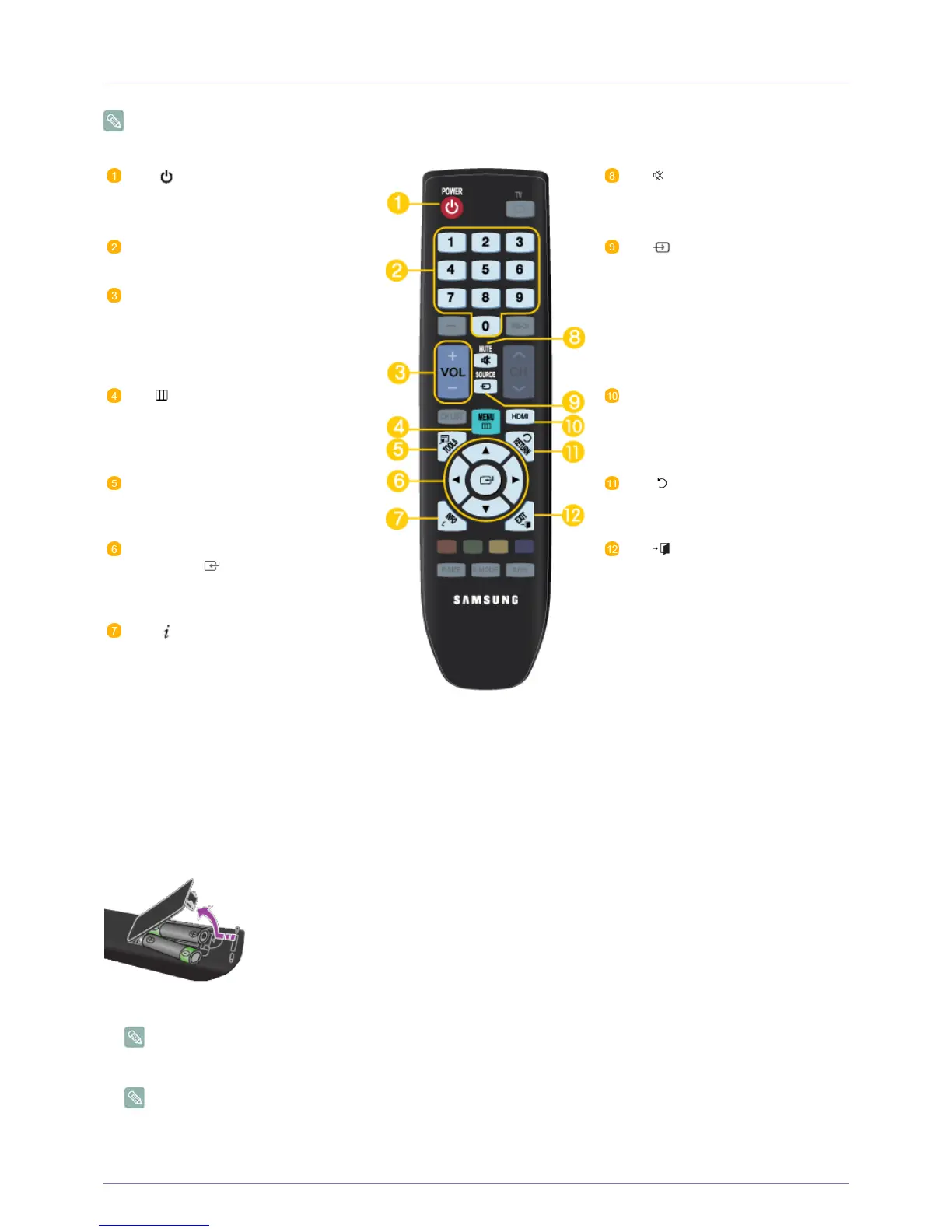
You can use the remote control up to a distance of about 23 feet from the product.The performance of the remote control
may be affected by bright light.
Installing Batteries in the Remote Control
1. Lift the cover at the back of the remote control upward as shown in the figure.
2. Install two AAA size batteries.
Make sure to match the +and - ends of the batteries with the diagram inside the compartment.
3. Close the cover.
Remove the batteries and store them in a cool, dry place if you won't be using the remote control for a long time.
If the remote control doesn't work, check the following :
• Is the product power on?
POWER
Turns the product On/Off.
MUTE
Press to temporarily cut off the
sound.
Number Buttons
Press to change the channel.
SOURCE
Press the button to change the
input signal SOURCE.
Changing the SOURCE is only
allowed for external devices that
are connected to the monitor at
the time.
+ VOL -
Press to increase or decrease the
volume.
MENU
Opens the on-screen menu and
exits from the menu or closes the
adjustment menu.
HDMI
Selects the HDMI mode directly.
TOOLS
Use to quickly select frequently
used functions.
RETURN
Returns to the previous menu.
UP▲/DOWN▼/LEFT◄/RIGHT►/
ENTER : Use to select on-
screen menu items and change
menu values.
EXIT
Exits from the menu screen.
INFO
Current picture information is dis-
played on the upper left corner of
the screen.




 To Next Page