EasyManua.ls Logo

Samsung TW-J5500/ZA - User Manual

Samsung TW-J5500/ZA
22 pages
Print Icon
To Next Page IconTo Next Page
Loading...
Wireless Audio - SoundTower
User manual
TW-J5500
Imagine the possibilities
Thank you for purchasing this Samsung product.
To receive more complete service, please register your product at
www.samsung.com/register
'This Nanum Gothic Eco font is provided by NAVER'
Question and Answer IconNeed help?

Do you have a question about the Samsung TW-J5500/ZA and is the answer not in the manual?

Overview

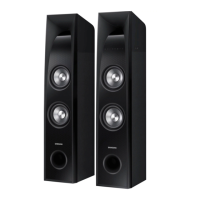
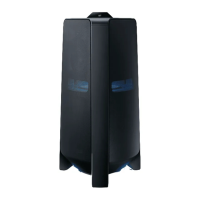
The Samsung TW-J5500 Wireless Audio - SoundTower is a home audio system designed to deliver high-quality stereo sound with various connectivity and playback options.

Function Description:

The SoundTower offers multiple input modes and features for versatile audio enjoyment:

  • TV SoundConnect: This feature allows users to listen to audio from a Samsung TV on the SoundTower via a Bluetooth connection. It also enables control of the sound from the TV.
  • Special Sound Modes: Users can select from different sound modes including MUSIC, VOICE, SPORTS, CINEMA, and STANDARD (OFF) to optimize audio for various content types.
  • Multi-function Remote Control: The system comes with a remote control for convenient operation of its various functions.
  • Bluetooth Function: It supports Bluetooth connectivity, enabling wireless streaming of music from compatible devices with high-quality stereo sound.
  • DRC Function (Dynamic Range Control): This feature balances the range between the loudest and quietest sounds, which is particularly useful for enjoying Dolby Digital sound at low volumes, such as at night.
  • USB Playback: The SoundTower can play audio files (MP3/WMA format) from external USB storage devices like flash drives or HDDs connected to its USB 1 or USB 2 ports.
  • Recording Function: Users can record audio from radio broadcasts, USB devices, or external sources directly to a USB storage device connected to the USB 2 REC port. Recorded files are saved in MP3 format.
  • FM Radio: The system includes an FM tuner, allowing users to listen to and store up to 15 FM stations. It supports both manual and preset tuning modes, as well as stereo and mono broadcasts.
  • AUX Inputs: Two analog auxiliary inputs (AUX IN 1 and AUX IN 2) are available for connecting external analog audio components like MP3 players or receivers.
  • Digital Audio Input (Optical): A digital optical input (D.IN) allows connection to external digital audio sources like TVs or other source devices.
  • Power Link Function: When connected to a TV via a digital optical cable, this function allows the SoundTower to automatically turn on or off with the TV.
  • Audio Sync Function: This feature helps to synchronize video and audio when the SoundTower is connected to a digital TV, allowing adjustment of audio delay time between 0 ms and 300 ms.
  • Software Upgrade: The firmware can be upgraded via a USB drive, allowing for future enhancements and bug fixes.

Important Technical Specifications:

  • Model Name: TW-J5500
  • USB: 5 V/0.5 A
  • Weight:
    • Main unit: 31.97 lbs
    • Speaker: 29.1 lbs
  • Dimensions (W x H x D):
    • Main unit: 7.95 x 38.6 × 11.6 inches
    • Speaker: 7.95 x 38.6 × 11.1 inches
  • Operating Temperature Range: +41°F to +95°F (+5°C to +35°C)
  • Operating Humidity Range: 10% to 75%
  • Rated Output Power (Amplifier):
    • Front Speak: 75 W (THD = 10%, 2 kHz)
    • Subwoofer: 100 W (THD = 10%, 100 Hz)
  • S/N Ratio (Analog Input): 65 dB
  • Separation (1kHz): 50 dB
  • Supported USB File Formats: MP3 (MPEG 1 Layer3, MPEG 2 Layer3, MPEG 2.5 Layer3) and WMA (Wave_Format_MSAudio1, Wave_Format_MSAudio2).
    • MP3 Bit Rates: 80Kbps ~ 320Kbps
    • WMA Bit Rates: 56Kbps ~ 128Kbps
  • Bluetooth Operational Range: Recommended pairing range within 19.75 inches (50cm) for TV SoundConnect, and within 16.25 ft (5m) for general Bluetooth connection.

Usage Features:

  • Placement: The speakers should be placed on the floor on either side of the TV, facing inwards at about 45° towards the listening position, with tweeters at ear height. The listening position should be 2.5 to 3 times the TV screen size away from the TV.
  • Auto Power Off: The unit automatically turns off after 25 minutes of inactivity (no buttons pushed, no audio signal) in D.IN/USB 1/USB 2/BLUETOOTH/TV SOUNDCONNECT modes. In AUX mode, it turns off after 8 hours of inactivity. This auto shut-off function can be toggled ON/OFF in AUX mode.
  • USB Device Compatibility: Supports external HDDs formatted in FAT file system (NTFS not supported for playback or recording). Only removable HDDs less than 160GB are supported. Files with DRM are not supported.
  • Bluetooth Pairing: Only one Bluetooth device can be paired at a time. The connection is terminated when the product is turned off and not automatically restored. PIN code for pairing is 0000.
  • Remote Control Battery: Uses a 3V lithium battery (CR2032).
  • Mute Function: The Function button on the front panel can be configured as a MUTE button by pressing and holding it for more than 3 seconds.
  • DRC On/Off: Press and hold the SOUND EFFECT button on the remote for 5 seconds to select ON-DRC or OFF-DRC.

Maintenance Features:

  • Cleaning: Clean the unit only with a dry cloth.
  • Power Cord Protection: Protect the power cord from being walked on or pinched.
  • Ventilation: Ensure ventilation slots are not blocked and maintain 2.75~4 inches (7~10cm) of space around the unit.
  • Battery Replacement: Replace remote control batteries with the same or equivalent type.
  • Troubleshooting: A dedicated troubleshooting section in the manual provides solutions for common issues like power problems, sound output, remote control malfunction, TV SoundConnect pairing failures, and radio reception.
  • Service: Refer all servicing to qualified service personnel. Do not attempt to remove covers or service internal parts. The power plug should be easily accessible to completely turn off the apparatus.
  • Environmental Disposal: Batteries and unwanted electronics should be disposed of through approved recyclers. Do not dispose of batteries in general household trash or fire.
  • Ferrite Core: Attaching a toroidal ferrite core to the power cable can help prevent RF interference from radio signals.

Samsung TW-J5500/ZA Specifications

General IconGeneral
BrandSamsung
ModelTW-J5500/ZA
CategorySpeaker System
LanguageEnglish

Related product manuals