4
English
Getting Started
Accessories
✎
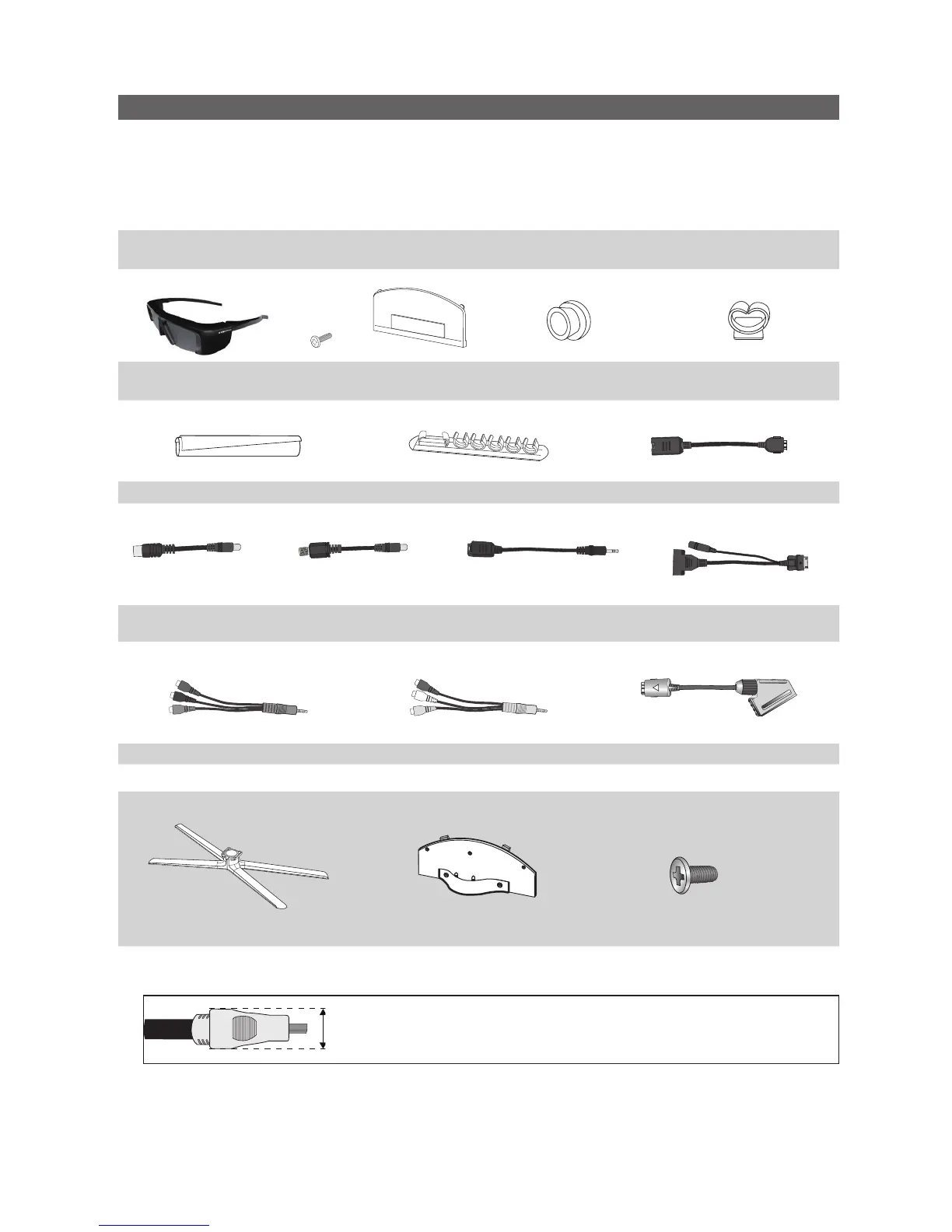
Please make sure the following items are included with your LED TV. If any items are missing, contact your dealer.
✎
The items’ colours and shapes may vary depending on the models.
✎
Cables not included in the package contents can be purchased separately.
CAUTION: INSERT SECURELY LEST SHOULD BE DETACHED IN SET
y Remote Control & Batteries (AAA x 2)
y Warranty Card / Safety Guide (Not available in some locations)
y Cleaning Cloth
y Owner’s Instructions
y Samsung 3D Active
Glasses
y Blanking Bracket &
Screw (X1)
y Holder-Ring (4EA) y Holder-Wire stand
y Cable Tie y Holder-Wire (3EA) y LAN Adapter
y Antenna Adapter
(Air / Cable)
y Antenna Adapter
(Satellite)
y Optical Adapter y PC Adapter
y Component Adapter y AV Adapter y SCART Adapter (2EA)
See separate guide for installing the stand.
s
s
s
s
s
M4 X L8
y Stand (1EA) y Guide Stand (1EA) y Screws (9EA)
✎
For best cable connection to this product, be sure to use cables with a maximum thickness as below:
y Maximum thickness - 0.55 inches (14mm)
(M4 X L8)
[UC8700_ZG]BN68-02849K-01L02.indb 4 2010-08-13 오후 2:17:33




 To Next Page