SKU
SAM1913
Black 1
SAM1914
White 1
Adhesive (If necessary)
Pre-Cut 1
Roll Adhesive (If necessary)
Cut as needed 1
Required Tools
(From Kit):
Phillips #00 Screwdriver
Tweezers
Plastic Spudger
Plastic Opening Pick
Personal Protective Equipment (Safety Glasses and Gloves)
Display / Assembly Replacement
Description
Parts Required
Specifications
Scroll to About
Phone and click.
Click on Status
strength for
reference once
repair is complete.
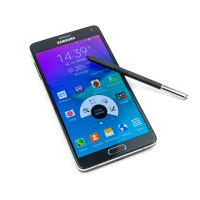
Samsung Galaxy Note 4 Black / White
For Reference when repairing the:
Pre Repair Test
Instructions
Click on Apps
Click on Settings
Perform a full function test to ensure that there are no other issues with the phone. I.E. No power, will not make a phone call, etc. Check phone Power Levels.
Go to Settings, About Phone, Status and check Signal Strength. Annotate power levels for future tests after repair.
PHONE RF FIELD TEST
Perform this test BEFORE conducting the screen replacement to confirm the phone is working properly and repeat after screen replacement is complete to
confirm the phone is properly working.
Test procedure
Review the current signal strength by following these paths to get to the Signal Strength screen.
To put the Phone in field test mode
Dial *3001#12345#*
Perform a full function test to ensure that there are no other issues with the phone. I.E.
No power, will not make a phone call, etc. Any issue outside of the LCM and the repair
should not be performed.
PHONE RF FIELD TEST
Perform this test BEFORE conducting the screen replacement to confirm the phone is
working properly and repeat after screen replacement is complete to confirm the
phone is properly working.
Once repairs are completed Signal Strength must be compared to the original
readings. Strength of signal must be within -10 dBm of the original reading at the
same phone location. Example: If first reading is -91 dbm, new reading cannot be
greater than -101 dBm. Readings moving up show a stronger strength and are
acceptable. Example: From -91dBm to -81dBm. -150 dBm is a no signal
indication.
Note: Clean Work area of all or any debris after Repair.

 Need help?
 General










 To Next Page