ENGLISH
Advanced Recording
Grabación avanzada
53
TV DISPLAY MONITOR DE TELEVISIÓN
✤ The TV DISPLAY function works in CAM, VCR, M.REC, M.PLAY
modes.
✤ You can select the output path of the OSD (On Screen Display).
■ OFF: The OSD appears in the LCD screen only.
■ ON: The OSD appears in the LCD screen, CVF and TV.
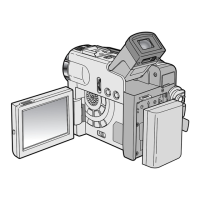
■ Use the DISPLAY button located at the rear of the
camcorder to turn ON/OFF all of
the OSD displayed on the LCD/CVF/TV.
1. Set the camcorder to CAM, VCR, M.REC, M.PLAY mode.
2. Press the MENU button.
■ The menu list will appear.
3. Turn the MENU DIAL to highlight
VIEWER and push the MENU
DIAL.
4. Select the TV DISPLAY mode in
list, push the MENU DIAL.
■ The DISPLAY mode switches between ON/OFF with each
push.
5. To exit, press the MENU button.
✤ La función MONITOR DE TV (TV DISPLAY) opera en las
modalidades CAM, VCR, M.REC, y M.PLAY.
✤ Se puede elegir la vía de salida de la OSD (presentación en
pantalla).
■ OFF: La OSD sólo aparece en la pantalla LCD.
■ ON: La OSD aparece en la pantalla LCD, en el CVF y en el
monitor de TV.
■ Use el botón DISPLAY, que está en la parte posterior de la
videocámara, para activar o desactivar la OSD que aparece
en la LCD/CVF/TV.
1. Ajuste la videocámara en una de
las siguientes modalidades:
CAM, VCR, M.REC o M.PLAY.
2. Pulse el botón MENÚ.
■ Aparece la lista del menú.
3. Gire el DIAL MENÚ hasta resaltar
VIEWER (visor) y después
púlselo.
4. Seleccione la modalidad TV DISPLAY y pulse el DIAL MENÚ.
■ Al pulsar repetidas veces DISPLAY, la opción cambiará
alternativamente entre ON y OFF.
5. Para salir, pulse el botón MENÚ.
ESPAÑOL



 To Next Page