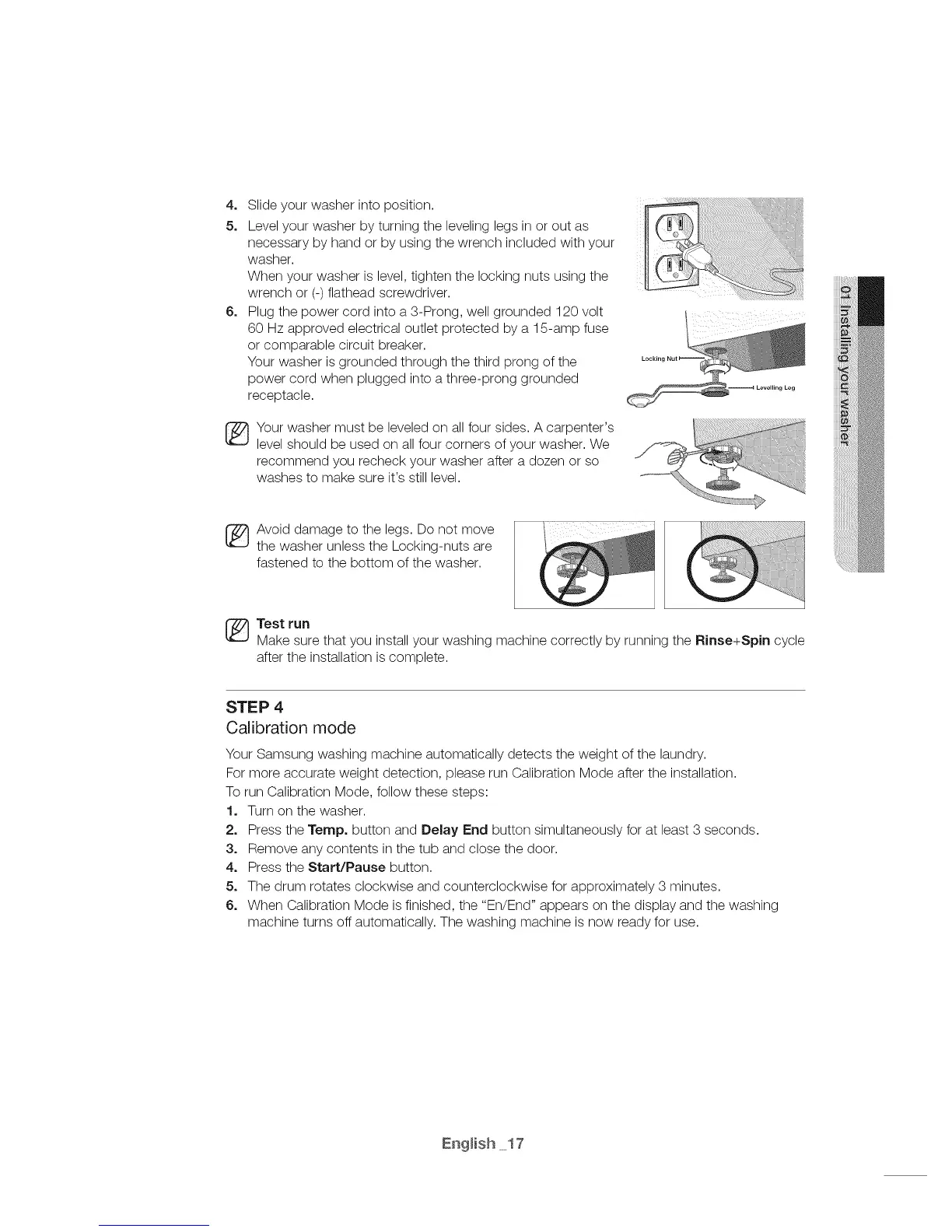
4, Slideyourwasherintoposition.
5, Levelyourwasherbyturningthelevelinglegsinoroutas
necessarybyhandorbyusingthewrenchincludedwithyour
washer.
Whenyourwasherislevel,tightenthelockingnutsusingthe
wrenchor(-)flatheadscrewdriver.
6, Plugthepowercordintoa3-Prong,wellgrounded120volt
60Hzapprovedelectricaloutletprotectedbya15-ampfuse
orcomparablecircuitbreaker.
Yourwasherisgroundedthroughthethirdprongofthe
powercordwhenpluggedintoathree-pronggrounded
receptacle.
Yourwashermustbeleveledonallfoursides.Acarpenter's
levelshouldbeusedonallfourcornersofyourwasher.We
recommendyourecheckyourwasherafteradozenorso
washestomakesureit'sstilllevel.
_ voiddamagetothelegs.Donotmove
thewasherunlesstheLocking-nutsare
fastenedtothebottomofthewasher.
Test run
Make sure that you install your washing machine correctly by running the Rinse+Spin cycle
after the installation is complete.
STEP 4
Calibration mode
Your Samsung washing machine automatically detects the weight of the laundry.
For more accurate weight detection, please run Calibration Mode after the installation.
To run Calibration Mode, follow these steps:
1. Turn on the washer.
2o Press the Tempo button and Belay End button simultaneously for at least 3 seconds.
3, Remove any contents in the tub and close the door.
4, Press the Start/Pause button.
5, The drum rotates clockwise and counterclockwise for approximately 3 minutes.
6, When Calibration Mode is finished, the "En/End" appears on the display and the washing
machine turns off automatically. The washing machine is now ready for use.



 To Next Page