30_ cleaning and maintaining your washing machine
cleaning and maintaining your
washing machine
Keeping your washing machine clean improves its performance, wards off
unnecessary repairs, and lengthens its life.
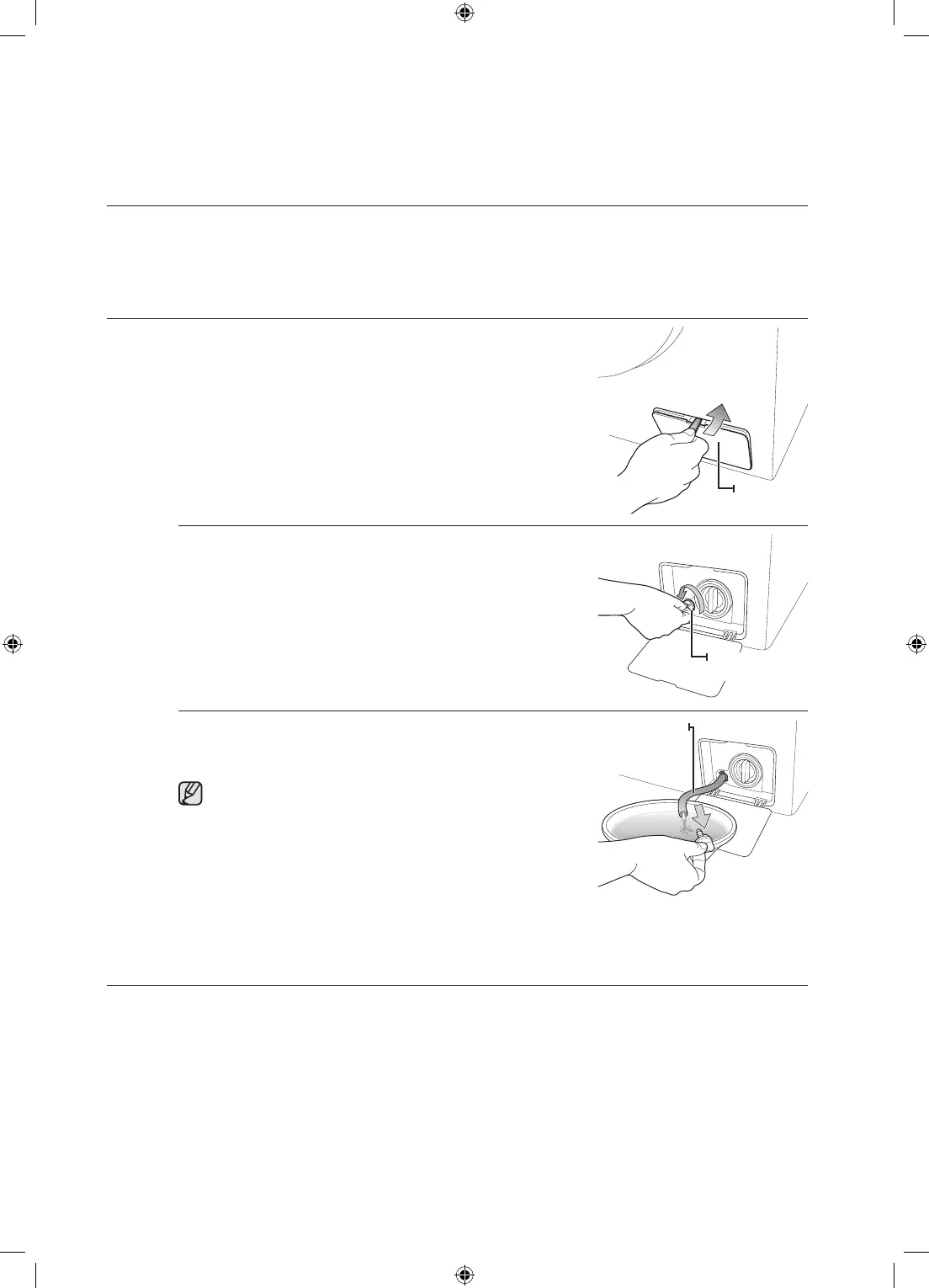
DRAININGTHEWASHINGMACHINEINANEMERGENCY
1. Unplug the washing machine from the power supply.
2. Open the filter cover using a coin or a key.
3. Unscrew the emergency drain cap by turning it to the left.
4. Hold the cap on the end of the emergency drain tube and
slowly pull it out about 15 cm.
5. Allow all the water to flow into a bowl.
Remain water maybe more than you expected. Prepare
larger bowl.
6. Reinsert the drain tube and screw the cap back on.
7. Replace the filter-cover.
CLEANINGTHEEXTERIOR
1. Wipe the washing machine surfaces, including the control panel, with a soft cloth using a
nonabrasive household detergent.
2. Use a soft cloth to dry the surfaces.
3. Do not pour water onto the washing machine.
Filtercover
Emergency
draincap
Emergency
draintube
WF8804RS-02591C-01_EN(XEU)_ErP.indd 30 2011-8-24 17:28:33



 To Next Page