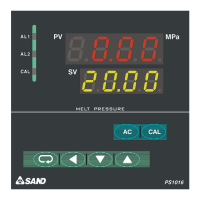
Keyboard
AC: key: (if pressed with switch key simultaneously, reset; press AC key for more than 5
seconds and zero, i.e. zero in calibration, can be recovered;
Cal: Calibration key: if pressed with switch key simultaneously, calibration can be done automatically.
Conversion key
Shift key
Down key
Up key
Signal Lamp
AL1: Alarm signal lamp for pressure upper limit
AL2: Alarm signal lamp for pressure lower limit
Cal: Signal lamp for calibration state (if calibration done automatically, the lamp flashes)
Diagram of installation dimensions
Methods of Use
Connection of instrument with pressure transducer:
Connection for transducer plugs is as follows: (numerically marked plugs are of Type I alphabetically
marked plugs are of Type II. Please give clear indication if order)
1. ASPositive signal(blue)
2. BENegative bridge pressure(red)
3. CSNegative signal(yellow)
4. D.EENegative bridge pressure(white)
5. FC Calibration (green)
Connect all leads with the connection terminal at the back of temperature and pressure gauge (there
are signs on connection terminal) and earth the shielded wire.
Connection signs on rear panel of temperature pressure gauge are as follows;
Switch on;
1
2
3
4
6
7
8
9S
10E
11S
12E
13C
14
15
16
5
O
u
t
p
u
t
P
r
e
s
s
u
r
e
T
r
a
n
s
d
u
c
e
r
220VAC
P
r
e
s
s
u
r
e
u
p
p
e
r
l
i
m
i
t
A
L
1
A
L
2
P
r
e
s
s
u
r
e
l
o
w
e
r
l
i
m
i
t
Switch on power supply and the instrument goes through power-on self-test (POST).
Meanwhile, value of pressure measurement range is displayed on upper display window;
Value of temperature measurement range is displayed on lower display window. Two
seconds later, pressure division value is displayed on upper display window; temperature
division value and the code of transducer are displayed on lower display window
Measuring working state
Measured values for pressure on upper and lower display windows respectively. If time drift exists
after being switched on, press AC Clear key consistently and meanwhile, press inconsistently Shift key to
clear current zero. If malfunctioned in zeroing, press AC key for more than 5 seconds and return to zero
before calibration.
Http://www.sandcop.com E-mailcdsand@163.com TEL:+86-28-87078792 FAX:+86-28-87078762
3


 To Next Page
 Loading...