23
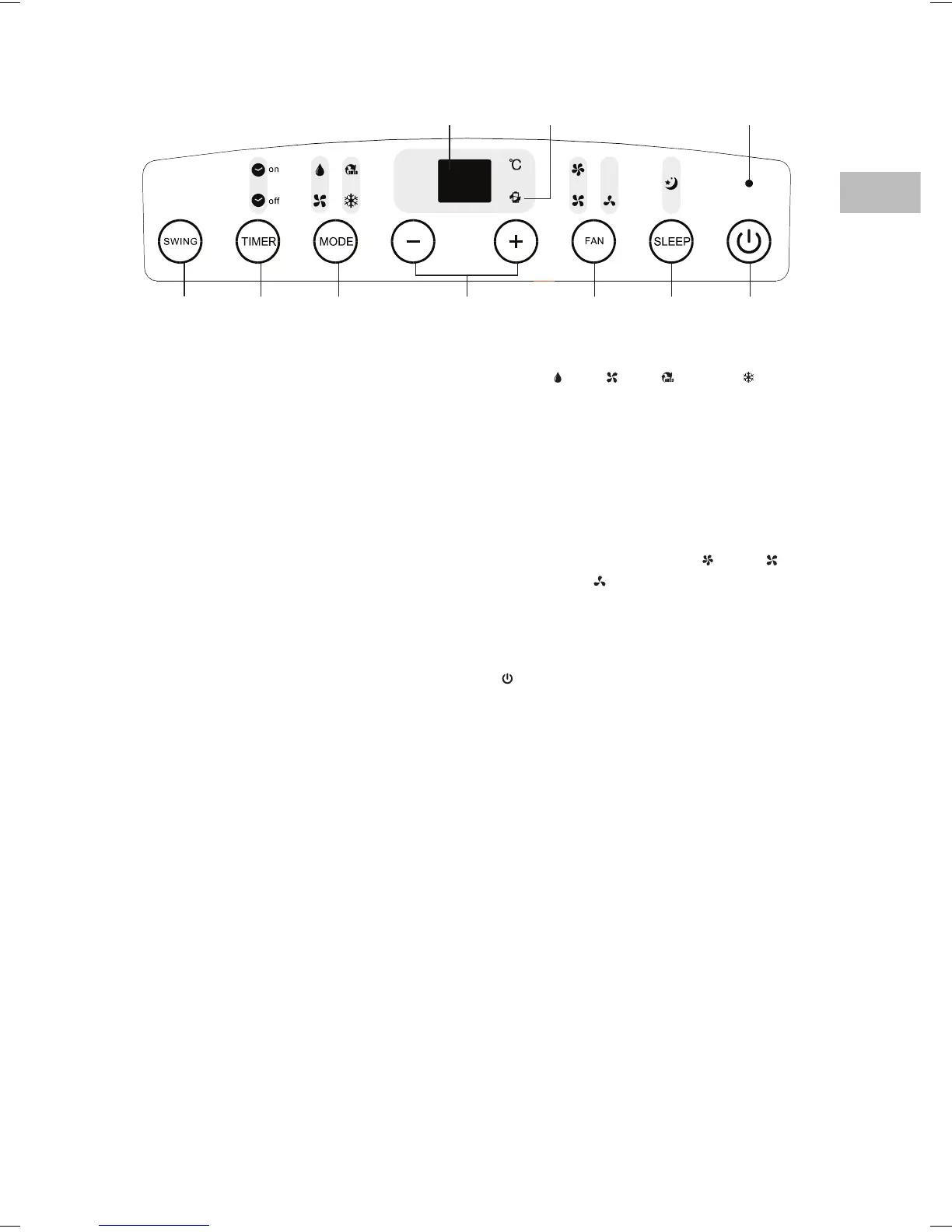
1. LED Display
2. Power Management Indicator
In Cool mode, when the ambient
temperature is lower than the set
temperature for a period of time, the
compressor and fan motor will stop
automatically. The Power Management
Indicator will light up, indicating that
Power Management is activated.
3. Power Indicator
4. SWING Button
Set the louvre to auto-swing or stop
swinging.
5. TIMER Button
Set the unit’s auto on/o time.
Control Panel
6. MODE Button
Select “ Dry”, “ Fan”, “ Auto” or “ Cool”.
7. + / – Buttons
•Adjust the temperature and timer
settings.
•Press both buttons together for 4 seconds
or more to change from Celsius to
Fahrenheit and vice versa.
8. FAN Button
Set the fan speed to “Auto”, “
High”, “
Medium” or “ Lo w ”.
9. SLEEP Button
Set the unit for optimal performance in
Auto or Cool mode.
10.
Button
Switch the unit on or o.
4 5 86 7 9 10
1 32
SAC09_12C13E_IB_5L_RC_150319_grace.indd 23 19/3/15 8:17 pm


 To Next Page