3A81WP0S30020
SG-106
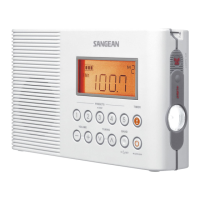
AM / FM Portable Digital Radio
GB Operating instruction
Important Safety Instructions
1.
Read these instructions.
2.
Keep these instructions.
3.
Heed all warnings.
4.
Follow all instructions.
5.
Do not use this apparatus near water.
6.
Clean only with dry cloth.
7.
Do not block any ventilation openings. Install in accordance with the instructions.
8.
Do not install near any heat sources such as radiators, heat registers, stoves or
other apparatus (including amplifiers) that produce heat.
9.
Do not defect the safety purpose of the polarized or groundingtype plug. A
polarized plug has two blades with one wider than the other. A grounding type
plug has two blades and a third grounding prong. The wide blade or the third
prong are provided for your safety. If the provided plug does not fit into your
outlet, consult an electrician for replacement of the obsolete outlet – USA version
only.
10.
Protect the power cord from being walked on or pinched particularly at plug,
convenience receptacles, and the point where they exit from the apparatus.
11.
Only use attachments / accessories specified by the manufacturer.
12.
Use only with the cart, stand, tripod, bracket, or table specified by the
manufacturer, or sold with the apparatus. When a cart is used, use caution when
moving the cart / apparatus combination to avoid injury from tip-over.
13.
Unplug this apparatus during lightning storms or when unused for long periods of
time.
14.
Refer all servicing to qualified service personnel. Servicing is required when the
apparatus has been damaged in any way, such as power-supply cord or plug is
damaged, liquid has been spilled or objects have fallen into the apparatus, the
apparatus has been exposed to rain or moisture, does not operate normally, or
has been dropped.
15.
To reduce the risk of fire or electric shock, Do not expose this appliance to Rain
or Moisture.
16.
The Shock Hazard Marking and Associated Graphical Symbol is provided on the
bottom panel of unit.
17.
Apparatus shall not be exposed to dripping or splashing and no objects filled with
liquids, shall not be placed on the apparatus.
GB
F Mode d’emploi
Consignes de sécurité importantes
1.
Veuillez lire les instructions suivantes.
2.
Conservez ces instructions.
3.
Respectez tous les avertissements.
4.
Respectez toutes les instructions.
5.
N’utilisez pas cet appareil près de points d’eau.
6.
Nettoyez l’appareil uniquement avec un chiffon sec.
7.
Ne bloquez pas les orifices de ventilation. Effectuez l’installation conformément aux
instructions du constructeur.
8.
N’installez pas l’appareil à proximité d’une source de chaleur telle qu’un radiateur, un
convecteur, un poêle ou tout autre appareil (amplificateurs compris) dégageant de la
chaleur.
9.
Ne retirez pas la sécurité d’une prise polarisée ou dotée d’une broche de mise à la terre.
Une prise polarisée comporte deux lames, dont une plus large que l’autre. L’autre modèle
de prise est équipé d’une broche de mise à la terre. La lame large ou la troisième broche
vise à assurer votre protection. Si la prise fournie n’entre pas dans la prise secteur, faites
remplacer cette dernière par un électricien – version américaine seulement.
10.
Protégez le cordon d’alimentation afin qu’il ne soit pas piétiné ou pincé, en particulier au
niveau des prises de courant, dans les gouttières de câblage ou à la sortie de l’appareil.
11.
Utilisez exclusivement les pièces et accessoires spécifiés par le constructeur.
12.
Utilisez exclusivement la table à roulettes, le socle, le trépied, le support mural ou
la table spécifié (e) par le constructeur ou vendu (e) avec l’appareil. Si vous utilisez
une table à roulettes, déplacez-la avec précaution pour qu’elle ne risque pas de se
renverser avec l’appareil.
13.
Débranchez l’appareil pendant les orages ou si vous ne l’utilisez pas pendant une
période prolongée.
14.
Toute réparation doit être effectuée par des techniciens qualifiés. Une réparation peut
être nécessaire lorsque l’appareil a été endommagé d’une manière quelconque, par
exemple si le cordon d’alimentation ou la prise est abîmée, si du liquide a été renversé
sur l’appareil ou si des objets sont tombés à l’ intérieur, si l’appareil a été exposé à la
pluie ou à l’humidité, ne fonctionne pas normalement, ou s’il est tombé.
15.
Afin de réduire les risques d’incendie et d’électrocution, n’exposez pas cet appareil à la
pluie ou l’humidité.
16.
L’avertissement d’un risque d’électrocution présent et le symbole associé sont situés au
dessous de l’appareil.
17.
N’exposez pas l’appareil aux éclaboussures et égouttements. Aucun objet rempli de
liquide, comme un vase, ne doit être placé sur l’appareil.
F
For United States:
Cautions to the user
The changes or modifications not expressly approved by the party responsible for
compliance could void the users authority to operate the equipment.
The equipment has been tested and found to comply with the limits for a Class B
Digital Device, pursuant to part 15 of the FCC Rules. These limits are designed to
provide reasonable protection against harmful interference in a residential installation.
This equipment generates, uses and can radiate radio frequency energy and, if not
installed and used in accordance with the instruction, may cause harmful interference
to radio communication. However, there is no guaranty that interference will not occur
in a particular installation. If this equipment does cause harmful interference to radio
or television reception, which can be determined by turning the equipment off and on,
the user is encouraged to try to correct the interference by one or more of the following
measures:
− Reorient or relocate the receiving antenna.
− Increase the separation between the equipment and receiver.
− Connect the equipment into an outlet on a circuit different from that to which the
receiver is connected.
− Consult the dealer or an experienced radio / TV technician for help.
Controls
1
Speaker
2
Band Selection
3
LCD Display
4
Alarm by radio
5
Power / Auto shut off button
6
Volume Control
7
Alarm by buzzer
8
Tuning Control
9
Station Scan and Time Set
10
Station Presets
11
Charge LED indicator
12
Battery Compartment
13
FM Telescopic Antenna
14
Headphone socket
15
DC In socket
LCD Display
A
Radio Band
B
Station Frequency
C
Sleep and Snooze
D
Clock Set
E
Clock
F
Buzzer Alarm
G
Radio Alarm
H
PM
I
Frequency unit
J
Preset Station
K
Battery Power Indicator
Battery operation using alkaline batteries
1.
Remove the battery cover on the back of the unit by sliding the cover in the direction of
the arrow.
2.
Insert 6 x AA (UM3, LR6) alkaline batteries into the spaces in the compartment. Take
care to ensure the batteries are inserted with correct polarity as shown inside the battery
compartment.
3.
Slide the battery switch to the Alkaline position and then replace the battery cover.
when using alkaline batteries, the battery
switch must be placed in the alkaline
position. Failure to do so could result in
serious damage to the batteries or radio.
IMPORTANT
Reduced power, distortion and a “stuttering” sound are all signs that the batteries may need
replacing.
If the radio is not to be used for any extended of time, it is recommended that the batteries
are removed from the radio.
We would suggest for economy that the radio is used via the supplied AC power adaptor
whenever possible, with battery operation for occasional or stand-by use only. If extended
listening using anticipated, then the use of rechargeable batteries is suggested.
Battery operation using rechargeable batteries
1.
Remove the battery cover on the back of the unit by sliding the cover in the direction of
the arrow.
2.
Insert 6 x rechargeable AA (UM3) batteries into the spaces in the compartment. Take
care to ensure all batteries are inserted with the correct polarity as shown inside the
battery compartment. The radio is designed to be used with Nickel Metal Hydrive (NiMH)
rechargeable batteries.
3.
Slide the battery switch to the Rechargeable position and then replace the battery cover.
4.
Insert the supplied AC power adaptor into the DC IN socket on the left hand side of the
radio and plug the adaptor into a standard 13A mains socket outlet.
5.
The charge light will flash indicating batteries are charging. Batteries will be fully charged
in around 7 hours while charge LED will stop flashing.
IMPORTANT
when using rechargeable batteries, the battery switch must be placed in the
Rechargeable position. Batteries will only be charged when the radio is switched off
and connected to the AC adaptor.
IMPORTANT
Under some conditions the charging LED indicator may switch off after ashing briey.
This may happen if the batteries are already freshly charged, or if the radio detects
that you may be attempting to recharge alkaline batteries or mixed different types or
capacity of rechargeable battery. In these cases the charging will be stopped.
6.
Reduced power, distortion and a “stuttering” sound are all signs that the batteries may
need recharging. Charge LED will be lighted when batteries have no power to turn on the
radio.
7.
If the radio is not to be used for any extended period of time, it is suggested that the
batteries are removed from the radio.
NOTE
Please be aware that the rechargeable battery undergoes a time of charging and
discharging, the battery capacity will gradually decline during over time with repeated
use. The battery icon shows the remaining battery life on the LCD screen when the radio
is turned on. In addition, the calculation of charging time is based on the capacity of the
rechargeable battery and charging current power output of the charger. The two examples
in the below table are for your reference only.
SG-106
Size Model Capacity (mAh) Charging Current (mA) Charging Time (hrs)
AA
GP2700 2600
Approx.
350
Approx.
7.5
GP1800 1800 350 5
Using the supplied AC power adaptor
The supplied AC adaptor is 12 Volts DC output 500mA center pin positive.
1.
Insert the adaptor plug into the DC IN socket on the left hand side of the radio.
2.
Plug the adaptor into a standard 13A mains socket outlet. Whenever the adaptor is
plugged into the radio and switched on the mains, the batteries are automatically
disconnected.
If the adaptor is plugged into the radio but not the mains is not switched on then the radio
will run from the batteries if fitted.
The AC adaptor should be disconnected from the mains supply and the radio when not is
use.
Setting the clock
1.
Clock can be set either the radio is power on or off.
2.
Display will show “- : - -” when the batteries are installed when the radio is connected to
the mains supply.
3.
Press and hold the button for more than 2 seconds, display will flash time set symbol
and also the hour digit, followed by a beep.
4.
Press Tuning Up / Down to set required hour.
5.
Press button again, the minute digits will flash.
6.
Press Tuning Up / Down to set required minute.
7.
Press button to complete time setting.
Operating the radio
This radio is equipped with three tuning methods – Scan tuning, Manual tuning and Memory
presets recall.
Scan tuning
1.
Press the Power button to turn on the radio.
2.
Select the required waveband by pressing the Band button. For FM band fully extend and
rotate telescopic aerial to get best reception. For AM (MW) band, rotate the radio to get
best signal.
3.
Press and release Scan button (long press Scan button more than 2 seconds will activate
time setting), the radio will up search and stop automatically when it finds a radio station
with good signal. Press the Scan button again to pick up the found station. The radio will
continue to search next available stations if you do not press Scan button again when it
finds a radio station.
4.
Rotate the Volume Control to get required sound level.
5.
To turn off the radio, press the Power button. Display will show OFF.
Manual tuning / station searching
1.
Press the Power button to turn on the radio.
2.
Select the required waveband by pressing the Band button. Adjust the antenna as
described above.
3.
A single press on either the Tuning Up or Down button will change the frequency in the
following increments:
FM: 50 or 100 kHz
AM (MW): 9 or 10 kHz
4.
Press and hold either Tuning Up or Down button until the frequency in the display begins
to change rapidly. Release the button. Your radio will search the selected waveband and
stop automatically when it finds a station of sufficient signal.
5.
Rotate the Volume control to get required sound level.
6.
To turn off the radio, press the Power button. Display will show off.
Storing stations in preset memories
There are 5 memory presets for each waveband.
1.
Press the Power button to turn on the radio.
2.
Tune to a required station using one of the methods previously described.
3.
Press and hold down the required preset until the radio beeps. The preset number will
appear in the display and the station will be stored under chosen preset station.
4.
Repeat this procedure for the remaining presets.
5.
Stations stored in preset memories can be overwritten by following above procedures.
Recalling stations from preset memories
1.
Press the Power button to turn on the radio.
2.
Select the required waveband.
3.
Momentarily press the required preset button, the preset number and station frequency
will appear in the display.
Setting the radio alarm
When the radio alarm is selected, the radio will turn on and play the chosen radio station
at the chosen alarm time. The radio alarm will continue for an hour unless turned off by
pressing the Power button. Press the Power button whilst the alarm is activated will cancel
the alarm for 24 hours.
NOTE
Radio alarm can be activated only until both radio alarm time and radio alarmed station
are set. Radio alarm will be automatically switched to buzzer alarm when the radio is in
low battery status or the selected radio alarm station signal is too weak.
1.
The radio alarm can be set either radio is on or off.
2.
Press and hold the radio alarm button for 2 seconds, the radio will show radio alarm
symbol followed by a beep.
3.
Display Hour will flash, using Tuning up / Down button to select the hour then press
button again to confirm hour setting.
4.
Press the Tuning up / down button to select the desired minute and press button to
confirm minute setting.
5.
While radio alarm symbol is flashing, press the Tuning up / down to select desired wake-
up band and station, then press button to confirm the selection. Radio alarm setting
is now completed. Active alarms are shown using alarm indicator on the display.
6.
To cancel a sounding alarm, press the Standby button to cancel a sounding alarm.
7.
To cancel the radio alarm setting before the alarm sounds off, press and hold the radio
alarm button for 2 seconds (followed by a beep).
NOTE
If the signal of the set station cannot be found, the buzzer alarm will be used instead..........
Setting the HWS (Humane Wake System) buzzer alarm
A beep will activate when selecting the HWS alarm. The alarm beep will increase in volume
every 15 seconds for one minute followed by one minute silence before repeating the cycle.
The HWS alarm will sound for an hour until turning off by pressing the Power button. Press
the Power button whilst the alarm is activated will cancel the alarm for 24 hours.
1.
The HWS buzzer alarm can be set wither radio is on or off.
2.
Press and hold the HWS buzzer alarm button for 2 seconds, the symbol will
show on the display followed by a beep. Now the display hour digit will flash.
3.
Press Tuning Up / Down button to select required alarm hour, then press button
again, the minute digit will then flash.
4.
Press Tuning Up / Down button to select required alarm minute, then press button
again to complete alarm setting. Display will appear when buzzer alarm has been
set.
5.
To cancel a sounding alarm, press the Standby button to cancel a sounding alarm.
6.
To cancel the buzzer alarm setting before the alarm sounds off, press and hold the
buzzer alarm button for 2 seconds (followed by a beep).
Snooze function
1.
Whilst the alarm is activated, press any buttons except the Power button will activate
the snooze function. The radio or HWS buzzer alarm will be silenced with interval of 5
minutes.
2.
The display will flash both the snooze symbol and the alarm symbol. The snooze
function can be repeatedly during the one hour that the alarms are active.
Sleep function
The sleep timer will automatically switched off the radio after a preset time has elapsed.
1.
Press and continue to hold down the Power button for more than 2 seconds, followed by
a beep, the display will cycle through the available sleep timers in the order of 60-45-30-
15-120-90-60. Release the Power button when the required sleep timer appears in the
display. The symbol will appear in the display and the radio will play the last station
selected.
2.
To cancel the sleep function, press the Power button. The symbol will disappear
and radio is off.
Display backlight
Press any buttons will illuminate the LCD display for approx. 10 seconds. During scanning
14
15
13
12
FGJK HI
C DA EB
6
7
8
91011
1
2 3 4 5
Pour les États-Unis:
Précautions pour l’utilisateur
Des changements ou des modifications sur ce produit non expressément approuvés
par la partie responsable de la conformité peut annuler le droit de l’utilisateur d’utiliser
cet équipement.
Cet équipement a été testé et approuvé conforme au limites des appareils
numériques de classe B, conformément à la partie 15 des règles de la FCC. Ces
limites ont pour objectif de fournir une protection raisonnable contre les interférences
nuisibles dans une installation résidentielle. Cet équipement génère, utilise et
rayonne de l’énergie de fréquence radio et peut nuire aux communications radio
s’il n’est pas installé et utilisé en accord avec les instructions du mode d’emploi.
Cependant, il n’est pas garanti que des interférences surviennent dans une
installation particulière. Si l’équipement cause des interférences nuisibles à la
réception radio ou télévision, qui peuvent être localisées en allumant ou en éteignant
l’équipement, l’utilisateur est encouragé à corriger les interférences en employant
une ou plusieurs des mesures suivantes:
− Réorienter ou déplacer l’antenne de réception.
− Séparer davantage l’équipement et le récepteur.
− Connecter l’équipement à une prise de courant située sur un circuit différent de
celui du récepteur.
− Demandez assistance à un revendeur ou un technicien expérimenté dans le
domaine radio / TV.
Commandes
1
Haut-parleur
2
Touche de sélection de la bande
3
Écran LCD
4
Touche Alarme radio
5
Touche Alimentation / Arrêt automatique
6
Commande de réglage du volume
7
Touche Alarme buzzer
8
Commande de réglage de la fréquence
radio
9
Touche Recherche / Validation de l’heure
10
Touches de présélection de stations
11
Indicateur de charge
12
Compartiment à piles
13
Antenne Fm télescopique
14
Connecteur Ecouteurs
15
Connecteur DC In
Écran LCD
A
Bande de fréquences radio sélectionnée
B
Fréquence de la station radio sélectionnée
C
Indicateur Veille et Snooze
D
Indicateur de réglage de l’horloge
E
Horloge
F
Alarme Buzzer
G
Alarme Radio
H
Indicateur PM
I
Unité de fréquence
J
Présélections
K
Indicateur du niveau de charge des piles
Fonctionnement sur piles alcalines
1.
Retirez le couvercle du compartiment à piles situé à l’arrière de la radio en faisant
glisser celui-ci dans le sens indiqué par la flèche.
2.
Insérez 6 piles alcalines AA (UM3, LR6) dans leurs emplacements respectifs.
Assurez-vous de bien respecter la polarité indiquée dans le compartiment à piles.
3.
Positionnez le sélecteur du type de pile sur la position Alcaline, replacez le couvercle
du compartiment à piles.
lorsque vous utilisez des piles
alcalines, le sélecteur de piles doit
toujours être positionné sur Alcaline.
Ne pas faire ceci pourrait se résulter
par de sérieux dommages à la radio
ou aux piles.
IMPORTANT
Une baisse des performances, distorsion du son et un son ‘troublé’ sont des signes de
charge insuffisante des piles, il est alors recommandé de les remplacer à ce moment.
Il est recommandé de retirer les piles de la radio lorsque vous pensez ne plus l’utiliser
sur une période prolongée.
Nous vous recommandons d’utiliser l’adaptateur CA lorsque vous le pouvez, et de faire
fonctionner la radio sur piles occasionnellement ou pour laisser l’appareil en veille.
Lorsque vous pensez écouter de la musique sur une période prolongée, utilisez des piles
rechargeables.
Fonctionnement sur piles rechargeables
1.
Retirez le couvercle du compartiment à piles situé à l’arrière de l’appareil en faisant
glisser le couvercle du compartiment à piles dans le sens indiqué par la flèche.
2.
Insérez 6 piles rechargeables AA (UM3) dans les emplacements. Assurez-vous de
respecter la polarité indiquée dans le compartiment à piles lorsque vous installez
les piles. La radio est conçue pour fonctionner avec des piles rechargeables Nickel
métal hybride (NiMH).
3.
Faites glisser le sélecteur de piles sur la position Rechargeable puis replacez le
couvercle du compartiment à piles.
4.
Raccordez l’adaptateur de courant CA fourni au connecteur DC In situé sur le coté
gauche de la radio, puis raccordez l’autre extrémité de l’adaptateur à une prise de
courant standard 13A.
5.
Le témoin d’alimentation clignote et indique que la mise en charge des piles est en
cours. La durée de mise en charge est d’environ 7 heures, le témoin de mise en
charge s’arrête de clignoter une fois la mise en charge terminée.
IMPORTANT
lorsque vous utilisez des piles rechargeables, vériez que le sélecteur de piles est
positionné sur Rechargeable. Les piles se mettent en charge seulement lorsque la
radio est éteinte et l’adaptateur de courant connecté à la radio.
IMPORTANT
Sous certaines conditions, l'indicateur DEL de chargement peut s'éteindre après
avoir clignoté brièvement. Cela peut se produire si les piles ont été chargées
récemment ou si la radio détecte que vous essayez de recharger des piles
alcalines ou que vous mélangez différents types de piles rechargeables. Dans ces
cas, le chargement s'arrêtera.
6.
Une baisse des performances, distorsion du son et un son ‘troublé’ sont des signes
de charge insuffisante des piles, il est alors recommandé de les recharger. L’indicateur
de charge s’allume lorsque les piles sont épuisées et sont trop faibles pour pouvoir
mettre la radio en marche.
7.
Il est recommandé de retirer les piles de la radio lorsque vous n’utilisez pas la radio
sur une période prolongée.
REMARQUE
Veuillez noter que le nombre de charges de la batterie rechargeable est limité, la
capacité de la batterie diminue progressivement au fur et à mesure que vous l’utilisez.
Lorsque l’unité est allumée, l’indicateur de batterie afché sur l’écran LCD indique l’état
de charge de la batterie. De plus, le calcul de la durée de charge est basé sur la capacité
de la batterie rechargeable et de la tension de charge du chargeur. Les deux exemples
gurant dans le tableau ci-dessous sont fournis à titre de référence seulement.
SG-106
Dimensions Modèle Capacité (mAh)
Courant de charge
(mA)
Durée de charge
(hrs)
AA
GP2700 2600
Env.
350
Env.
7.5
GP1800 1800 350 5
Alimentation via l’adaptateur de courant CA
L’adaptateur de courant CA possède une sortie 12 Volts CC de 500mA avec broche
centrale positive.
1.
Raccordez une extrémité de l’adaptateur de courant au Connecteur DC In situé sur
le côté gauche de la radio.
stations and alarm activated will also automatically illuminate the display.
Software version
The software display cannot be altered and is just for your reference.
1.
Turn off the radio.
2.
Press the Band / step button for 2 seconds until the software version number (e.g. P01)
shown on the display.
Time format
1.
Continue pressing the Band / step button until ’24H’ or ’12H’ shown on the display
followed by a beep.
2.
Press the Tuning up / down button to choose the desired selection and press the Band /
step button to confirm the setting.
Setting tuning step
Tuning steps in some countries are different from where you purchase the radio. If you buy
the radio in Europe and intend to use in Northern America or some Southern American
countries. You may have to adjust tuning step so that the radio can work properly.
1.
After the FM range setting is completed, the display will switch to tuning step setting.
Press the Tuning up / down button to choose the desired FM tuning step (50kHz or
100kHz) and press the Band / step button to confirm the setting.
2.
After the confirmation of FM tuning step, press the Tuning up / down button to choose the
desired AM tuning step (9kHz or10kHz) and press the Band / step button to confirm the
setting.
Headphone socket
A 3.5mm headphone socket located on the left hand of your radio is provided for use with
either headphones or an earpiece. Insert a plug automatically mutes the internal speaker.
Specifications
Power Requirements
AC Power adaptor DC 12V 500mA center pin positive
Batteries 6 x UM-3 (AA size, LR6)
Battery Life
Approx. 38 hours of listening for 4 hours a day at
normal volume using alkaline cells.
Frequency Coverage
FM 87.50-108 MHz
MW
522-1710 kHz (9kHz / step) or
520-1710 kHz (10kHz / step)
Circuit Feature
Loudspeaker 3inches, 8ohm
Output Power 1.0 Watt using AC power adaptor
Headphone socket 3.5mm dia
Aerial System Telescopic aerial
Operating temperature range
0°C to +35°C
※
The barcode label on the product is defined as below:
Serial number
Production month
Production year
Product code
The company reserves the right to amend the specifications without notice.
If at any time in the future you should need to dispose of this product please note
that: Waste electrical products should not be disposed of with household waste.
Please recycle where facilities exist. Check with your Local Authority or retailer for
recycling advice. (Waste Electrical and Electronic Equipment Directive).

 Need help?

 To Next Page
 General