Need help?
Do you have a question about the Sangean WR-22 and is the answer not in the manual?
User must read, keep, heed warnings, and follow all instructions provided in the manual.
Precautions regarding water, cleaning, ventilation, heat sources, plug safety, and cord protection.
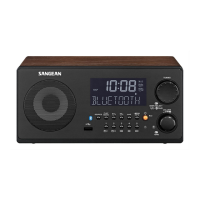
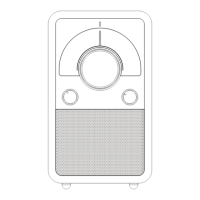
Identifies and describes the function of each button and control on the WR-22 front panel.
Details the buttons on the remote control and their corresponding functions for operating the WR-22.
Instructions for connecting the radio to AC power or a DC power source for operation.
Guidance on connecting and positioning the FM antenna for optimal reception.
How to automatically scan and tune to FM/AM radio stations.
Instructions for saving favorite stations into memory presets and recalling them later.
Step-by-step guide for manually setting the radio's clock time.
Detailed steps for setting Alarm 1, including hour, minute, and alarm options like ONCE, DAILY.
How to select alarm type (buzzer, FM, AM, USB) and set the sound level.
Information on supported USB devices, capacity, file systems (FAT/FAT32), and unsupported formats.
Step-by-step guide to pair a Bluetooth device with the WR-22 for music playback.
Procedure to reset the radio to factory defaults, clearing settings and presets.
 General
| Radio type | Clock |
|---|---|
| Tuner type | Analog |
| RDS features | CT, PS, PTY, RT |
| FM band range | 87.5 - 108 MHz |
| PLL synthesizer | - |
| Supported radio bands | AM, FM |
| Radio Data System (RDS) | Yes |
| Preset stations quantity | 10 |
| RMS rated power | 7 W |
| Audio formats supported | MP3, WMA |
| Number of built-in speakers | 1 |
| Subwoofer driver diameter (imperial) | 3 \ |
| Display type | LCD |
| Wi-Fi | No |
| USB 2.0 ports quantity | USB 2.0 ports have a data transmission speed of 480 Mbps, and are backwards compatible with USB 1.1 ports. You can connect all kinds of peripheral devices to them. |
| Antenna type | FM F & AM ANT-IN |
| Video in | 0 |
| Remote control type | IR |
| Connectivity technology | Wireless |
| Apple docking compatibility | Not supported |
 Weight and Dimensions
| Depth | 193.4 mm |
|---|---|
| Width | 240 mm |
| Height | 112 mm |
| Weight | 2900 g |

 To Next Page