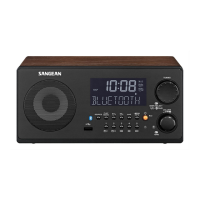
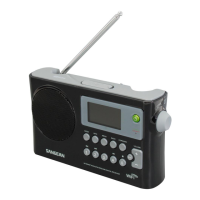
Need help?
Do you have a question about the Sangean WR-15WL and is the answer not in the manual?
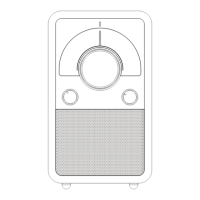
Rotary dial for selecting radio bands and functions.
Indicates signal strength or tuning status.
Pointer showing the selected frequency on the dial scale.
Visual representation of radio frequencies.
Knob for adjusting the radio frequency.
Adjusts audio volume and powers the radio on/off.
Produces audio output.
Connector for external FM antenna.
For WR-15 AM antenna; WR-15BT Bluetooth status.
Power input for 12V DC adapter.
Port for connecting headphones.
Audio output for external devices.
Audio input for external sources.
Selects between built-in and external antennas.
For pairing NFC-enabled devices with WR-15BT.
How to connect the radio using an AC adapter.
Information regarding the use of mains plugs and couplers.
Guide to connecting the FM antenna for optimal reception.
Steps to power on the radio and tune to FM stations.
How to set volume and switch off the radio.
Guide to connecting the AM antenna for reception.
Steps to tune to AM stations and adjust volume.
Advice on minimizing interference with the AC adapter.
Instructions for pairing devices to stream music.
Step-by-step guide to initially pair a Bluetooth device.
Information on operating range and device compatibility.
How to re-pair devices and disconnect from the radio.
Steps to pair devices using NFC technology.
Important notes regarding NFC connection and sensitivity.
Method to disconnect an NFC-paired device.
How to connect and use headphones with the radio.
Caution regarding high sound pressure levels from headphones.
Steps to connect and play audio from external devices via AUX IN.
Use of the Line Out socket for audio output.
Details on radio frequency bands and power supply requirements.
Information on antenna types and audio output characteristics.
Specifications for input/output sockets and included accessories.
Physical dimensions and environmentally responsible disposal advice.
Basic bands and cabinet construction details.
Information on tuning, volume, LED indicators, and power cord.
Details on headphone, REC out, and Aux in sockets.
Details on the speaker and bass compensation.
Information on external antennas and power adapter socket.
Controls for switching bands and adjusting volume.
Controls for tuning, dial scale, and LED indicators.
Sockets for power, headphones, REC out, and Aux in.
Switch and terminals for external and internal antennas.
How to power the radio using AC power.
How to power the radio using a DC 12V source.
Steps for connecting the antenna for FM reception.
Guide to tuning stations and adjusting volume on FM.
Instructions for turning off the radio after use.
Guide to connecting the AM antenna.
Steps for tuning AM stations and adjusting volume.
How to turn off the radio after AM operation.
How to connect headphones to the radio.
Connect external audio sources via the AUX IN socket.
Functionality of the REC out socket for tuning or recording.
Radio frequency bands and power consumption details.
Information on antenna types and audio output specifications.
Specs for sockets, accessories, dimensions, and weight.
Guidelines for environmentally responsible disposal of the product.

 To Next Page
 General