EasyManua.ls Logo

Sangean WFR-70 - User Manual

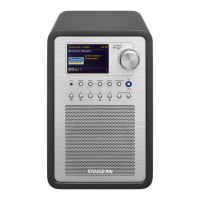
Sangean WFR-70
84 pages
Print Icon
To Next Page IconTo Next Page
Loading...
GB
WFR-70
Version 1

Table of Contents

Question and Answer IconNeed help?

Do you have a question about the Sangean WFR-70 and is the answer not in the manual?

Summary

Before You Can Use This Product

Using the AC Power Adaptor

Controls and Connections

Navigation Controls

Configuration

Connecting Your Radio to Your Computer Network

Guides through connecting the radio to a wired or wireless network.

Network Remote Control Options

Network Pin Setup (Pin Number)

Details how to set up a PIN for remote control security.

Internet Radio

Internet Radio - The Basics

Explains how to find and select internet radio stations by location, genre, or name.

Selecting a Radio Station by Location

If Your Radio Cannot Connect to a Radio Station

Selecting a Radio Station by Genre

Searching for a Radio Station by Name

Selecting a New or Popular Station

Selecting a Podcast; BBC Listen Again

Presetting Stations

Storing a Preset

Details the process of saving a current station to a preset memory.

Recalling a Preset

Explains how to access saved radio stations from preset memory.

Last Listened

Display Modes

Customizing Your Radio

Registering an Account

Guides on registering an account to manage favorite radio stations online.

Configuring My Favorite Stations

Configuring My Added Stations

Selecting Your Favorite Stations

Selecting Your Added Stations

Music Player

Use with Windows, Apple Mac and Linux

Explains how to use the music player with different operating systems and UPnP servers.

Accessing Your Audio Files Via a UPnP Server

Locating and Playing Media Files Using UPnP

Media Selection

Listening to a Particular Track

Controlling Playback

Repeat Tracks

Shuffle Tracks

Display Modes

Playlists

Adding a Single Track to Your Playlist

Guides on adding individual tracks to a playlist.

Adding an Entire Album or Folder

Guides on adding entire albums or folders to a playlist.

Viewing Your Playlist

Erasing a Track from the Playlist

Clearing the Playlist

Playing Your Playlists

Wake On LAN

Prune Servers

Keep Network Connected

Windows 7 Play to Function (UPnP Renderer)

Using USB Memory Devices

Playing Files from USB Memory Devices

Guides on selecting and playing audio files from a USB memory device.

Inserting and Removing Memory Devices

DAB Radio

Using DAB Mode for the First Time

Guides through the initial setup and scanning process for DAB radio.

Selecting a DAB Radio Station

Secondary Services

Display Modes

Finding New DAB Radio Stations

Manual Tuning

Dynamic Range Control Setting

Station Order Setup

Prune Stations

FM Radio

Operating Your Radio in FM Mode

Guides on tuning and listening to FM radio stations.

Manual Tuning

Explains how to manually tune to specific FM frequencies.

Display Modes

Scan Setting

Stereo; Mono Switching

Presetting Stations in DAB and FM Modes

Recalling a Preset in DAB and FM Modes

Guides on accessing saved radio stations from preset memory for DAB and FM.

Listening to Spotify

Playing Music Using Spotify Connect

Details the setup and requirements for using Spotify Connect.

Play Tracks Via Your Radio

Control Playback

Display Mode - Spotify Connect

Streaming Data Rate - Spotify Connect

Friendly Name - Spotify Connect

Multi-room

To Use Multi-room Feature

Guides on downloading and setting up the UNDOK app for multi-room functionality.

Clock and Alarms

Automatically Updating the Clock

Explains how the radio clock updates automatically via internet, DAB, or FM.

Setting the Clock Format

Manually Setting the Clock

Setting the Alarm Clock

When the Alarm Sounds

Disabling Alarms

Snooze Timer

Sleep Timer

Inactive Standby

Mute Function

Display and Audio

Equalizer Function

Allows adjusting sound equalizer modes for personalized listening.

Setting Up Your My EQ Profile

Brightness Control

Language Selection

Headphone Socket

Line Out Socket (3.5 mm Jack)

Speaker Out Socket

Auxiliary Input Socket

Charging with USB Socket

Information

Factory Reset

Guides on how to reset the radio to its original factory settings.

Software Update

Network Profiles

Software Version Display

Audio FAQ

Accessing Your Audio Files Via a UPnP Server Using Windows Vista and XP

Audio Codecs

Bit-Rates

Cautions

Specifications

Sangean WFR-70 Specifications

General IconGeneral
Radio typeInternet
Tuner type-
RDS featuresCT, PS, PTY, RT
FM band range87.5 - 108 MHz
PLL synthesizerNo
DAB III band range174 - 240 MHz
Supported radio bandsDAB+, FM
Radio Data System (RDS)Yes
Preset stations quantity15
Display typeTFT
Display diagonal2.4 \
Display resolution320 x 240 pixels
Product colorGrey, Silver
Volume controlRotary
Amplifier classD
Internet radio services supportedSpotify, vTuner
USB 2.0 ports quantity1
Equalizer modesClassic, Flat, Jazz, Pop, Rock
RMS rated power10 W
Audio formats supportedAAC, MP3, WMA
Frequency band2.4 - 5 GHz
Wi-Fi standards802.11b, 802.11g
Subwoofer driver diameter (imperial)3 \
Power sourceDC
Weight and Dimensions IconWeight and Dimensions
Depth210 mm
Width128 mm
Height213 mm
Weight1928 g

Related product manuals