The provided document is a Quick Start Guide for the Sangoma Vega SBC (Session Border Controller) for SMB (Small and Medium Business). This guide outlines the initial setup, access methods, power procedures, and support resources for the device.
Function Description:
The Sangoma Vega SBC for SMB is a Session Border Controller designed to manage and secure real-time communication sessions, primarily voice and video, for small and medium-sized businesses. An SBC acts as a demarcation point between different IP networks, providing security, interoperability, and quality of service for VoIP and other real-time communications. Key functions typically include:
- Security: Protecting the network from malicious attacks such as denial-of-service (DoS) attacks, toll fraud, and unauthorized access by hiding the internal network topology and performing network address translation (NAT).
- Interoperability: Bridging incompatible signaling protocols (e.g., SIP, H.323) and media codecs, allowing different communication systems to connect seamlessly.
- Session Management: Controlling call admission, routing, and quality of service (QoS) to ensure reliable and high-quality communication.
- NAT Traversal: Enabling communication between devices located behind NAT firewalls, which is crucial for remote workers and cloud-based services.
- Regulatory Compliance: Assisting businesses in meeting regulatory requirements for lawful interception and emergency services.
The Vega SBC for SMB is specifically tailored for smaller organizations, offering a compact form factor and simplified management while still delivering essential SBC functionalities. It aims to provide a robust and secure communication infrastructure for businesses looking to deploy or enhance their VoIP systems.
Important Technical Specifications:
While the quick start guide does not delve into detailed technical specifications like CPU, RAM, or specific throughput capabilities, it highlights crucial connectivity and access parameters:
- Network Interfaces: The device features multiple LAN ports (LAN 0, LAN 1, LAN 2, LAN 3) on the back, indicating its role in connecting to various network segments. LAN 0 is specifically designated for initial WebGUI/SSH access.
- Console Port: A dedicated RJ45 CONSOLE port is located on the front for direct serial access.
- USB Ports: Two USB ports (USB 1, USB 3) are present on the front, likely for firmware updates, configuration backups, or connecting peripherals.
- Power Input: A DC 12V port on the back is used for power supply.
- Indicator Lights: An SSD indicator light and a POWER indicator light are visible on the front panel, providing visual status cues.
- Default IP Address: The static IP address for the back RJ45 port labeled LAN 0 is
192.168.168.2.
- WebUI URL: The WebUI can be accessed via
http://192.168.168.2/.
- Console Baud Setting: The serial console requires a baud setting of
115200,n,1.
- Default Credentials:
- WebGUI/SSH Access: Username
root, Password sangoma.
- Console Access: Username
root, Password sangoma.
Usage Features:
- Web-based Graphical User Interface (WebGUI): The primary method for configuring and managing the SBC, accessible via a web browser using the default IP address. This provides an intuitive interface for setting up various SBC functions.
- SSH Access: For command-line interface (CLI) access, offering more granular control and scripting capabilities for advanced users.
- Serial Console Access: A direct connection method for initial setup, troubleshooting, or recovery, especially useful if network access is unavailable. It requires a serial console client like HyperTerminal, PuTTY, or Minicom.
- Quick Start Guide: The document itself serves as a key usage feature, providing immediate instructions for getting the device operational. It directs users to the Sangoma Wiki for comprehensive user guides covering installation, getting started, configuration, operation, backup and restore, troubleshooting, release notes, and software updates.
- Power Management: Clear instructions are provided for powering the appliance ON (plug in DC 12V, push and hold front power button) and OFF (graceful shutdown via GUI or forced shutdown by pressing and holding the front power button).
Maintenance Features:
- Software Updates: The user guide on the Sangoma Wiki includes information on how to update the software, ensuring the device runs the latest features and security patches.
- Backup and Restore: The user guide also covers procedures for backing up configurations and restoring them, crucial for disaster recovery and system migration.
- Troubleshooting: Comprehensive troubleshooting guides are available on the Sangoma Wiki to help users diagnose and resolve common issues.
- Online Self-Help (Wiki): Sangoma provides an extensive online knowledge base at
wiki.sangoma.com/display/SBC/Session+Border+Controllers, offering tutorials, configuration guides, and troubleshooting information. This is a primary resource for self-maintenance and problem-solving.
- Annual Maintenance Plan: Sangoma offers an annual maintenance plan that includes major software updates and provides quick response times for support issues. This is a proactive maintenance feature to ensure ongoing system health and support.
- Direct Support Contact: Users can contact Sangoma support directly via
sangoma.com/support and submit online service requests, especially for those with an Annual Maintenance Plan.
- Training: Sangoma offers online introductory and in-class advanced technical training. This empowers users and administrators to effectively configure, install, and maintain Sangoma products, reducing reliance on external support for routine tasks.
- Default Password Change Reminder: A critical security maintenance feature highlighted is the explicit recommendation to change default passwords (
root/sangoma) to prevent unwanted remote access, which is a fundamental security best practice.
- Warranty: A standard 12-month warranty is included, with additional warranty services available, providing assurance and potential repair/replacement options for hardware issues.

 Need help?
 General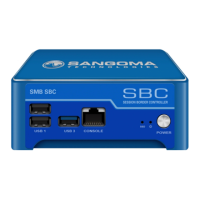

 To Next Page