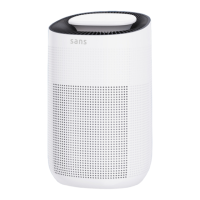
The Sans Water Purifier is a countertop device designed to provide purified water for household use, featuring a multi-stage filtration system and convenient dispensing options, including instant hot water. It aims to improve health and wellness by addressing water quality issues.
Function Description:
The primary function of the Sans Water Purifier is to filter tap water, removing impurities and providing clean, purified drinking water. It utilizes a three-filter system: Pre/Carbon, Reverse Osmosis (RO), and VOC Carbon filters, ensuring comprehensive purification. The device also includes an internal UV light for additional sterilization, which activates periodically. A key feature is its auto-dispense capability, which automatically fills the included glass pitcher when water is present in the tap water tank. The pitcher lid incorporates a float sensor to manage this process. Furthermore, the purifier offers an "Instant Hot" function, allowing users to dispense hot water on demand. The system is designed to recycle water multiple times for efficiency, but it also generates concentrated waste water that needs to be discarded regularly to prevent sediment buildup and maintain warranty validity.
Important Technical Specifications:
- Operating Temperature: The suitable temperature for product installation and operation is between 40°F and 104°F.
- Filtration System: Three filters are included:
- Pre/Carbon filter
- Reverse Osmosis (RO) filter
- VOC Carbon filter
- UV Sterilization: An internal UV light is integrated for periodic activation, indicated by a "UV RUNNING" light on the control panel.
- Water Quality Display: The control panel features a digital display to show water quality.
- Filter Replacement Indicators: The control panel includes indicators (PPC/RO/C) that flash when a specific filter requires replacement.
- Refill Tank Indicator: An indicator flashes when the tap water tank is empty.
- Power: The device connects to an electrical outlet.
- Warranty: Sans offers a 3-year warranty for the purifier.
Usage Features:
- Getting Started:
- Install Drip Tray and Pitcher: Clip in the drip tray and place the pitcher on top of the purifier.
- Fill the Tank: Wash both the tap water tank and pitcher with soap and water. Fill the tap water tank with cold (never hot) water up to the Max line and return it to the purifier.
- Plug In: Connect the purifier to an electrical outlet. Filtration will begin automatically once the pitcher is in place and the internal tank fills.
- Run 4 Filtration Cycles: Before initial use, run four full cycles of filling the tank and dispensing water into the pitcher. Discard the water from the pitcher each time to prepare the new filters.
- Controls: The control panel provides intuitive interaction:
- Refill Tank Indicator: Flashes when the tap water tank is empty, reminding the user to empty waste water first before refilling.
- UV Running: Illuminates when the internal UV light is active.
- Activate Instant Hot: Tap "Hot" to activate the hot water function (button illuminates red), then tap "Dispense." Tap "Dispense" again to stop. Note: Hot water cannot be dispensed into the glass pitcher.
- Dispense Water Button: Tap to start dispensing purified water; tap again to stop.
- Reset Filter Indicator: Press to select the filter type (PPC, RO, C) and press and hold to reset the corresponding filter replacement indicator after a filter change.
- Auto Dispense: The purifier automatically dispenses purified water into the glass pitcher when water is available in the tap water tank, managed by a float sensor in the pitcher lid.
- Refilling the Tap Water Tank: Lift the hinged cover, remove the tank using its handle, tip out residual waste water (between Min and Max lines), refill with tap water, and then re-hook the tank into the machine before closing the flap.
- Waste Water Management: It is crucial to empty the concentrated waste water from the tap water tank with every refill. Failure to do so can lead to sediment buildup and void the warranty.
Maintenance Features:
- Exterior Cleaning: Use a soft cloth and an optional neutral cleaning product to wipe down the exterior of the machine.
- Pitcher and Tank Cleaning: Regularly clean the glass pitcher and the tap water tank with soap and water. These items are not dishwasher safe.
- Filter Replacement:
- Remove the lid by lifting the hinged flap and then the lid completely.
- Remove the tap water tank using its handle.
- For Pre/Carbon or RO filters: Identify the filter, lift its hinged tab, pull it outwards, and replace it with a new one. Re-secure the tab by pressing it down until it clicks.
- For VOC Carbon filter: First remove the RO filter (steps 3 and 4). The VOC Carbon filter is located behind the RO filter and hinges out from the top. Unscrew it to remove and replace.
- After replacing any filter, use the "Reset Filter Indicator" button on the control panel to select the replaced filter type and then press and hold to reset its indicator.
- Scheduled Filter Replacement: All filters must be replaced on schedule to ensure optimal performance and maintain water quality.
- Support: For questions or guidance, users can email hi@livesans.com or use the Live Chat feature on the Sans website.
- Warranty Registration: Users can register their product for the 3-year warranty at livesans.com/warranty.

 Need help?
 General

 To Next Page