EasyManua.ls Logo

Sansui A-X950 - Page 23

Sansui A-X950
24 pages
Print Icon
To Next Page IconTo Next Page
To Previous Page IconTo Previous Page
Loading...
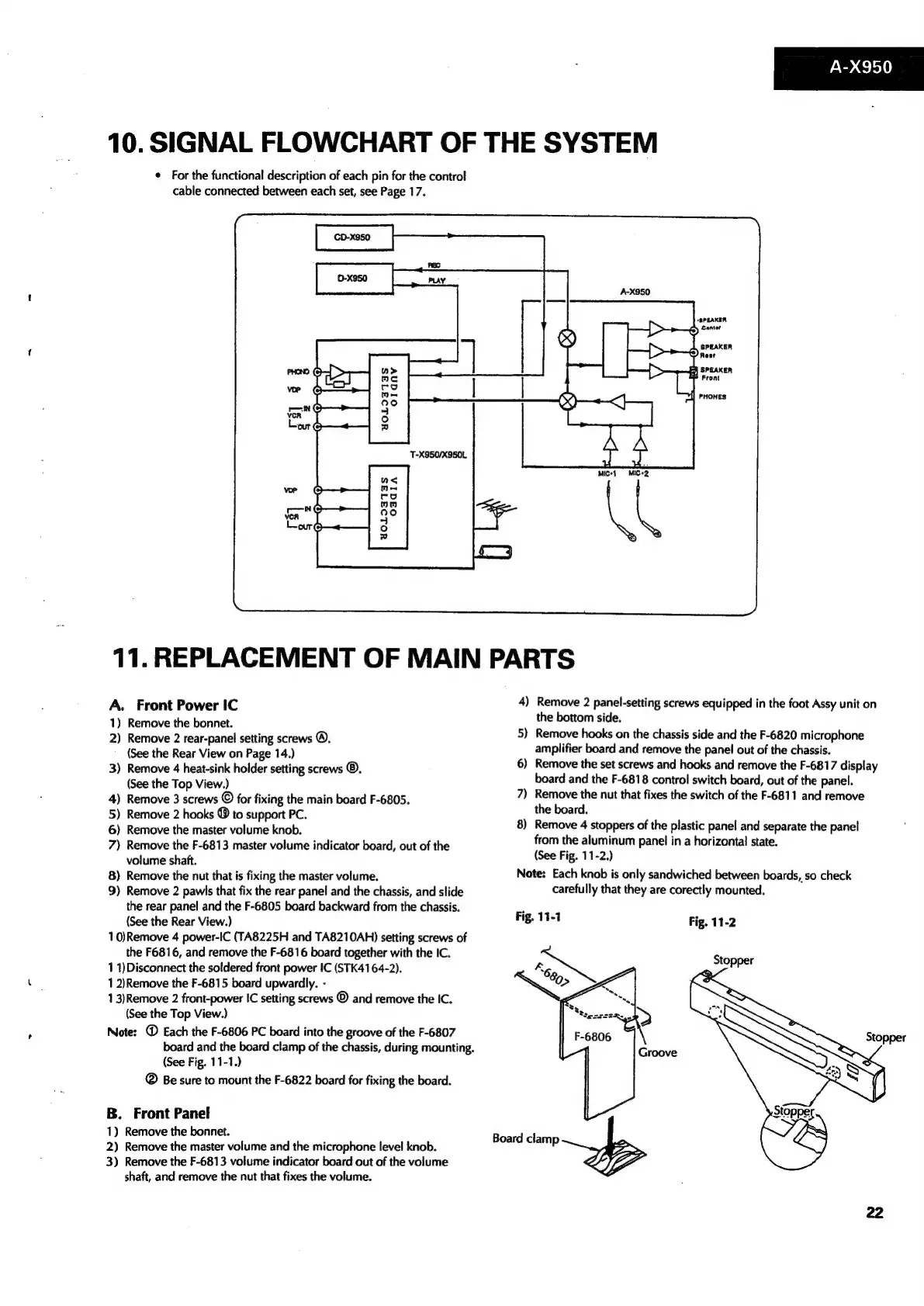
10.
SIGNAL
FLOWCHART
OF
THE
SYSTEM
¢
For
the
functional
description
of
each
pin
for
the
control
cable
connected
between
each
set,
see
Page
17.
YOLIITIS
OIlanv
as
Me
co
om
exe)
4
°
td
11.
REPLACEMENT
OF
MAIN
PARTS
4)
Remove
2
panel-setting
screws
equipped
in
the
foot
Assy
unit
on
A.
Front
Power
IC
1)
Remove
the
bonnet.
2)
Remove
2
rear-panel
setting
screws
®.
(See
the
Rear
View
on
Page
14.)
3)
Remove
4
heat-sink
holder
setting
screws
®.
(See
the
Top
View.)
4)
Remove
3
screws
©
for
fixing
the
main
board
F-6805.
5)
Remove
2
hooks
®
to
support
PC.
6)
Remove
the
master
volume
knob.
7)
Remove
the
F-6813
master
volume
indicator
board,
out
of
the
volume
shaft.
8)
Remove
the
nut
that
is
fixing
the
master
volume.
9)
Remove
2
pawls
that
fix
the
rear
panel
and
the
chassis,
and
slide
the
rear
panel
and
the
F-6805
board
backward
from
the
chassis.
(See
the
Rear
View.)
10)Remove
4
power-IC
(TA8225H
and
TA8210AH)
setting
screws
of
the
F6816,
and
remove
the
F-6816
board
together
with
the
IC.
11)Disconnect
the
soldered
front
power
IC
(STK4164-2).
1
2)Remove
the
F-6815
board
upwardly.
-
13)Remove
2
front-power
IC
setting
screws
©
and
remove
the
IC.
(See
the
Top
View.)
Note:
@
Each
the
F-6806
PC
board
into
the
groove
of
the
F-6807
board
and
the
board
clamp
of
the
chassis,
during
mounting.
(See
Fig.
11-1.)
®
Be
sure
to
mount
the
F-6822
board
for
fixing
the
board.
B.
Front Panel
1)
Remove
the
bonnet.
2)
Remove
the
master
volume
and
the
microphone
level
knob.
3)
Remove
the
F-6813
volume
indicator
board
out
of
the
volume
shaft,
and
remove
the
nut
that
fixes
the
volume.
5)
6)
~~
7)
8)
the
bottom
side.
Remove
hooks
on
the
chassis
side
and
the
F-6820
microphone
amplifier
board
and
remove
the
panel
out
of
the
chassis.
Remove
the
set
screws
and
hooks
and
remove
the
F-6817
display
board
and
the
F-6818
control
switch
board,
out
of
the
panel.
Remove
the
nut
that
fixes
the
switch
of
the
F-6811
and
remove
the
board.
Remove
4
stoppers
of
the
plastic
panel
and
separate
the
panel
from
the
aluminum
panel
in
a
horizontal
state.
(See
Fig.
11-2.)
Note:
Each
knob
is
only
sandwiched
between
boards,
so
check
Fig.
11-1
Board
clamp
carefully
that
they
are
corectly
mounted.
Fig.
11-2
Stopper

Related product manuals