EasyManua.ls Logo

Sansui ES-27X3A - Using The OSD Menu; Picture Setting Options; Color Setting Options

Sansui ES-27X3A
10 pages
Print Icon
To Next Page IconTo Next Page
To Previous Page IconTo Previous Page
Loading...
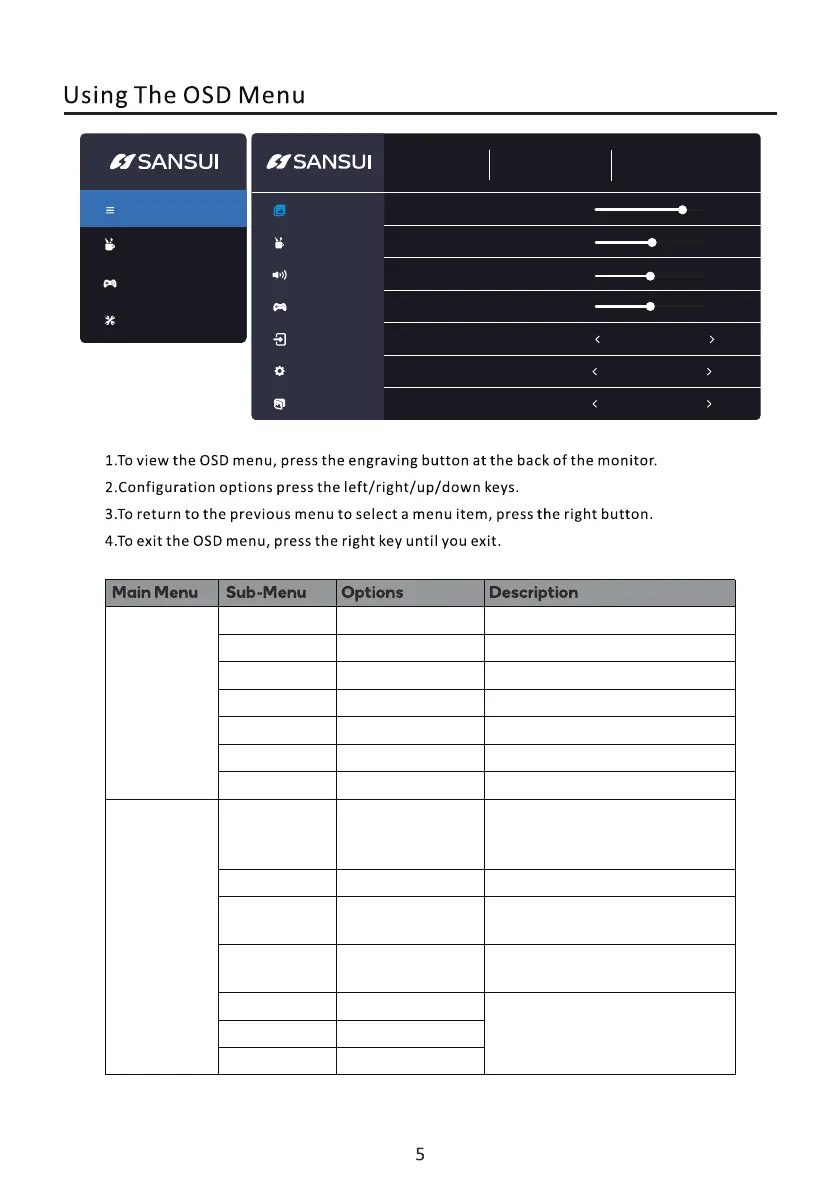
HDMI
1920X1080 100Hz
Adaptive-Sync Off
Picture Setting
Color Setting
Sound setting
Gaming Mode
lnput Source
Picture Adjust
OSD Setting
Brightness
Contrast
Blacklevel
Sharpness
DCR
HDR
OFF
OFF
lmage Ratio
80
50
5
2
16:9
Picture Mode
Menu
CrossHair
Source
Picture Setting
Brightness
Contrast
Blacklevel
Sharpness
0-100 Adjust display brightness
Adjust display contrast
Turn DCR function off/on
Set aspect ratio
Turn HDR function off/on
Select Picture Mode
0-100
0-10
0-4
Off/On
Auto,16:9,4:3
Off/On
/
/
DCR
lmage Ratio
HDR
Color Setting
Picture Mode
Gamma
Low blue light
Color
temperature
Energy Star/Standard/
Movie/Office/FPS/
RTS/RACING/SRGB
Adjust color temperature
Adjust display low Blue
Customize RGB components
Off/1.8/2.0/2.2/2.4
0-100
0-100
0-100
Off/weak/Middle/
Strong
Warm/User/
Cool/Normal
Red
Green
Blue

Related product manuals